


Gamesir G7 Pro review - a fantastically capable PC controller for a great price
Gamesir G7 Pro review - a fantastically capable PC controller for a great price
Verdict

While the Gamesir G7 Pro is far from a truly budget game controller, its sub-$80 price is amazing value for the amount of features this controller offers. It's also well-built, if not quite on par with truly premium controllers that pack in similar numbers of features. However, it's also half the price of those options.
Pros
- Quality TMR thumbsticks
- Excellent value for money
- Premium build quality
- Loads of features, including a charging dock
Cons
- Wired connection required on Xbox
- Face buttons can feel unusual initially
- Battery life is only average
If you're looking for a controller upgrade that can give you more than just the basics you get with a standard Xbox controller, but you're not able or willing to push your budget to $150 or more, the Gamesir G7 Pro is probably for you. It takes that Xbox controller format and adds switchable rapid triggers, switchable rear paddles, a removable faceplate, TMR thumbsticks, an internal rechargeable battery, and a convenient docking station, all for just $30 more than a standard Xbox controller.
Add in that this is a well-built controller available in some smart-looking color combinations, and Gamesir has created easily the best PC controller in its class. Good game, sir, indeed.
Specs
| Gamesir G7 Pro specs | |
| Connections | 2.4GHz wireless, wired (USB-C), Bluetooth |
| Power | Rechargeable battery and USB |
| Platforms | Xbox, PC |
| Layout | Xbox |
| Dimensions | 152 x 103 x 58mm |
| Weight | 272g |
| Price | $79.99 |
Features
It's the sheer number of features packed into this $80 controller that make it standout. It competes with the sort of feature set available in the Xbox Elite Controller Series 2 or the Scuf Valor Pro Wireless, but for half the price.
For a start, it has TMR thumbsticks, which means this controller should offer better accuracy than old-style ones, and it will never develop dead spots. Similarly, its triggers use Hall Effect sensing, so again they shouldn't lose accuracy and responsiveness over time. The triggers can also switch between analog mode and a short-throw, mouse button-like clicky mode for fast non-analog inputs (such as firing a gun).

The trigger mode is controlled by sliding switches on the back of the controller, and here there are also switches for enabling or disabling the rear paddle buttons, of which there are two.
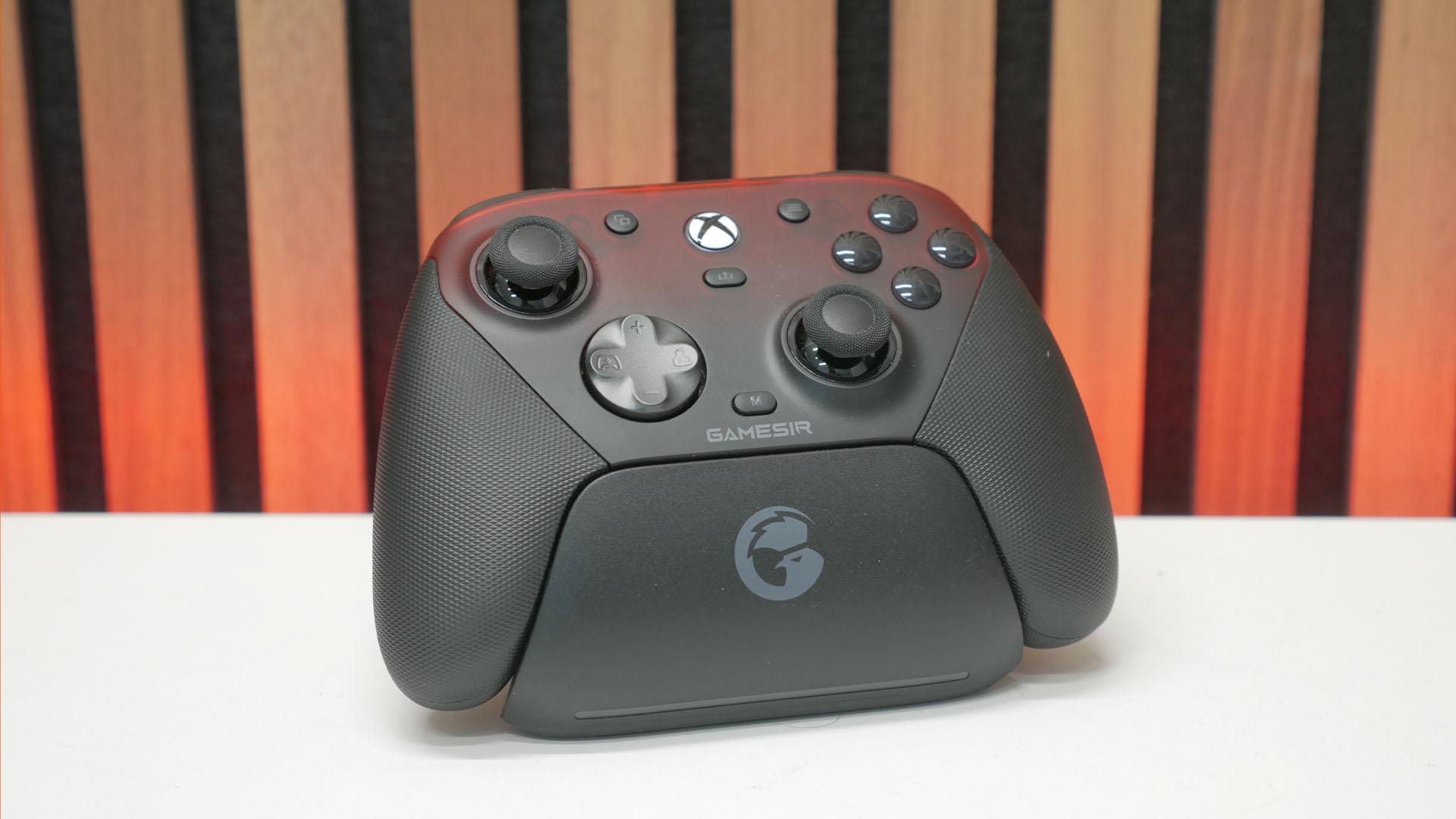
Four gold contact points also hint at the fact that this controller can be charged via its convenient docking station, which can transfer power as well as provide a connection to your PC.

A USB-C port at the back provides this connection while a flap on the underside of the dock gets you access to the wireless dongle. Remove this, and you could, for instance, connect the dongle directly to your PC while having the charging dock be used just for charging and plugged into a dedicated outlet.
Back to the controller, and it gets its own USB-C port on its front edge, so you can play wired (required for Xbox) as well as wirelessly (along with over Bluetooth). On this front surface, there are also the bumpers, triggers, and two tiny extra buttons hidden between the bumpers and triggers.
The controller's main face buttons and controls are pure standard Xbox, in terms of layout and main abilities. However, the buttons use optical microswitch buttons for a faster, clickier feel. The d-pad can also be removed and swapped for a concave disc or cross-style pad.

Also removable is the faceplate, which here on this black version is a translucent black and red color that I'd be inclined to give a bit of a custom paint job. Underneath this plate, though, is a neat feature, which is that the controller is transparent, so you can see its insides through the dark plastic.
Design and comfort
The Gamesir G7 Pro is available in some fantastic designs. There's the stunning Wuchang: Fallen Feathers Edition (available here), and the plain white and gray one looks great too (here). This black and red one doesn't quite hit home as much for me - thus the desire for a custom paint job on the faceplate - but it's still a reasonably smart-looking controller.

Crucially, it's a well-made unit, too. The main body feels rock solid, with no flex or creaking, while the controls all feel good and the faceplate fits precisely, attaching with magnets.
The grips have a textured, rubberized coating that does feel great and aids grip, but these coatings can go a bit sticky over time. Valve, for instance, chose not to use such a coating in its Steam Controller, seemingly at least partly because of this. Still, you should get several years of use before encountering this, and it's not guaranteed to happen.

Otherwise, the rest of the controls and features all fall into place just as you'd expect. The core Xbox controller shape is there and feels as familiar and comfortable as ever, while the extra bumper buttons and rear features are all easy to reach.
Performance
While this controller doesn't claim to compete with the very highest-speed controllers, with features such as 8kHz polling, this is still a very capable controller that will satisfy all but the most elite players.

Starting with the thumbsticks, their tops have really good grippy rubber finishes, and the feel of the sticks is smooth and somewhat on the light side, but without feeling like you can't easily control them. I particularly liked that the central section that the stick snaps to doesn't have too strong a breakout force - it's easy to smoothly transition across the middle, without the stick feeling like it's forcing you back to the middle.
Their accuracy is immediately noticeable in competitive games. Tracking opponents in Call of Duty or Apex Legends, the sticks feel smooth, predictable, and exceptionally precise. There's a confidence to the inputs that cheaper controllers often struggle to replicate.

Likewise, the triggers feel really good. Smooth and precise with well-weighted resistance. The rapid trigger mode doesn't feel as snappy as some, with less of a defined click, but it's still better than controllers that simply shorten the throw of the trigger without adding an extra switch.
As for the microswitch face buttons, they feel nice and tight and snappy, though not quite as clicky as some that we've encountered - it's not like clicking a mouse button. Still, if you're used to a standard controller, you may find the ones here - including those under the d-pad - more reactive than initially feels comfortable. After a while though, the responsiveness feels so much better than standard buttons.
Battery life
The Gamesir G7 Pro's battery life is merely adequate rather than exceptional: at around 10-12 hours of use it doesn't break any records. However, the included charging dock offsets this limitation in many ways. Obviously it doesn't help if you're caught short mid-game, but having a place to drop the controller in between sessions means the battery should always be fully charged when you pick it up.
The Gamesir G7 Pro price is $79.99, making it more expensive than a standard Xbox controller, and considerably more than truly budget units, such as the EasySMX X05. However, the number of features it packs in is on a completely different level to those controllers, and the vast majority of competing options are around twice the price. As such, despite its small premium, it's fantastic value. What's more, right now you can get 20% off thanks to Amazon Prime Day.
Verdict
If you're in the market for a gamepad for your PC and Xbox that provides a meaningful upgrade over a standard or budget controller, the Gamesir G7 Pro absolutely delivers. The reliability and precision of TMR thumbsticks and Hall Effect triggers, the extra buttons, the customization options, the docking station, and an internal rechargeable battery. It all adds up to a lot more functionality.
Crucially, all this functionality doesn't come at a huge price premium. Yes, it's more than a standard controller, but you'll be paying a minimum of $50 more for most alternatives with similar feature sets - and many of those still don't come with a charging dock.

 English
 Arabic
 French
 Spanish
 Portuguese
 Deutsch
 Turkish
 Dutch
Dutch
 Italiano
 Romaian
 Portuguese (Brazil)
 Greek
Greek