


I had high hopes for Nvidia's DLSS 4.5 Dynamic Multi Frame Gen, but it's not quite what I expected
I had high hopes for Nvidia's DLSS 4.5 Dynamic Multi Frame Gen, but it's not quite what I expected
Nvidia DLSS 4.5 has just landed via the beta version of Nvidia App, bringing with it the ability to try out the company's latest and greatest version of DLSS frame generation. Along with yet another improvement to upscaling image quality and the ability to deliver up to five "fake frames" with its 6x frame generation option, what really excited me about this release was the new Dynamic Multi Frame Generation feature. With it, you can unlock the frame rate-boosting ability of multi-frame generation (MFG), but without forcing it to be on all the time. Surely, I thought, it would be the ultimate version of frame generation. So, I fired it up to find out.
As for all versions of Nvidia MFG, the new Dynamic version is only officially available to users of RTX 5000 series graphics cards, so of all the best graphics card options currently available, I grabbed an RTX 5080 for my testing. It's an ideal candidate for MFG, as it has the power to render games at high resolutions and detail settings, with reasonably solid base frame rates, allowing MFG to fill in the gaps, as it were, stretching a 60fps base frame rate to 240fps and beyond.
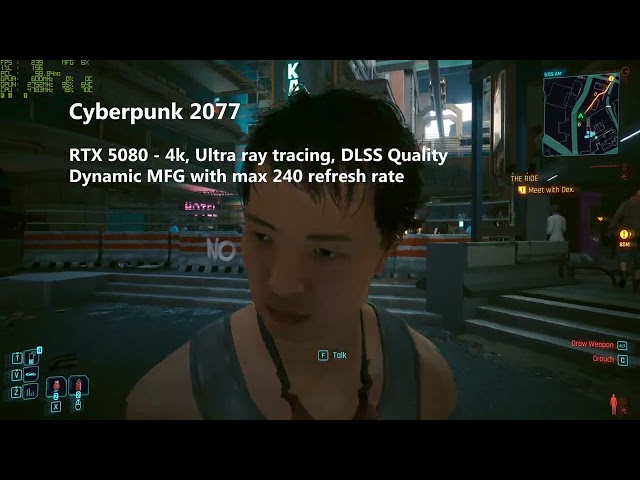
Firing up Cyberpunk 2077 for my testing, I first did a baseline run, setting the game to run at 4k with the Ultra Ray Tracing preset and DLSS set to Quality. This resulted in a typical frame rate of around 60fps, with peaks of around 70fps and 1% lows of around 40 fps, and, according to Nvidia Frameview, the PC latency (PCL) that measures the delay from mouse input to the response being visible on screen was around 40ms. That's essentially just about playable in a game like Cyberpunk 2077, even on keyboard and mouse.
Next, I turned on standard 2x frame generation, which saw frame rates jump to around 105fps typically, with peaks of 120fps, and 1% lows of 85fps, all the while PCL hovered around 46ms - a small but noticeable step up from without frame gen.
I then moved to 4x frame generation and saw the expected jump up again to around 180fps, typical, with peaks of 210fps, and 1% lows of 125fps. Meanwhile, PCL jumped to around 60ms, bringing a noticeable amount of extra input lag to the experience. So far, so typical of MFG.
The next test is where I really hoped Dynamic Frame Generation would show what it was all about. Could a mode that only invoked as much frame gen as was needed both maximize frame rate while minimizing PC latency?

To start my testing, I opened up Nvidia App to Graphics > Global Settings > DLSS Override - Frame Generation Mode and selected Dynamic, letting the Target FPS be the Max Refresh Rate, which was the max 240Hz of my monitor, and the Multiplier be up to 6x.
With these settings, the game sat at between 210fps and 250fps, opting to use either 5x frame gen or 6x frame gen to hit its target frame rate, hitting as high as 68ms of PCL. This resulted in a very syrupy-feeling experience, with the apparently smooth 240fps frame rate feeling slow and wallowy compared to how I was moving my mouse, which essentially fits in with my experience of using any amount of frame gen higher than 2x and trying to play a game with a mouse and keyboard.
However, what really leapt out at me was just how little variation there was in the amount of frame gen being used. Even just standing and facing a wall with nothing else visible on screen, the base frame rate wouldn't rise enough to drop frame generation to lower than 5x.

To test this even further, I engaged the custom Target FPS, setting this to 120, and fired up the game again. This time, the game duly hovered at around the 120fps mark, using either 2x or 3x frame gen, for an experience that felt much better than with the higher levels of frame gen, thanks to the lower PCL, and the much closer connection between mouse input and frame output.
However, it was still notable just how much the level of MFG didn't change. It was either 2x or 3x, and that was it. On reflection, it makes a lot of sense that a game wouldn't change its frame rate all that much within the same level and using the same settings, but I expected staring at a wall to, perhaps, triple the frame rate, eliminating the need for frame generation at all at times.
Now, this will vary from game to game and from setting to setting - using ray-traced lighting, for instance, will mean that even staring at a single wall could put a limit on maximum frame rate. However, it does ultimately expose the limitation of this new Dynamic mode.
Moreover, taking this as another overall example of using MFG once again proved how very limited it is. A single extra AI-generated frame (2x frame gen) is a reasonable way to make a 60-120fps game feel a bit smoother. However, anything more than that seldom feels usable on a keyboard and mouse, and even with a controller, much more than 3x frame gen either feels weird and laggy, or just doesn't really make enough of a difference to the look of the game - 280fps via six AI-generated frames doesn't really feel any better than 180fps via three AI-generated frames. It simply isn't the same as a "true" faster frame rate.
Nonetheless, if you do find you get on with MFG, it is great that there's now a "set and forget" option for using it. With Dynamic MFG, you can just switch it on, set it to your monitor's maximum refresh rate, and, so long as a game supports MFG, the software takes care of the rest. You do have to jump in and set MFG to 4x in the game - as Dynamic mode only kicks in if a game is set to 4x MFG - but you don't need to worry about fine-tuning each game. Plus, if you do only prefer a limited amount of MFG, you can set the Target FPS to a lower amount, and Dynamic MFG should tend to only use 2x or 3x MFG, limiting your exposure to higher levels of MFG unless absolutely necessary.

 English
 Arabic
 French
 Spanish
 Deutsch
 Turkish
 Dutch
Dutch
 Italiano
 Russian
 Romaian
 Portuguese (Brazil)
 Greek
Greek