


My Logitech G Pro X2 Superstrike review took me a month to write - that's how important this mouse is
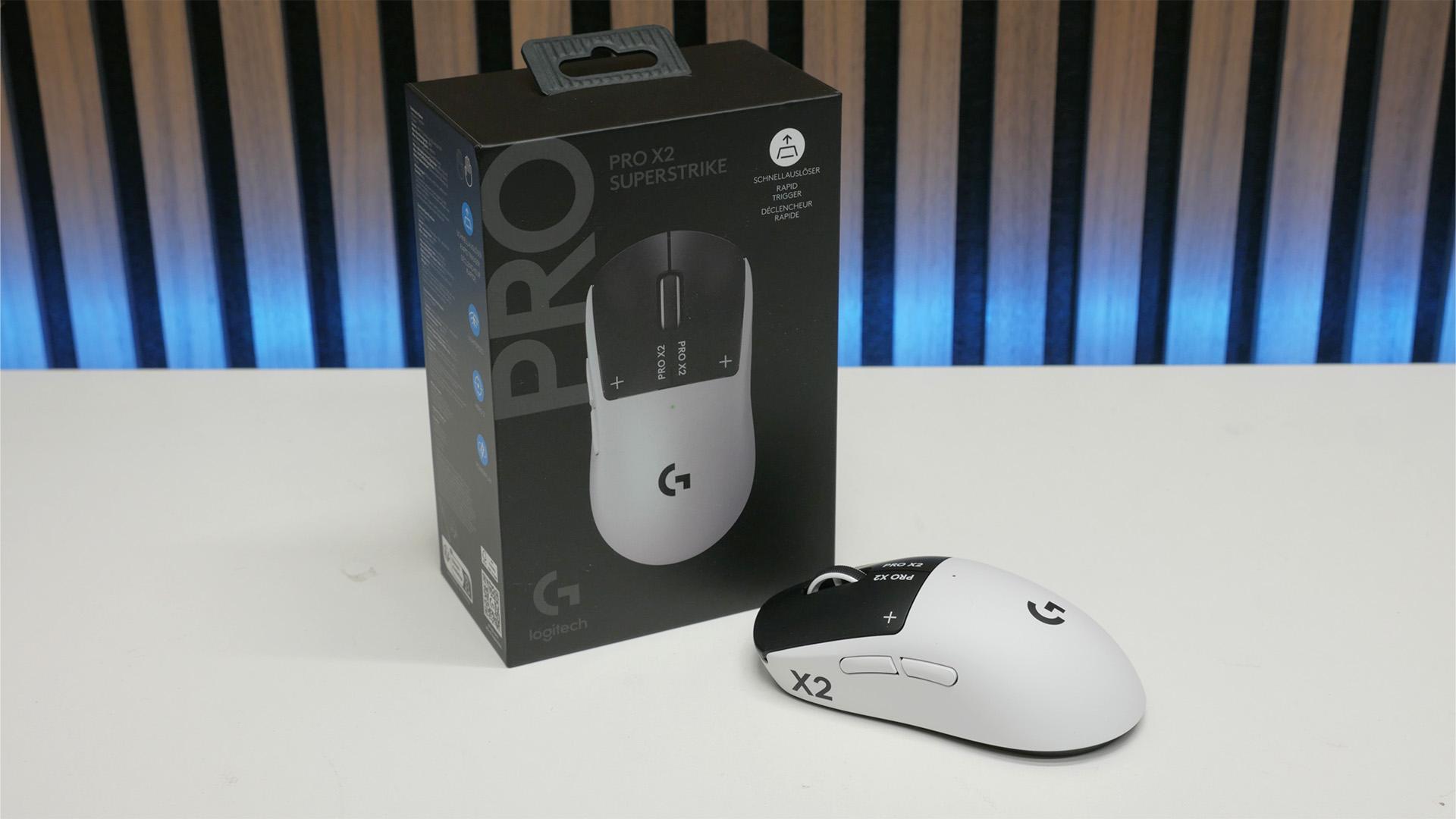
My Logitech G Pro X2 Superstrike review took me a month to write - that's how important this mouse is
Verdict

The normal switch-replacing inductive, haptic trigger technology in the Logitech G Pro X2 Superstrike truly feels like the future of gaming mice. However, its benefits only stretch so far, so isn't yet the ultimate choice for all gamers.
Pros
- HITS technology is much faster than normal switches
- Independent control over speed and feel of left and right buttons
- Comfortable, familiar design
- No more expensive than Logitech's previous flagship
Cons
- HITS isn't of much benefit in many games
- Much lighter mice are better for shooters
- Expensive
It's not often that PC gaming tech takes a huge stride these days. So honed is what we already have that truly groundbreaking ideas are hard to come by. When it comes to gaming mice, over the past 20 years we've only really seen two huge changes. The first was the return to optical sensors, after the misadventure that was laser sensors, and then came the arrival of really good, low-latency wireless. With the launch of the Logitech G Pro X2 Superstrike, though, we can add a third item to that list: HITS.
Haptic Inductive Trigger System is the core technology at the center of this new mouse, and it completely replaces the conventional switches of the left and right buttons with inductive sensors and haptic feedback actuators, making for a mouse whose clicks can be tuned to precisely respond just how you like. Not only does HITS allow for altering the trigger point and haptic feedback of the button, but it also unlocks a massive step forward in the potential response time and overall click speed of gaming mice, plus it allows for Rapid Trigger.
It alone is not enough to make Logitech's latest the single best gaming mouse on the market for all gamers, but it can revolutionize certain uses, and feels like a glimpse of the future. In fact, it's so different from the norm that I've taken longer than usual to review this mouse, in order to truly get a sense of where it does and doesn't deliver on its revolutionary promise. Four weeks in, I've fully made up my mind.
Specs
| Logitech G Pro X2 Superstrike specs | |
| Sensor | Logitech Hero 2 |
| Buttons | Five |
| Switches | Logitech Haptic Inductive Trigger System |
| DPI | 100 - 44,000 |
| Weight | 61g |
| Connections | Lightspeed 2.4GHz wireless, USB-C |
| Polling rate | Up to 8kHz wireless, 1kHz wired |
| Battery | Up to 90hrs at 1kHz polling rate |
| Extras | USB-C wireless dongle, USB-A to USB-C cable, |
| Price | $99.99 / £89.99 |
Features
Despite its headline-grabbing internal tech, the core features of the Logitech G Pro X2 Superstrike are very basic. Like so many lightweight gaming mice before it - including the Logitech G Pro Superlight 2 - the Superstrike has just five buttons on its top and nothing but a power switch on its underside.
I say "nothing", but, under a circular magnetic cover, there is, in fact, a stowage area for the USB-A wireless dongle. This cover can also be swapped for a wireless charging puck compatible with the Logitech PowerPlay 2 mousemat, which will continuously keep the mouse charged without ever having to plug it in.

If you don't opt for wireless PowerPlay, charging is done via the USB-C port on the front edge, with Logitech including a USB-A to USB-C cable in the box for this purpose. Interestingly, Logitech is still sticking with a simple, rubber/plastic-coated cable rather than the fabric-covered cables favored by some ultra-lightweight mouse designs. This means it's not as nice as some mice to use with the cable plugged in - it's a fair bit stiffer than those lightweight cables.
Thankfully, with 90 hours of play time when using the mouse at a polling rate of 1kHz, it's seldom that you'll need to actually play with the mouse plugged in. Talking of polling rate, the mouse can hit 8kHz polling rate over wireless, which will offer peak smoothness in ultra-competitive gaming scenarios when used with very fast refresh rate monitors. However, it will drop battery life to well under 20 hours. 8kHz polling is also only available over wireless and not via the USB cable.
Also included in the box is a USB-C to USB-A adapter, which lets you plug the USB-A dongle into the end of the USB-C cable, keeping the dongle as close to the mouse as possible, for the strongest signal. There's also an extra cover for the underside of the mouse that has an integrated glide pad/skate. The default cover is plain plastic and sits slightly above the mouse mat surface.

Otherwise, that really is about it for the main features of this mouse. Its scroll wheel is a standard, lightweight, non-tilting one. This mouse has no extra buttons, and the sensor here is the same excellent Hero 2 one of the Superlight 2. It's just some mouse. All, that is, other than what's inside.
Haptic Inductive Trigger System (HITS) explained
The Logitech G Pro X2 Superstrike doesn't have normal mouse switches under its left and right buttons, nor does it even have the conventional optical or magnetic switches found on some mice. Instead, this mouse uses tiny inductive sensors to measure how far away the button is from the body of the mouse. This allows the Superstrike to offer ten different distances at which you can choose for the button to trigger a click, from 0.1mm to 0.6mm.

This alone is clever, but means you get no feedback as to when the button has been clicked, other than an action happening on your screen. So, Logitech has added a tiny linear actuator that bumps the button, providing haptic feedback. Crucially, this haptic feedback can be completely turned off (so you don't feel anything) or fine-tuned to one of five levels. Also, note that it's not a haptic buzz like you get on controllers, but a single back-and-forth push that simulates the click of a button.

Logitech has set up these two systems so that the default mid-level for both settings feels most like a normal mouse (though not quite the same). Then, if you want to ensure a button triggers ultra-quickly and with minimal disturbance from the haptics, you turn the settings down. Or, if you want a button to be quite unresponsive, so that you don't accidentally trigger it, for instance, you can turn the sensitivity/travel distance up. Or maybe you have really calloused, unsensitive fingers and need a powerful haptic feedback - the Superstrike has you covered for the lot.

This HITS system also comes with two big benefits. The first is that this ability to reduce the distance the mouse button has to travel means it can physically respond to your finger far, far quicker than a normal mouse. How much quicker? Legitimately, up to 36ms quicker. Yes, while some gaming mice are nitpicking over sub-1ms differences in internal, electronic response time, the Superstrike just beat everything else out there by an order of magnitude, and then some. You can learn more about how Logitech tested for this in our recent Logitech labs tour.

You do have to set the mouse to its lowest actuation setting to get such a fast response, but even set to level two or three out of ten, it's still incredibly fast. Logitech cited dozens of pro gamers who had tried the mouse and immediately switched, simply based on this speed. However, as I'll talk about more in the performance section of this review, it's not quite as clear-cut as "faster = better."
When it comes to the ultimate in speed, though, this brings us to the second advantage of HITS, which is that you can enable Rapid Trigger. Like on keyboards with analog keyswitches, this uses the fact that an analog switch simply measures the location of the switch to allow it to reset the switch, making it ready to be pressed again, as soon as your finger slightly lifts upwards. That's in contrast to a normal switch where your finger, and the switch mechanism, must rise up past a certain fixed point before the switch can be pressed again.

By enabling Rapid Trigger on the Superstrike, this means you can rapid-fire a mouse button far faster than any normal switch. I'm no pro-gamer when it comes to click speed, but I can jitter-click somewhat (where you tense up your hand and twitch your fingers, often pinching your thumb and index finger or middle and index fingers together), and was able to do so at a rate of 8.9 clicks per second (cps) when using the mouse with Rapid Trigger.
That figure compares to 7.8cps using the mouse with its lowest activation point without Rapid Trigger, and 7.5cps using the mouse at its longest activation point setting. Meanwhile, using the conventional switches of the G Pro Superlight and Corsair Sabre V2 Pro, I could hit 7.7cps and 6.7cps respectively.
However, pro gamers can hit over 12cps, with Logitech reporting that Yiğit "Yigox" Arslan has taken the official Guinness World Record for the most clicks in 60 seconds. They clicked 760 times, for a cps reading of 12.6cps.
Design and comfort
Getting back to more day-to-day considerations, the G Pro X2 Superstrike is effectively identical to the previous G Pro Superlight and Superlight 2 models, in terms of shape, button placement, and weight. This means it hits the ground running with a tried and well-liked shape. However, there are a couple of negatives to note.

The first is that, while this mouse isn't exactly heavy, at 61g, it is technically 1g heavier than the Superlight 2 and is well behind truly cutting-edge ultra-light mice. For instance, the Corsair Sabre V2 Pro is a mere 36g, and it feels like night and day switching between the two - the Sabre V2 Pro feels so much more nimble.
A factor I was less sensitive to, but is still worth noting, is that this mouse is more front-heavy than the Superlight 2. You can pick up the Superlight with your thumb resting as far back as in line with nearly the center of the rear side button, whereas the Superstrike will tip forward unless held at least beyond the gap between the two side buttons.

As for design, the crash test dummy aesthetic of the Superstrike is a fun idea, and the black and white combo is striking (plus, Logitech assured me that the choice of black or white materials also has benefits for factors such as weight distribution), but I can't help but wish there was a plain all-black or all-white version. Or, let's face it, a pink one. But, Logitech's G Pro mice have never really been particularly aesthetically pleasing, so the Superstrike is hardly breaking that trend.
Performance
As alluded to earlier, when it comes to sensor performance, this mouse is making no grandiose claims, with it featuring the same excellent Hero 2 of the Superlight 2, and sure enough, it effectively feels identical. That means there are no flaws to be found in how well this mouse tracks during even the most extreme movements. Most modern gaming mice have excellent tracking, and this mouse is no exception.
Likewise, when it comes to wireless and wired performance, the X2 Superstrike showed no signs of difference between the two, offering impeccable signal integrity. As ever, I found myself unable to detect much of a difference between running the mouse at 4kHz or 8kHz. However, I could feel the difference between 1kHz and 4kHz. When playing CS2 and Apex on a 480Hz monitor, 4kHz feels a touch smoother. For any other gaming scenario, though, 1kHz is plenty, and I'd take the longer 90-hour battery life over needing to charge every day like you do running this mouse at 8kHz.

Back to the HITS technology, and the crux of why it took so long to really make my mind up about this mouse, is that for the vast majority of games I played, I didn't really notice a raw performance benefit. For playing CS2, Valorant, Apex, and myriad other shooters, as well as RTS, RPGs, and a broad range of other games, it didn't meaningfully feel like it affected my performance, other than in reducing misclicks - as discussed below. Instead, I simply always preferred using either a much lighter mouse, like the Corsair Sabre V2 Pro, or a different -shaped mouse, such as my perennial go-to, the Xtrfy MZ1 Wireless.
Moreover, where I didn't feel I cared much about a mouse being light, such as playing a game where extra buttons or a fast-scrolling mouse wheel can be beneficial (such as scrolling in and out of large RTS maps), it was those extra features that I cared more about than click speed.
That really only leaves games where high click speed, and high click volume are essential, as being ones that benefit from HITS. That might seem obvious to say, but the key point here is that HITS didn't for me unlock some never-before-realised potential in other games. It's just a mouse that's really good for League of Legends.

That said, there are aspects to this mouse that I did enjoy, and that I can see being the reason HITS-like technology simply becomes the new norm. For instance, lowering the sensitivity and having super low-effort clicks is just nice for all sorts of gaming and desktop use. The lower amount of cumulative strain helps over the course of spending all day, every day at a computer.
Likewise, there were a few games/scenarios where adjusting one or other of the buttons to require a firmer click was useful too. In a lot of shooters, I find I accidentally right-click quite a lot in the heat of battle, so being able to crank up the sensitivity for that button meant I was able to reduce these occurrences.
Price
As you'd expect for a new flagship Logitech G Pro mouse featuring cutting-edge new switch tech, the Logitech G Pro price is high. However, at $159.99, it's as expensive as the Superlight 2 was at launch, and is on par with other flagship mice from top-tier brands.

Verdict
If you're a die-hard convert to seeking the lightest mouse possible for use in competitive shooters and other esports-like titles, the Logitech G Pro X2 Superstrike and its HITS technology don't do enough for me to recommend it ahead of far lighter mice. When the likes of the Corsair Sabre V2 Pro are nearly half the weight of this one, it's a no-brainer. There wasn't a time when playing CS2, Apex, and the like, where I didn't always prefer the much lighter option.
On the complete flip side, if click speed is a top priority for the style of game you play, the Superstrike is a total game-changer. Nothing comes close. It's an order of magnitude faster to click than any other mouse on the planet, and allows for record-breaking jitter click speed.
What's more, it allows for this speed while also offering a lighter, less effortful click feel, and, if you're using Rapid Trigger, it never fails to click, so it doesn't disrupt your speed-clicking flow.
Add in the fact that you can tailor the responsiveness and feel of the left and right buttons individually, allowing for per-game and per-app optimization of your inputs, and you have a technology that truly feels like the future of gaming mice.
If Logitech can squeeze this tech into a true ultra-light mouse - and if it rolls it out to its full range of mice, from the feature-packed G502 to the ultra-compact Superlight 2c, and even to productivity mice like the MX Master 4 - it's going to have a lot of converts.

 English
 French
 Spanish
 Portuguese
 Deutsch
 Turkish
 Dutch
Dutch
 Italiano
 Russian
 Romaian
 Portuguese (Brazil)
 Greek
Greek