


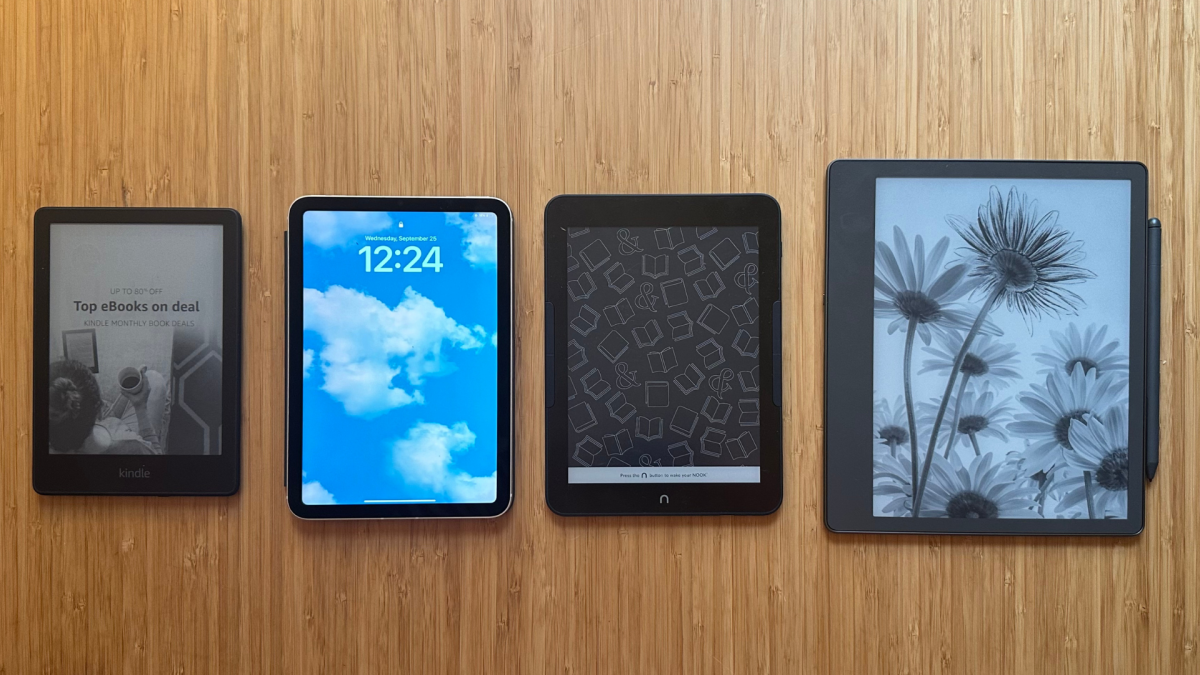
You won't miss the feeling of paper with these e-readers.
By

Samantha Mangino
Shopping Reporter
Boston-based Shopping Reporter, Samantha Mangino, covers all things tech at Mashable, rounding up the best products and deals. She’s covered commerce for three years, spending extensive time testing and reviewing all things home, including couches, steam irons, and washing machines. She thoroughly vets products and internet trends, finding out if those cozy gamer chairs are really as comfortable as TikTok claims.
on
All products featured here are independently selected by our editors and writers. If you buy something through links on our site, Mashable may earn an affiliate commission.

Credit: Samantha Mangino / Mashable
While you can't replace the feel of paper — the beauty of bound hardcovers and the ritual of turning the page — an e-reader brings convenience and portability that a physical book just can't beat. Sure, you can throw a book in your tote bag, but what about an entire library?
When you think of the best e-readers, your first thought is likely an Amazon Kindle; however, this isn't a list of the best Kindles, although we do have a list of those, too. While Kindles are great — there's certainly no denying that — you can find a couple of equally wonderful alternatives.
Overview
Table of Contents
So, what is the best e-reader for 2025? I'm regularly testing new e-readers (and tablets) and cycling through different models to stay up to date on the best options available. So, if you're gearing up to read more books this summer or fall, I can recommend a model you'll love.
Our Pick

The Good & The Bad
- Good storage option
- Warm light adjusts from white to amber
- 20% faster page turns
- 12-week battery life
- Fully waterproof
- Ad-free version more expensive
- Brightness doesn't auto-adjust
Our review
Read our full review of the Kindle Paperwhite.
Who it’s for
After several months of testing the Kindle Paperwhite against other e-readers, I always came back to the Kindle Paperwhite as my preferred e-reader. While the Kobo Clara Colour impressed me initially, the Kindle Paperwhite proved to be a faster device with better battery life.
If Amazon is pretty intrinsic to your spending, then going for a Kindle, specifically the Paperwhite, makes the most sense. Amazon promised that the 2024 Kindle Paperwhite would be the fastest yet, and it delivered. It turns pages without stuttering, never slowing down when you’re in the thick of the action.
The screen is vibrant and has adjustable brightness, meaning it can adjust when transitioning from reading in bright sunlight to dimmer indoors. It also comes with adjustable screen warmth, perfect for evening readers who want to give their eyes a chance to relax. It’s lightweight and fits comfortably in small crossbody bags. Plus, it’s waterproof, keeping it safe against poolside vacations and spilled water bottles in bags.
It's generally the best e-reader, but it's also the best e-reader for Libby. If you use Libby to its fullest potential, with your account loaded with multiple library cards, the Kindle allows you to read from all of those accounts at once, something you can't do on a Kobo e-reader.
Why we picked this
Not a ton has changed between the 2022 (our previous pick) and 2024 models of the Kindle Paperwhite, but I can say for certain that the 2024 Kindle Paperwhite is the sleekest, fastest e-reader yet. It now has a slightly bigger screen at 7 inches compared to the previous 6.8-inch model, but the change is minuscule — besides the fact that the bigger model is slightly too big for my old Kindle case.
The 2024 Paperwhite has gotten a slight upgrade in screen quality compared to the 2022 Paperwhite. While the resolution is still 300 ppi, it appears to have higher contrast, straying away from the like-paper look and edging closer to the look of a tablet. Don’t worry, though — unlike tablets, the Kindle Paperwhite still has a gloriously glare-free screen. It still has an IPX68 waterproof rating, so you can get some leisurely reading in the bath.
In his review of the 2022 model, Mashable senior editor Stan Schroeder found only one extremely minor quibble with the Paperwhite Signature Edition, and I have to agree with him. On all Kindle models (besides the Scribe), the power button sits on the bottom, resulting in many accidental presses. This was the case with the prior Paperwhite model, and I was hoping that it'd move up top for the new model, but alas, Amazon has not made all the improvements it could have. Additionally, I wish this Kindle Paperwhite had page-turning buttons like the now-discontinued Kindle Oasis or the Kobo Libra Colour for a more ergonomic design.
A big reason why I came back to the Kindle Paperwhite as the best overall e-reader is its processor. It's exceptionally fast and updates quickly. With Kobo e-readers, I had to manually sync them to get my library books to appear. The only feature I wish the operating system of the Paperwhite had was the ability to recalculate the page count of a book when you adjust the font size or margins.
That said, the Kindle Paperwhite is still the best e-reader you can buy.
Details

The Good & The Bad
- Matte, glare-free display
- Perfect screen size
- Adjusts page count based on font
- Color display
- Waterproof
- Ad-free
- No page-turning buttons
- Can't log in to multiple library accounts at once
- No Amazon integration (though that may be a pro)
Our review
Watch our comparison of the Kobo Clara Colour and Kindle Paperwhite.
Who it's for
If you're just diving into the world of e-readers and not particularly thrilled about Kindles and their Amazon ties, then the Kobo Clara is the right answer. It offers a color display for those who enjoy manga and graphic novels, but it remains speedy with fast processing when turning pages or swapping between books.
It's especially great for Libby users, who want seamless integration with books that automatically load into your library as soon as you borrow them. It really is a great e-reader for anyone.
Why we picked this
Having tried my hand at nearly a dozen e-readers in all shapes, sizes, and brands, I wasn't expecting to be so deeply impressed by the Kobo Clara Colour, but it is a wonderful e-reader. With a 6-inch screen, it's slightly smaller than the Kindle Paperwhite, but it allows you to hold it comfortably for multiple hours at a time without any wrist or arm fatigue.
In my previous testing with Kobo devices, I've really liked them, but one sticking point is that they're slower than Kindles. Initially, I found that the Kobo Clara kept up with the Paperwhite, but after several months of use, it had a tendency to lag. Compared to Kindles, I had to manually sync the Kobo Clara to get my library books to show up.
Its processing system is otherwise really smart and fixes one of my biggest e-reader pet peeves. When you adjust the font size on a Kindle, the device doesn't recalculate how many pages are in the book, making it inaccurate, so you don't know exactly how many pages you have left in a chapter. The Kobo Clara does recalculate page count accurately for a more exact reading experience. Though, one thing to note: Kobo counts the number of digital pages, whereas Kindle page numbers typically match up with physical book copies.
For the same price as the Kindle Paperwhite, the Kobo Clara offers color displays, something you can't get in the Kindle lineup unless you're willing to spend $250. The colors aren't as bright as you'd experience in a physical book, but they're still vivid enough to enjoy a graphic novel.
Its Libby (aka Overdrive) integration is seamless, and e-books you borrow on your library card will automatically populate on your account. You can browse and borrow library books directly from the e-reader, instead of having to whip out your phone app. However, for users who use Libby to the max with multiple library cards, you can only log in to one account at a time.
The Kobo Clara's biggest downfall is its battery life. It's supposed to last up to 42 days, although many online users say it averages out at about two weeks. That's quite pathetic in the face of the Kindle's 12-week battery life; however, I'd trade in a better reading experience over a couple weeks of battery life any day.
Details

The Good & The Bad
- The perfect size for being portable without being too small
- Buttons are excellent for turning the pages
- Generally well-designed
- Color (especially highlights) show up clearly
- OverDrive integration is seamless and beats Kindle's options
- Pocket integration is great for folks who love to read articles
- Palm rejection could use some work
- Kobo’s online store isn’t as expansive (or affordable) as Amazon’s
- Some ghosting issues occasionally
- Notebook mode could use some work
- Battery life could be better
Our review
Read our full review of the Kobo Libra Colour.
Who it's for
For serious readers who don't mind splurging a little, the Kobo Libra Colour delivers an upgraded e-reader experience. With a similar seven-inch display, the Libra Colour offers two features the Kindle Paperwhite cannot: Color and note-taking. Book covers, in-book illustrations, and photos are all featured in color with the Libra. And if you're an annotator, you can highlight and mark up your pages in different colors to stay organized. In the Kindle family, only the Scribe supports scribbling, and with a higher price tag.
It's equipped with more than enough storage at 32GB and is waterproof. Plus, if you were devastated by the discontinuation of the Kindle Oasis, the Libra Colour offers a similar design that includes page-turning buttons.
Why we picked this
If you were to ask me which e-reader to buy, it's a real toss-up between the Kindle Paperwhite and the Kobo Libra Colour. While the Kobo Libra Colour is expensive at $229.99, it's worth its price tag, something I can't say is true for Amazon's Paperwhite Signature Edition.
Above all, the Kobo Libra Colour has the best ergonomic design. It's more square than a Kindle, as one side offers extra space for page-turning buttons. This makes it easier to hold, especially while lying down and reading one-handed. It's the only e-reader (besides the iPad) on this list that has an internal gyroscope, so when you rotate the device, the display rotates with it. While reading in bed, if I flipped over, I could rotate the device to still be able to hold it on the side with page-turning buttons.
The Overdrive (aka Libby) integration is great as you can log in with your library card, and your borrowed e-books instantly populate on the Overdrive tab. While this is a more seamless integration than Kindle, I do have some minor beef with it. On a Kobo, you can only log in to one library card at a time, so if you borrow using multiple cards, you might be signing in and out of different accounts often. Plus, while using the Kobo Libra Colour, one of the library books I borrowed wasn't available on the Kobo and I had to switch to the Paperwhite to be able to access it.
While the color display on the Kobo is nice, it is still rather muted. While reading Heartstopper, the colors were quite toned down in comparison to how they appeared on the iPad Mini. The Libra Colour's battery life isn't as strong as a Kindle Paperwhite's. While testing the Kobo Libra Colour over 10 weeks, my colleague Bethany Allard had to charge the device twice. Plus, it's a bit slower than a Kindle with the occasional stall while switching between books.
While the Kindle may have the Kobo beat on processing and battery life, I still think the Libra Colour is a worthy upgrade as it offers the best design of an e-reader with the perk of color. Amazon's first color e-reader, the Colorsoft, costs $279.99, so at $229.99, the Libra is a bargain.
Details

The Good & The Bad
- Great battery life
- Zoom feature works well
- Ad-free homescreen
- No auto-adjusting brightness
- Some color flashing
- Expensive
Our review
Read our full review of the Kindle Colorsoft.
Who it's for
The Kindle Colorsoft brings color to the digital page, making it great for graphic novel readers, those who like to annotate in color, or fans of experiencing the cover page in full color. Its included zoom feature allows you to focus and get an up close look at illustrations, especially handy when reading comics. While we think that the Kobo Libra Colour is a better e-reader, the Kindle Colorsoft is the best color Kindle if you'd prefer to be in the Kindle ecosystem.
Why we picked this
E-reader users have long had to accept reading exclusively in black and white on Kindles, but the Colorsoft changes things. The Colorsoft uses an E Ink Kaleido 3 display to support its color display. In black and white, it has its standard 300 ppi resolution, but in color, it maxes out at 150 ppi.
Amazon currently has three color Kindles: the Colorsoft, Colorsoft Signature Edition, Kindle Scribe Colorsoft, and Colorsoft Kids. Our preferred model is the standard Colorsoft, which was just released in July 2025. It comes with 16GB of storage and a slightly more affordable price tag of $249.99, better when compared to the Signature Edition's $279.99.
The color on the Kindle Colorsoft is accurate to what you'd find in a printed copy; however, it is slightly muted. When reading in black and white, it's as fast as any other Kindle we've tested, but the color displays slow things down a bit. When reading in color, the pages sometimes flash as they load, a problem that most color e-readers currently suffer.
While the Kindle Colorsoft works well, I wouldn't say it's able to totally justify its $249.99 price. Compared to the other model that Amazon offers, it's certainly a better value. But if you're looking for a color e-reader, I recommend avoiding Kindle entirely and going for either the Kobo Clara or Libra Colour.
But if you're really committed to the Kindle ecosystem, the Colorsoft is your best choice for reading in color.
Details

The Good & The Bad
- Compact size
- Most lightweight Kindle
- Best of the basics
- Generous storage space
- Cover sold separately
- Not waterproof
- No warm light
- Short battery life compared to other Kindle models
Our review
Read our full review of the Kindle (2024).
Who it’s for
If you want to dip your toes into e-readers, the standard Kindle model is the best budget-friendly model. Like the Paperwhite, it has 16GB of storage, with room for thousands of books. It’s the smallest Kindle, and you won’t miss the size of the Paperwhite. Instead, you’ll be delighted that it’s genuinely pocket-sized. Plus, if you want an e-reader with some flair, it’s now available in black and matcha, a vibrant light green.

 English
 Arabic
 French
 Spanish
 Portuguese
 Deutsch
 Turkish
 Dutch
Dutch
 Italiano
 Russian
 Romaian
 Portuguese (Brazil)