



Table of Contents
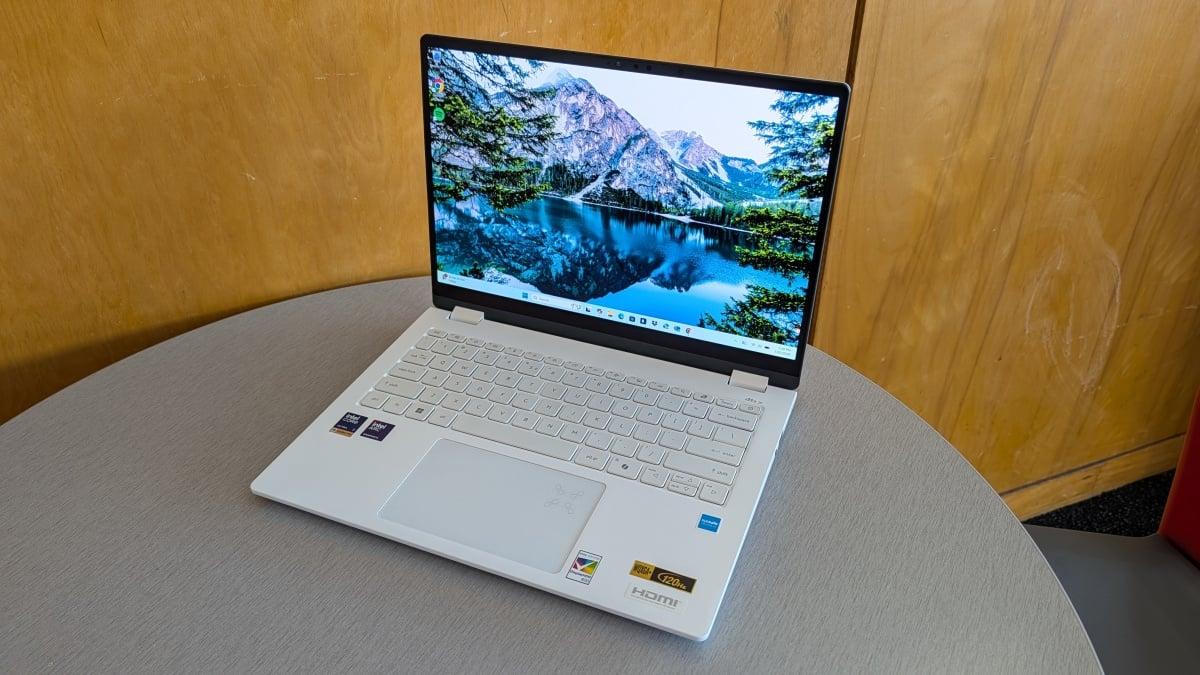
The Acer Swift Edge AI 14 surprised me every time I picked it up. I knew it only weighed 2.18 pounds and I’d marveled at its barely-there design countless times, and yet, it impressed me each time I held it. This laptop is simultaneously lightweight and well-built, with features that rival more expensive Windows alternatives.
In addition to its commuter-friendly form factor, Acer’s Swift Edge AI 14 boasts incredible battery life, a stunning 2.8K OLED display, and a keyboard that feels and sounds great. It also has a lovely variety of ports, though it unfortunately houses both of its USB-C ports on the left side, which isn’t the best for charging convenience.
It has greater flaws than just a lack of double-sided USB-C ports, too. The quality of its built-in webcam and two down-firing speakers left a lot to be desired, but despite these cons, I’d still say the Acer Swift Edge AI 14 is one of the best OLED laptops we’ve reviewed so far.
Acer Swift Edge AI 14 price and specs
For what it offers, Acer’s 14-inch Swift Edge AI is a well-priced mid-range laptop. Our Acer Swift Edge AI 14 review unit is $1,499.99 via Amazon and comes with the following specs:
Intel Core Ultra 7 258V processor
Integrated Intel Arc 140V graphics
32GB RAM
1TB of SSD storage
14-inch 2.8K (2880 x 1800) touch display
You can also find this specific Swift Edge AI 14 configuration at the same price directly through Acer’s online store. Occasionally, the laptop dips to $1,399, but for the most part, it sells for its advertised sale price.
A good-looking, lightweight contender for travelers
Weighing just 2.18 pounds, the Acer Swift Edge AI 14 feels like one of those paper display laptops you’d see sometimes at big box stores when a model was sold out or not yet debuted. It’s also an incredibly thin 14-inch laptop, measuring 12.35 x 9.03 x 0.65 inches.

This laptop looks sleek and is super portable. Credit: Sarah Chaney / Mashable
A laptop with commuter-friendly specs like these sometimes has a tradeoff of being a bit of an eyesore, but not the Swift Edge AI. It has a shimmery, white magnesium-aluminum alloy chassis that’s aptly described as pearl white, with a simple dual arrow pattern and the Acer Swift logo on the top lid, both etched in a gorgeous gold shade.
Plus, this eye-catching design stays looking great with excellent fingerprint resistance. I dramatically dragged my hands along the top lid, trying to leave behind fingerprints, and nada. It still looked brand new.
Considering its low weight, I was surprised by how sturdy this laptop felt. The hinges are strong, and there was zero give in the keyboard deck. The top lid, however, is super bendy — but who’s going to be twisting the display?
This 2.8K OLED display puts other mid-range laptops to shame

The Acer Swift Edge AI 14's display looks incredible. Credit: Sarah Chaney / Mashable
The Acer Swift Edge AI 14 features a 14-inch 2.8K (2880 x 1800) OLED touch display with a 120Hz refresh rate, and it’s just as gorgeous as it sounds. The picture is sharp, there’s great contrast with rich, true blacks, and colors appear vibrant and realistic, not overly saturated.
From watching YouTube videos and streaming Broadchurch to messing around with fun colors in a personal Google Sheet and reading articles online, this display was always pleasant to look at. At 400 nits max brightness, it was more than bright enough for indoor use, even in front of a window with the sun shining in.
This is also Acer’s first laptop touchscreen equipped with Corning Gorilla Matte Pro glass, which has anti-glare and anti-reflection properties. To put these claims to the test, I turned on a bright ceiling light and held the display directly under it — and I couldn’t see the light reflected in the display at all.
It has all the ports I want… with one exception
On paper, the Acer Swift Edge AI 14 has a beautiful port array: two USB-A ports, two USB-C ports, an audio jack, and an HDMI port. That’s a perfect variety of ports — for me, at least. But alas, the USB-C ports aren’t evenly distributed, which is much less convenient for charging purposes.

Left side ports. Credit: Sarah Chaney / Mashable
On the left side, you’ll find:
HDMI 2.1 port
USB-A 3.2 port
Two USB-C ports (Thunderbolt 4)

Right side ports. Credit: Sarah Chaney / Mashable
And on the right:
Audio jack
USB-A 3.2 port
Disappointing audio quality
Acer’s Swift Edge AI 14 is equipped with two bottom-firing speakers positioned along the left and right edges. This speaker placement means that if you put the laptop on a blanket or your lap, the audio will 100 percent be muffled.

The speakers and fan are located on the underside of the laptop. Credit: Sarah Chaney / Mashable
Even when the speakers are given their best chance to shine, with the laptop on a hard surface, they’re not great. Listening to dialogue in YouTube videos and other media was generally OK, albeit quiet, and listening to music was just disappointing.
The laptop is equipped with DTS: X Ultra, so you can adjust preferences via the pre-installed app, but the Music preset didn’t do much for my favorite songs. Everything I listened to came through a bit strained and one-note, and I opted to listen to music on my Pixel 10 Pro XL over this laptop.
A velvety keyboard and solid trackpad
I’m a big fan of the velvet-like, soft-touch keyboard on the Swift Edge AI 14, which Acer says is due to its “unique UV-cured coating.” This luxurious coating also helps the keyboard stay wear- and stain-resistant, though I spotted some fingerprints on the most-used keys after a few weeks of use.

This keyboard feels amazing and is designed to be wear- and stain-resistant. Credit: Sarah Chaney / Mashable
Past how the surface of the keys feels, this keyboard offers a decent amount of travel, a pleasant clacky sound with each keypress, and a decently crisp tactile experience. Overall, this is quite a nice keyboard for a mid-range laptop set at $1,499.
Below the keyboard sits a pretty standard trackpad. It’s a good size, responds well to gestures, and has no weird gaps near the edges when clicking. The only thing I think it’s missing is customizable haptics, but this feature is a rarity in laptops right now.
Not the most impressive webcam
For those who absolutely need a webcam for school, work, or personal use, the Acer Swift Edge AI 14’s webcam will get the job done. Its 1080p IR webcam delivers a fairly clear picture in well-lit environments, but colors can be quite oversaturated.

A webcam selfie of the author, taken on the Acer Swift Edge AI 14. Credit: Sarah Chaney / Mashable
On the plus side, this laptop’s webcam supports Windows Hello and a slew of helpful notifications from Acer, like posture reminders, automatic screen locks when you leave, and alerts when someone else is looking at your laptop.
Ultimately, I’d recommend pairing the laptop with one of the best webcams available if you need high-quality video.
Acer Swift Edge AI 14 benchmarks and performance
This laptop isn’t blowing the competition out of the water with its Geekbench performance results, but when it has so much else going for it — stellar battery life, just over two-pound weight, and a gorgeous 2.8K OLED display — the scores it delivers are alright.
Powered by a 2024 Intel Core Ultra 7 258V processor and tested using Geekbench 6, the Acer Swift Edge AI 14 earned a multi-core score of 10,802, slightly higher than that of Framework Laptop 13 with an AMD Ryzen AI 5 340 processor. Looking at single-core performance, the Swift Edge AI 14 notched a score of 2,717, almost exactly what the Framework Laptop 13 scored.
If you’re looking for a strong performer in this price range that’s also travel-friendly, Apple’s 15-inch MacBook Air might be a better fit. On the Geekbench 6 benchmark, the 15-inch MacBook Air equipped with an M5 chip delivered a multi-core score of 16,099 and a single-core score of 4,025.
In addition to Geekbench testing, I used the Swift Edge AI 14 as my daily driver for a few weeks, and it performed beautifully. The laptop starts getting a little hot and the fans lightly kick up when loading new tabs, frequently switching pages, or charging. But it never stuttered or lagged for me during typical daily use or stress testing, which involves running over 20 Chrome tabs and multiple apps simultaneously.
Acer Swift Edge AI 14 battery life
The Acer Swift Edge AI 14 notched an impressive 20 hours and 44 minutes during our standard battery test, which involves looping a 1080p video at 50 percent brightness and 50 percent speaker volume.
Does this laptop’s battery life pale in comparison to the 2026 HP OmniBook 3 16’s rundown that lasted 40 hours and 14 minutes? Yes. But does Acer’s Swift Edge AI 14 still have amazing battery life that, paired with its two-pound weight, makes it a traveler’s dream? Also yes.
Is the Acer Swift Edge AI 14 worth it?
The Swift Edge AI 14 is a promising addition to Acer’s lineup. It has a beautifully sharp, vivid 2.8K OLED display, battery life of 20+ hours despite that OLED display, a smooth and satisfying keyboard, and a healthy array of ports. And all of that is in addition to its best feature: a bafflingly thin and lightweight design.
Especially for frequent travelers, commuters, and students, this laptop’s 2.2-pound weight and slim profile are attractive qualities. Plus, its internal specs are more than enough to tackle basic productivity tasks, even with its mildly dated 2024 Intel Core Ultra 7 258V processor. That chip, 32GB of RAM, 1TB of SSD storage, and all the Swift Edge AI 14’s top features mentioned above only cost $1,499 full price.
If you’re searching for a Windows laptop, that’s a great value. If you’re on the fence between Windows and macOS and want stronger performance, better speakers, and a sharper webcam than the Swift Edge AI 14 can offer, the M5 MacBook Air (starting at $1,299) may be a smarter option.


 English
 Arabic
 French
 Spanish
 Portuguese
 Deutsch
 Dutch
Dutch
 Italiano
 Russian
 Romaian
 Portuguese (Brazil)
 Greek
Greek