


TL;DR key takeaways:
The 200-megapixel main sensor and F1.4 aperture capture sharper, brighter shots in the low-light conditions most phones struggle with after sunset.
The 50-megapixel telephoto features 5x optical and 10x optical-quality zoom, so performers stay in frame and in focus from anywhere in the crowd.
Super Steady[1] with Horizontal Lock keeps video stable and level even when you're being jostled in a packed pit.
Galaxy AI[2] tools like Photo Assist[3] and Creative Studio[4] let you clean up shots and turn them into shareable content straight from your device.
You're at a festival you’ve been eagerly anticipating for months; the lights are dramatic and the crowd is abuzz. You snap both photos and videos, hoping to chronicle this once-in-a-lifetime experience, but nothing adequately captures the energy of the scene. Before you know it, you’ve missed three of the headliner’s hits just trying to get a single usable clip.
If you’re in the market for a device upgrade, the Samsung Galaxy S26 Ultra is built to perform, so you can get back to the performance. The device pairs a 200-megapixel main sensor and wider F1.4 aperture with a stack of AI tools that handle the technicalities so you can stay present the whole weekend.
Upgrade your social media photos with this powerhouse smartphone camera
Here's how the Galaxy S26 Ultra upstages the competition.
1. Steady your crowd-level clips with Super Steady and Horizontal Lock
On your old device, handheld footage from the thick of the crowd used to come out jittery when you were being nudged from every direction.
That’s not the case, however, with the Galaxy S26 Ultra. Features like Super Steady rely on the phone's internal gyroscope and accelerometer to counter movement in real time, and Horizontal Lock keeps the horizon line consistent even when your phone tilts to dodge a stranger's arm in the air.
To turn on Super Steady, launch the Camera app and swipe over to Video mode. The Super Steady control (a body-in-motion icon) sits in the top row of shortcuts next to the flash; tap it to select the feature from the middle menu, or opt for Horizontal Lock, one icon to the right.
2. Shoot after dark with Nightography and the F1.4 aperture
Tented raves or sunset sets are where most phone cameras just can’t hang. Nightography uses Galaxy AI to reduce noise and balance exposure, and on the Galaxy S26 Ultra it pairs with a wider F1.4 aperture that pulls in more light than the standard found on most flagships. That means when the fireworks go off over the main stage or the pyrotechnics kick in when the beat drops, you'll actually catch all the color and detail with vivid realism.
To use Nightography in Photo mode, find the yellow moon icon that appears automatically in low light. A simple tap pulls up exposure options. You can then manually select the number of seconds you’d like, or leave it on Auto to let the camera choose. In Video mode, Nightography runs automatically in low-light conditions as soon as you start recording.
Mashable Light Speed
3. Zoom from the back of the crowd with the 50-megapixel telephoto lens
Unless you’re willing to arrive hours before showtime to stake out a spot by the barrier, you’re probably not as close to the action on stage as you’d like to be. The Galaxy S26 Ultra's 50-megapixel telephoto offers 5x true optical zoom, 10x optical-quality zoom, and up to 100x Space Zoom for still photos. Tight shots of the lead singer mid-chorus will stay sharp even from somewhere near the sound desk.
4. Capture the full scene with the 200-megapixel wide camera
The main camera is what you'll shoot most of the weekend on. The Galaxy S26 Ultra's 200-megapixel sensor combined with the F1.4 aperture leaves plenty of room to crop, so a wide group shot from a few rows back can become a tight portrait of whoever's most photogenic once you're back at the tent.
5. Clean up your shots with Photo Assist
Festival photos rarely come out ready to post. Maybe the tall bloke in front of you is blocking the stage, or the stranger next to you used a flash that blew out the lighting. Photo Assist, the AI editing tool in Gallery, lets you remove elements, add new ones, or shift the time of day using text or voice prompts. Edits save as copies, so the originals stay intact.
To play around with the feature, open the Gallery app and select the photo you want to edit, then tap the Galaxy AI icon (a sparkle-style starburst) in the bottom toolbar. From there, you can circle, scribble over, or tap an object to select it — the phone identifies the edges automatically. Drag the selection to reposition it, pinch to resize, or tap Erase to remove it entirely and let the AI fill in the background. For prompt-based edits (say, adding a different sky or shifting a daytime shot to look like dusk), tap the prompt bar and type or dictate what you want. Edits render in just a few seconds.
6. Build shareable recap content with Creative Studio
Creative Studio, accessed via the Edge panel, turns your shots into custom stickers or invitations so you can keep the weekend vibes going a little longer.
To get started, pick a photo, describe what you want to create, choose a style, and hit Generate. You can use the results as a sticker pack for the group chat or an invite to the post-festival recovery brunch.
7. Scan tickets, maps, and schedules with Document Scan
For paper-based festival essentials like tickets, stage schedules posted by the entrance, or laminated campsite maps distributed by the responsible planner in your crew, the Galaxy S26 Ultra’s Document Scan feature can save you a scramble if you lose the originals. The feature (which is built into the Camera app and appears automatically when you frame up a document) captures and digitises such materials. This means you never waste time wayfinding around the grounds (and can easily add maps or setlists to your social media story or festival recap video).
Galaxy S26 camera features for your next festival
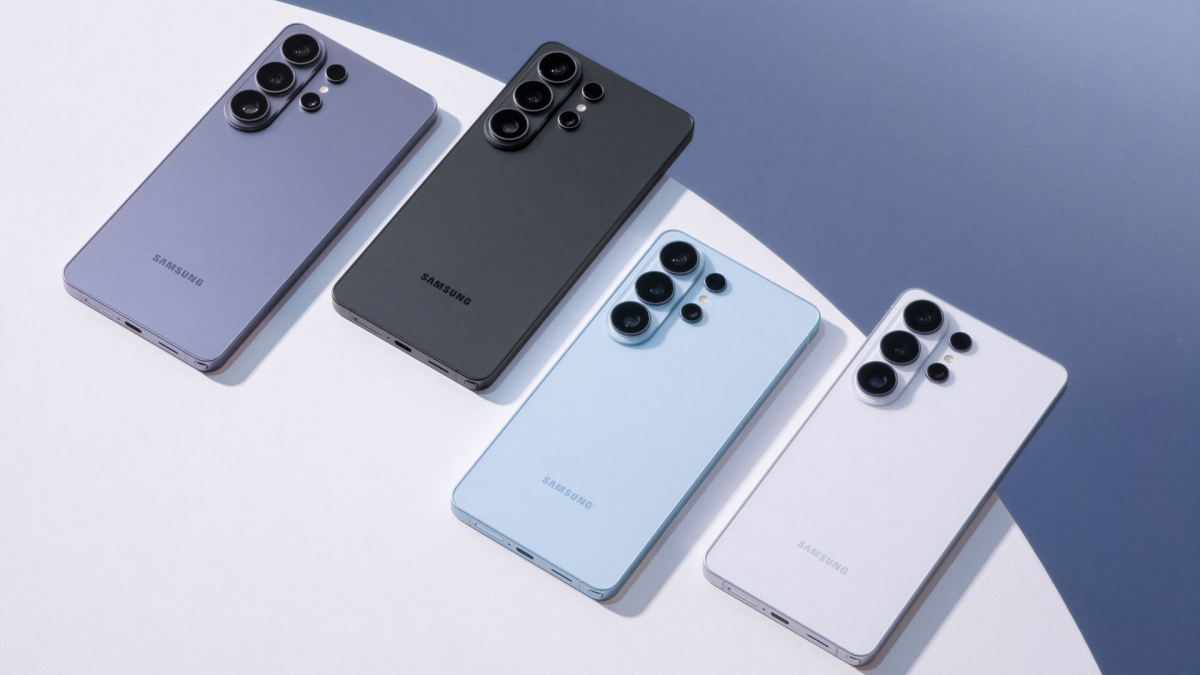
The Galaxy S26 line-up spans three phones, with the Ultra taking the headline slot on camera hardware. Here’s how the different devices compare.
The Galaxy S26 Ultra is designed to perform when the lights drop and the action moves faster than you can focus, so your post-festival camera roll is full of brilliant memories instead of blurry messes.
Ready to pick up the only accessory you really need to prepare for festival season? See the full Galaxy S26 line-up at samsung.com.
[1] Super Steady results may vary depending on editing method and/or shooting conditions.
[2] Samsung account login is required for certain AI features. Galaxy AI features are provided for free. Future releases may include additional advanced features that are offered as part of a paid subscription plan. Different terms may apply for AI features provided by third parties.
[3] Requires network connection and Samsung account login. A visible watermark is overlaid on the saved image to indicate it was generated by Galaxy AI. Accuracy of output not guaranteed.
[4] Requires network connection and Samsung account login. Accuracy of output not guaranteed.

 Arabic
 French
 Spanish
 Portuguese
 Deutsch
 Turkish
 Dutch
Dutch
 Italiano
 Russian
 Romaian
 Portuguese (Brazil)
 Greek
Greek