


See how the Asus Zenbook A14, Dell XPS 14, and other top-rated models compare.
By

Haley Henschel
Senior Shopping Reporter
Haley Henschel is a Chicago-based Senior Shopping Reporter at Mashable who reviews and finds deals on popular tech, from laptops to gaming consoles and VPNs. She has years of experience covering shopping holidays and can tell you what’s actually worth buying on Black Friday and Amazon Prime Day. Her work has also explored the driving forces behind digital trends within the shopping sphere, from dupes to 12-foot skeletons.
on
All products featured here are independently selected by our editors and writers. If you buy something through links on our site, Mashable may earn an affiliate commission.

Credit: Haley Henschel / Mashable
Mashable tech experts put the best laptops through a home testing gauntlet to find the top Windows laptops. Thanks to a recent wave of price increases and the arrival of the MacBook Neo, we know it's getting a lot harder to find Windows laptops that can compete on price with equivalent MacBooks. But whether you're a proud or reluctant member of Windows nation, we found plenty of worthy PCs to consider.
After testing 75+ laptops in the past two years, we created this regularly updated guide to the best Windows laptops, featuring the greatest devices from Dell, Lenovo, HP, Framework, and Acer.
Overview

These are the tech, tools, and products — from laptops to e-readers, from earbuds to robovacs, and more — that Mashable ranks best in class.
Table of Contents
We have to talk about RAMageddon
It's a tough time to be a new Windows laptop. PCs have been hit especially hard by the global RAM shortage. Many popular models have gotten steep price hikes as new AI data centers hog their components, making good values in the budget and mid-range tiers scarcer. (Unfortunately, that probably won't change anytime soon.)
MacBooks have managed to avoid such price increases, but they're not necessarily the ideal computers for everyone. Windows laptops are still much better for PC gaming, and they're more customizable with dedicated GPUs, OLED displays, and convertible designs.
So, before you defect to Team Apple, explore our guide to the best Windows laptops that are actually worth buying these days. Yes, they're still out there — just fewer and further between.
How we chose the top Windows laptops
To select our current picks, my colleagues and I have spent the last few months reviewing some of the newest Windows laptops using our in-house testing methodology. I've also re-evaluated some of last year's releases that remain in stock and don't feel like drastic downgrades.
As of mid-2026, the ultraportable Asus Zenbook A14 leads the pack as my top pick for most buyers.
Our Pick

The Good & The Bad
- Incredibly impressive performance in any everyday scenario
- Big NPU for on-device AI workloads
- Amazing battery life
- Super lightweight
- Pretty OLED display
- Creamy keyboard
- A great value
- Some compatibility issues
- Average webcam and speakers
Who it's for
The 2026 Asus Zenbook A14 is the best general-purpose Windows laptop for most people needing an attractive, lightweight, and affordable everyday driver. It's also my first choice for folks looking for the best MacBook Air alternative or a solid portable AI PC.
Why we picked this
I loved the original Zenbook A14 from 2025, and this year's model is even better. It's a very well-rounded ultraportable with a very fair MSRP. I challenge anyone to find a faster, longer-lasting, and better-made Windows laptop for the regular retail price of $1,349.99.
A new Snapdragon X2 Elite CPU adds some extra pep to this 14-incher's step. It can now keep up with modern MacBooks in both basic single-core and demanding multi-core scenarios, something only one other Windows laptop can claim. (That would be its 16-inch sibling, the Asus Zenbook A16, below.) It's actually slightly faster than the M5 MacBook Air in multi-core tasks like light video editing, which is nuts. It beats 92 percent of all the laptops in our testing database on this metric, including much pricier models meant for gamers and creatives.
The new Zenbook A14 also comes with a massive 80-TOPs neural processing unit (NPU) that can chew through local AI tasks. That's double Microsoft's TOPs requirement for Copilot+ PCs.
The Zenbook A14's stamina got even better this year, too. It lasted 27 hours and 36 minutes in our battery life benchmark, a video rundown test, which makes it our third-longest-lasting laptop of all time. For reference, last year's model couldn't compete with same-gen MacBooks and died just before the 22-hour mark.
The Zenbook A14's chassis is still made from a unique material called "Ceraluminum," which is durable, scratch-resistant, textured matte (almost like pottery), and remarkably lightweight. The base configuration I tested weighs just 2.4 pounds, but doesn't feel fragile. It comes in a modern-organic "Zabrinskie Beige" finish that's embellished with metallic, jewelry-like accents — a nice change of pace from your standard silver PC. Other highlights include a creamy keyboard, a silky touchpad, and a vivid OLED display.
Details

The Good & The Bad
- Good performance for the price
- Clean, minimalist design
- Relatively portable for a 16-incher
- Vivid, anti-reflective 120Hz touchscreen
- Great variety of ports
- Poor speakers
- Unimpressive build quality; plastic keyboard deck
- Webcam isn't great
- Some compatibility issues
Who it's for
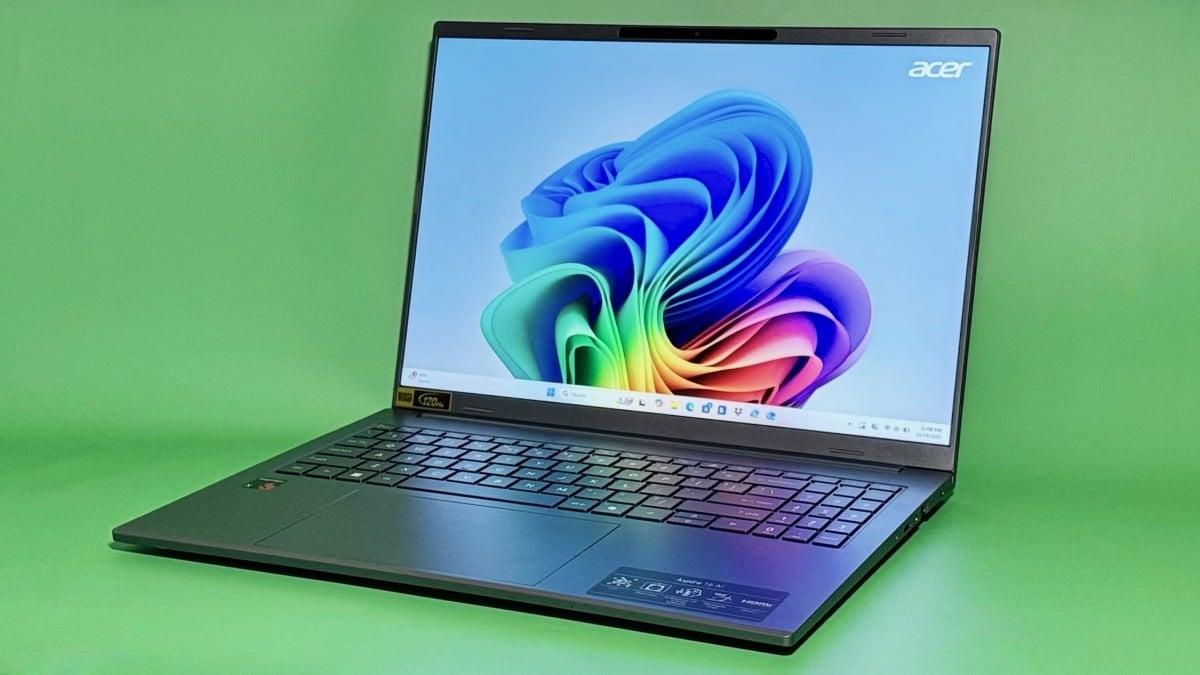
The Acer Aspire 16 AI from 2025 is the best cheap Windows laptop for frugal shoppers who need a competent laptop that costs well under $1,000. It's especially ideal for casual users with basic workloads, as well as those who like a bigger (but not too heavy) laptop for entertainment.
Why we picked this
This long-lasting big-screener doesn't sacrifice too much for the sake of its $700 price tag. It offers mostly amazing specs for the money — and even beats pricier laptops on this list in some small ways. It's my favorite MacBook Neo alternative... for now.
The Aspire 16 AI runs on an entry-level Snapdragon X CPU that can hold its own. (You'll find the same one in the $1,629.99 HP OmniBook 3 16 I tried, below.) It's not very snappy in single-core workloads like web browsing, which is where Apple's Neo really shines. But in multi-core scenarios like light video editing, the Aspire 16 AI can spar with some premium Windows laptops powered by the Intel Core Ultra 7 258V chip; that's an upper mid-range processor, albeit an older one. It's our fastest laptop under $900 on that point.
The Aspire 16 AI lasts for over 17 hours on a single charge, beating our current median runtime for Windows laptops by well over three hours. It outlasts 72 percent of all the laptops in our existing testing database, including the Dell XPS 14, the Asus Zenbook A16, and the Framework Laptop 13 (all below).
The Aspire 16 AI has a plastic keyboard deck, but it doesn't look too cheap. It has a really nice 1200p touchscreen with an anti-reflective finish and a 120Hz refresh rate. (Our top pick, the Asus Zenbook A14, lacks the latter.) I put it right next to my 2021 MacBook Pro to compare their displays, and while the Aspire 16 AI's picture wasn't nearly as crisp, its colors were just as punchy. The Aspire 16 AI's port selection is also excellent. An HDMI port and microSD card, on top of two USB-C and USB-A ports, are boons for peripheral-happy users. (The $2,899.99 XPS 14 doesn't have anything other than USB-C ports.) It's pretty lightweight for a laptop of its size, too. It weighs 0.23 pounds less than the OmniBook 3 16 and 1.28 pounds less than a 16-inch MacBook Pro.
Details

The Good & The Bad
- Wonderfully clacky keyboard
- Doubles as a tablet
- Excellent battery life
- Good mix of ports
- A great value
- No compatibility issues
- Very average webcam
- Quiet, mediocre speakers and mic
- OLED display is a little muted
- Doesn't come with a stylus
Who it's for
The best laptops for college students should be lightweight and portable, have long-lasting batteries, a display that can handle both work and entertainment, and a ton of ports.
And that's why last year's Lenovo Yoga 7 14 is still a fantastic pick for students of all ages, or really anyone who wants a nice, well-priced 2-in-1.
Why we picked this
Students will appreciate this 14-inch convertible's lightweight design, all-day battery life, and affordable price.
Its build quality impressed Mashable contributor Sarah Chaney, our reviewer. It has a premium all-aluminum chassis that's "solidly constructed despite weighing practically nothing," she wrote. It comes in at about three pounds and measures 0.6 inches thin, so your average textbook dwarfs it. It's packed with ports, including an HDMI port, a microSD card slot, and double-sided USB-C ports for convenient charging. Chaney also gushed about this hybrid's clacky, almost mechanical-feeling keyboard with adjustable backlighting, which gives it an expensive feel. Its OLED touchscreen is a little more muted compared to those on other models, but it's still a step up from an IPS display in terms of vibrancy. Plus, you can flip it all the way over on its hinge to use it like a tablet.
On the performance front, the Yoga 7 14 is solid for the money. We didn't record a single-core score when we ran it through our usual Geekbench 6 performance benchmark. However, another Windows laptop we tried with the same upper mid-range Ryzen 7 AI 350 CPU scored pretty dang well; in basic workloads, it rivaled pricier x86-based Windows machines meant for creative work and gaming. (It probably trails the ARM-based Asus Zenbook A14, a single-core overachiever, by about 20 percent.)
In more intensive multi-core workloads, the Yoga 7 14 falls about right in the middle of our database's pack. It's not a performance beast in this regard, but it's more than fine for everyday productivity and light multimedia work. If you need a super-powerful x86-based laptop with a dedicated GPU to run AutoCAD and other demanding specialty software, go with the Acer Swift X 14, below.
The Yoga 7 14 offers an above-average battery life of nearly 18 hours on a single charge, so you won't be panicking if you forget to bring your charger to a study session.
Details

The Good & The Bad
- Absurdly good battery life — best of any laptop we've ever tested (by a lot)
- Thin for a 16-inch laptop
- Above-average speakers
- Snappy, comfortable keyboard
- Very boring design with a plastic keyboard deck
- Display is a little dim
- Some compatibility issues
Who it's for
Our reigning battery life champ, the HP OmniBook 3 16 is a mid-range Windows laptop that will appeal to anyone who prefers working on the go. It's best-suited for those who don't need a ton of processing power.
Why we picked this
I love seeing people's reactions when I tell them that this 16-inch laptop ran for over 40 hours before dying. Forty hours! That number is so high it seems fake. Only one other Windows laptop we've tried has surpassed the 30-hour mark. (That would be last year's OmniBook 5 14.) Moreover, the latest MacBooks are capped at about 21 hours per charge. We've known for a while that Snapdragon X-powered laptops offer great battery life, but this one's is stupidly good.
Design-wise, OmniBook 3 16 is a basic silver laptop. Its IPS display isn't super sharp, but it's punchy and huge. Its comfy island-style keyboard is an almost-perfect mix of snappy and cushy, almost like it's trying to do an impression of one of Lenovo's premium thocky keyboards. I love that its backlighting doesn't cost extra, like it did on the OmniBook 5 14. It also doesn't suffer from the same rattling trackpad issue.
The OmniBook 3 16 has a pretty average weight, but it is very thin for its size. At 0.58 inches thick, it's slightly slimmer than every other laptop on this list save for the featherweight Acer Swift Go 14 AI and the Dell XPS 14, below. (It actually matches the latter in thinness.)
My testing unit cost $1,629.99 on HP's website — a steep price for a partially plastic laptop with an entry-level CPU. However, it came with 32GB of RAM and 1TB of storage, which is overkill for most everyday users. You can safely bump that down to 16GB RAM and 512GB SSD for $1,259.99, or even 8GB RAM and 256GB SSD for $999.99, depending on your needs. A 16GB RAM/1TB storage model is also sold on Amazon for $1,099.99.
Details

The Good & The Bad
- Vibrant 2.8K OLED touchscreen
- Great performance (very good for gaming)
- Plenty of ports
- Clickety-clackety keyboard
- Solid battery life for a laptop with dedicated graphics
- Reasonably priced for all it offers
- No compatibility issues
- Very boring design; not very sleek
- Screen is dim and overly glossy
- Included stylus doesn't work on the screen
Who it's for
I highly recommend the n

 English
 Arabic
 French
 Spanish
 Portuguese
 Deutsch
 Turkish
 Dutch
Dutch
 Italiano
 Russian
 Romaian
 Portuguese (Brazil)