


Minecraft snapshots - how to test the new features in 26.2
Minecraft snapshots - how to test the new features in 26.2
How do you test the latest Minecraft features? These snapshots are testing grounds for new Minecraft updates, providing Mojang with a way to introduce new blocks, biomes, and mobs before officially rolling them out. In the Bedrock edition, snapshots are referred to as Minecraft Previews, so keep that in mind if you're swapping between the two versions.
These days, Minecraft updates - or drops, as they're now known - come around thick and fast. Since snapshots give players the chance to test new features before drops go live, there's almost always something new to try out in the crafting game. Ahead of the next Minecraft update, here's what you can test in the latest Minecraft snapshot and how to do so.

Minecraft 26.2 pre-release 5
You can try out the new features of the next Minecraft update by loading up the 26.2 Pre-Release 5 update. Unlike the snapshots, pre-release updates are far more polished, providing you with a much smoother experience.
Minecraft 26.2 Pre-Release 5 was released on Wednesday, June 10, 2026, altering how Hardcore mode works. This update includes all the features from the snapshots, allowing you to try out all the sulfur cave biome additions.
To keep track of all the newest developments, keep an eye on the official snapshot information and changelogs page to discover what the developers have changed each month.
How to install a Minecraft snapshot
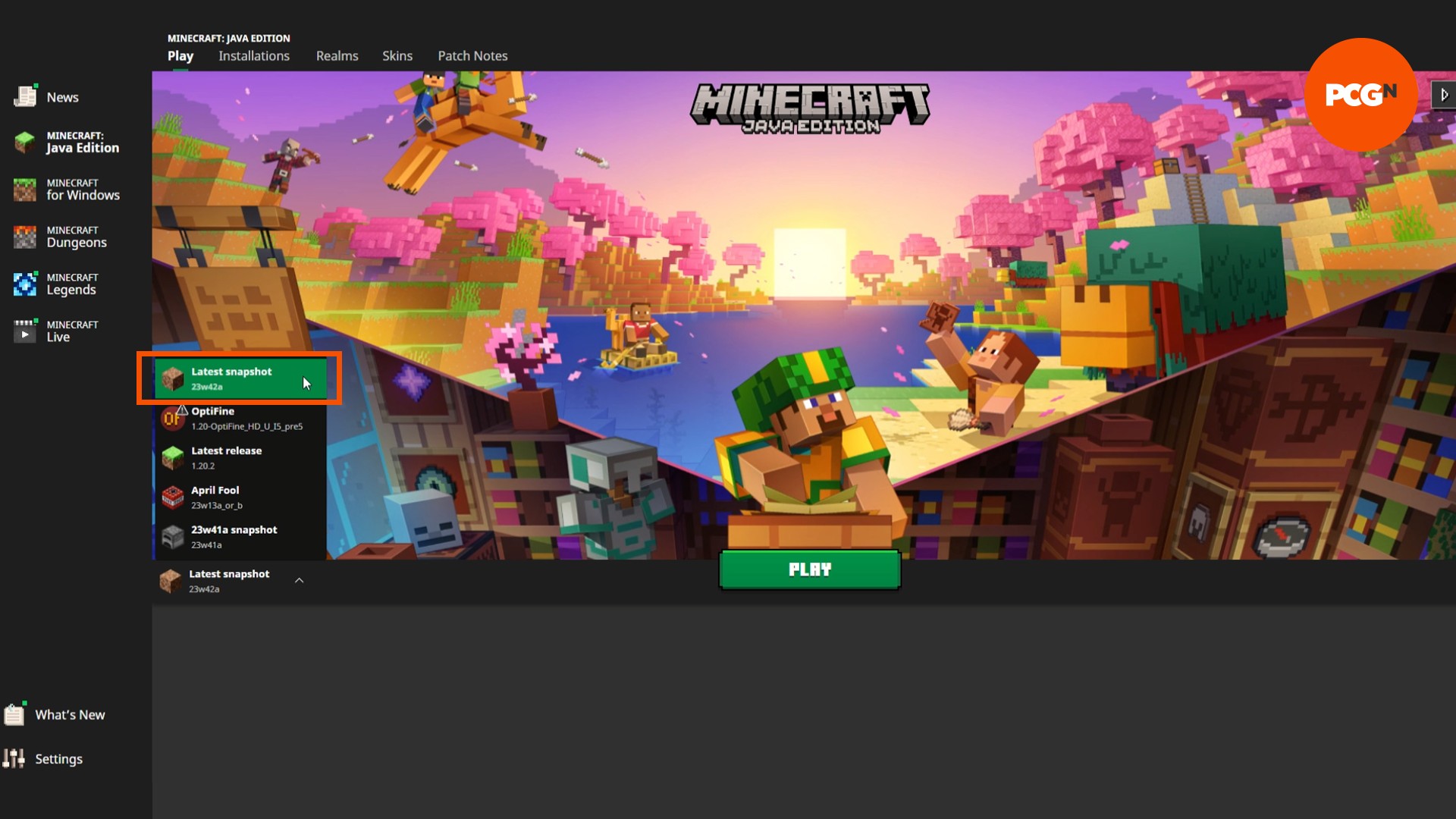
Play the latest Minecraft snapshot straight from the Minecraft Launcher. Click the installation dropdown to the left of the green 'Play' button and select 'latest snapshot' from the list. Hit play and set up a new world as normal.
You can load into existing worlds, but you should back them up first in case they get corrupted by a mysterious bug. If you load into an existing world, it's worth remembering that some features won't be available in loaded chunks, and you might need to explore the further reaches of your world.
How to turn on experimental features
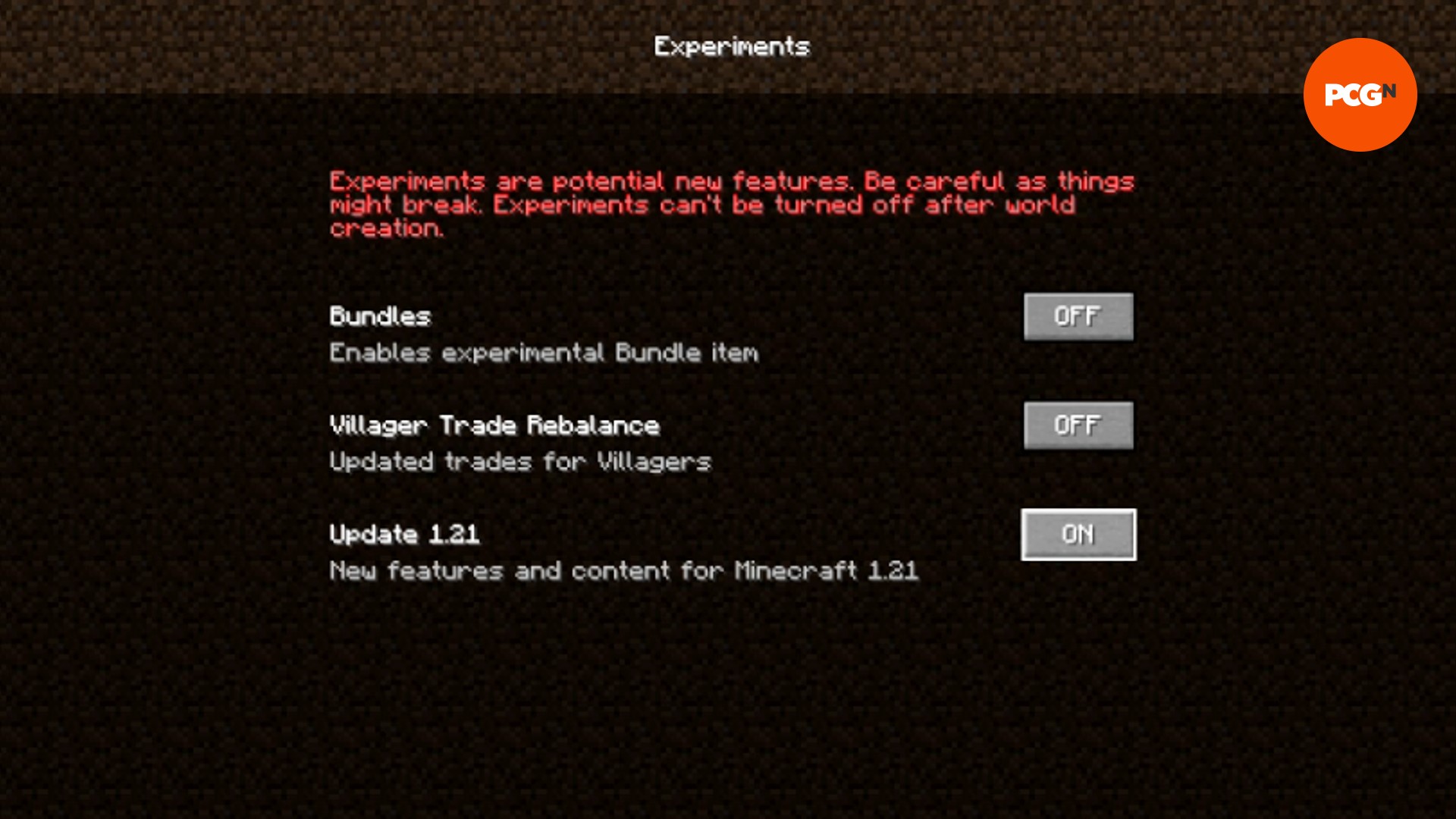
As standard, snapshots only include bug features and technical changes. To play with new experimental features, including future content changes, you must turn on experimental features. This should be done when you create the world, as they cannot be turned on or off later. To enable experimental features:
- Go to create a new world as normal
- On the main world creation page, click 'Experimental Features'
- Turn on any toggles you wish to see in your world
- Start your world
How to change Minecraft snapshot
You can also play old Minecraft snapshots, too. This requires a few extra steps and is the same as loading into old versions of Minecraft. To install and play an old Minecraft version or snapshot:
- Open the Minecraft Launcher
- Click the 'Installations' tab
- For snapshots, ensure that the 'snapshots' box is checked
- Click 'New Installation'
- Scroll down the dropdown list for your desired Minecraft version
- Name your installation
- Click 'Create'
- Select the 'Play' tab at the top of the Launcher
- Find your installation in the dropdown
- Hit 'Play'!
Again, you should always back up any existing worlds you load into with this installation, just in case it crashes and you lose progress. There are probably not many reasons you would want to revisit an old snapshot unless it's to test something that was changed or never made it to the game. If you are unsure which snapshot you're looking for, there are full changelogs available at minecraft.net.
Now you know how to test the latest features with Minecraft snapshots, go and have fun with them! If you're still looking for something new to do with your Minecraft world, why not try out some of our favorite Minecraft texture packs and Minecraft maps to transform your game.

 English
 Arabic
 French
 Spanish
 Portuguese
 Turkish
 Dutch
Dutch
 Italiano
 Russian
 Romaian
 Portuguese (Brazil)
 Greek
Greek