


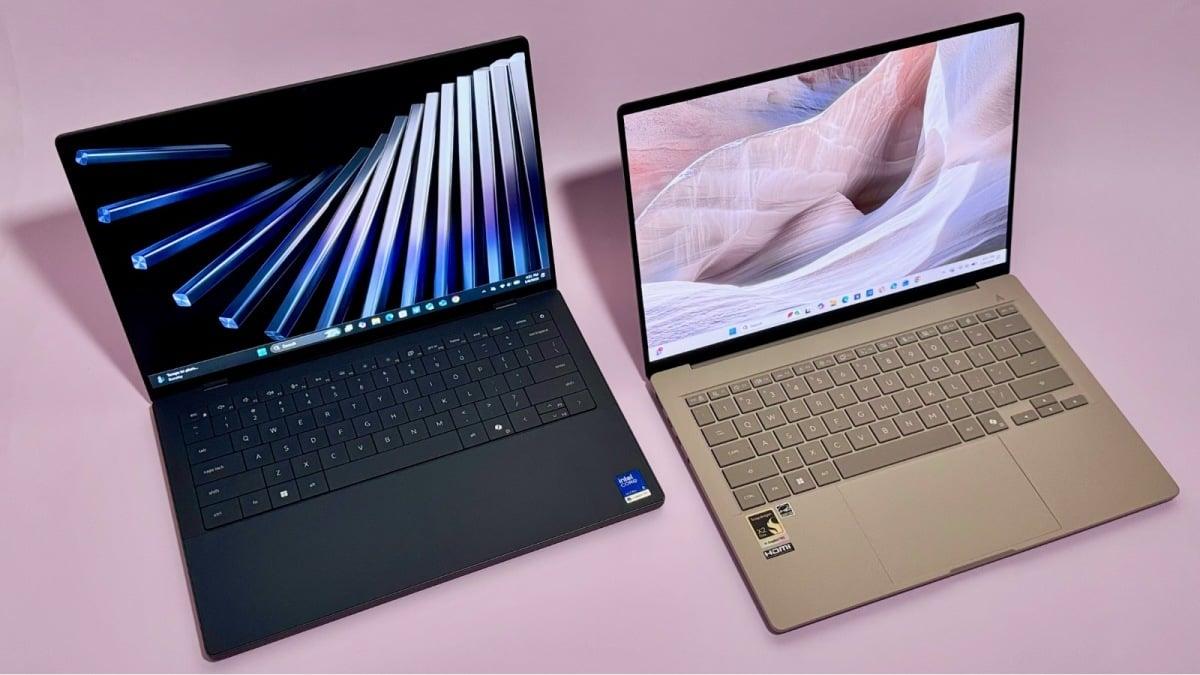
I've tested several laptops that can compete with Apple — and in some cases, beat it.
By

Haley Henschel
Senior Shopping Reporter
Haley Henschel is a Chicago-based Senior Shopping Reporter at Mashable who reviews and finds deals on popular tech, from laptops to gaming consoles and VPNs. She has years of experience covering shopping holidays and can tell you what’s actually worth buying on Black Friday and Amazon Prime Day. Her work has also explored the driving forces behind digital trends within the shopping sphere, from dupes to 12-foot skeletons.
on
All products featured here are independently selected by our editors and writers. If you buy something through links on our site, Mashable may earn an affiliate commission.

Credit: Haley Henschel / Mashable
Apple MacBooks are some of the best laptops on the market, bar none. They're incredibly fast, they won't die on you mid-workday, and they're very well-made. They're also pretty well-priced for all they offer, especially on the lower end. (Name another $600 laptop that's as polished as the MacBook Neo. I'll wait... and wait... and wait...)
Still, not everyone wants a MacBook. Maybe you like having lots of customization options; Apple doesn't make laptops with 2-in-1 designs, OLED displays, or touchscreens (yet). Maybe you prefer Windows or ChromeOS over macOS, or the software you rely on forces your hand. MacBooks have gotten better for gaming, but Windows laptops still own that realm. And Android phones don't work as seamlessly with Macs as they do PCs.
Whatever the reason, I put the best MacBook alternatives to the test and landed on seven worthy rivals to the MacBook Air, Pro, and Neo.
Overview

These are the tech, tools, and products — from laptops to e-readers, from earbuds to robovacs, and more — that Mashable ranks best in class.
Table of Contents
IMO, a Windows laptop or Chromebook is doing a good MacBook impression if it has above-average performance, battery life, and build quality. (Again, those are the main hallmarks of a modern Apple laptop.) I'll add some extra qualifiers depending on the exact Mac model:
MacBook Air alternatives should be super lightweight and portable
MacBook Neo alternatives should cost well under $1,000
MacBook Pro alternatives should have a crisp, rich 120Hz display and enough power for intensive tasks like video editing
I've been reviewing laptops for Mashable since 2023, so in compiling this guide, I combed through my testing database to see if any recent models fit the bill. I also called in several newer releases that looked promising and spent several weeks reviewing them this spring.
In the end, I selected six options from Asus, Acer, and Dell that make the best MacBook alternatives for 2026 buyers. I also included a fallback for those who want to stay within the Apple ecosystem.
Our Pick

The Good & The Bad
- Outperforms the M5 MacBook Air *and* Pro in multi-core tasks
- MacBook-beating battery life
- Lighter than a 13-inch MacBook Air, yet still durable
- Pretty OLED display
- Creamy keyboard
- Better mix of ports than a MacBook Air
- A good value
- Some app compatibility issues
- Second-rate webcam and speakers
- Display isn't as crisp
- No haptic touchpad
- More expensive than the Air
Who it's for
The 2026 Zenbook A14 is one of the best Windows laptops I've ever tried. It's close to perfect for users needing a snappy ultraportable with incredible battery life, solid build quality, and a pretty OLED display. It's an ideal daily driver for most people, and especially great for traveling.
Why we picked this
The latest Zenbook A14 overachieves on performance and battery life; it looks unique without being obnoxious; and it's so featherlight that it makes the MacBook Air feel hefty. Moreover, it feels fairly priced.
Performance: The Zenbook A14 runs on Qualcomm's peppy new Snapdragon X2 Elite chip, which I can't hype enough. It's just 10 percent slower than the M5 Air in single-core tasks like sending emails and web browsing (so they're effectively equals there). In multi-core workloads like video editing, it's actually 20 percent faster than the M5 Air — a difference you're more likely to feel in practice. It's also roughly 10 percent faster than the M5 Pro in multi-core scenarios. Eighty-eight percent of the laptops in our testing database can't pull that off.
FYI: That Snapdragon CPU is a Windows on ARM chip, which basically means that it's built differently than the traditional x86 chips inside other Windows laptops. As such, it's not compatible with as many PC games and certain specialty software. You might also run into problems trying to use ARM laptops with certain peripherals, like older printers. Most public universities recommend that their students avoid them for this reason.
Battery life: The Zenbook A14 is an endurance sprinter. It was able to loop a video for 27 hours and 36 minutes straight before dying, surpassing the M5 Pro, our reigning battery life champ among Apple computers, by 6.5 hours. (Compared to the latest Air, it offers 10 extra hours of battery life.) It's the third-longest-lasting laptop we've ever tested in our decade-plus of reviewing them.
Design: The Zenbook A14's chassis is made from Asus' proprietary "Ceraluminum" material, which is smudge-proof and ultra-light yet rigid. It weighs only 2.4 pounds, which makes it 0.3 pounds lighter than the Air. It comes in a tan finish ("Zabrinskie beige") with gold accents and a matte texture that reminds me of pottery; I find it refreshing in a world of boring silver laptops. Its crown jewel is its bright 14-inch OLED screen, which is more colorful than a MacBook Air's display, if not quite as crisp. Its keyboard is another standout feature: It has a pleasantly smooth, "creamy" feel. It comes equipped with an HDMI port, two USB-C ports, a USB-A port, and an audio jack, so it offers way more connectivity options than its Apple counterpart.
Value: The Zenbook A14 starts at $1,349.99 with 16GB of RAM and 512GB of storage. It's a bit pricier than a 13-inch M5 MacBook Air, which starts at $1,099 with the same specs. The Air also has a nicer haptic touchpad and 12MP webcam. But the Zenbook A14 offers better multi-core performance for demanding tasks, more ports, a more colorful display, and a lighter (but still sturdy) build. It also lasts much longer.
Details

The Good & The Bad
- Just as fast as the MacBook Neo in multi-core tasks (plus more RAM)
- Better battery life than the Neo
- Better mix of ports than the Neo
- More storage than the Neo
- 120Hz touchscreen display
- Backlit keyboard
- A great value for a Windows laptop
- Poor speakers
- Dimmer, less sharp display
- Unimpressive build quality; plastic keyboard deck
- Some app compatibility issues
- No fun colors
Who it's for
The 2025 Acer Aspire 16 AI is a stellar pick for casual users with limited budgets and simple workloads, particularly those who like a larger screen. (Younger students would make great use of it.) It's portable for its size and long-lasting, so big ups if you frequently work on the go. We can't say that it's better than the Neo, but we can say it's the best MacBook Neo alternative right now.
Why we picked this
The Aspire 16 AI is my reigning favorite cheap Windows laptop. It offers great multi-core performance for the money, a healthy amount of RAM and storage, plus a smooth display and all the ports you could need. You mainly feel its "budget-ness" in its build quality.
Performance: The Aspire 16 AI's Qualcomm Snapdragon X chip is about 40 percent slower than the Neo's A18 Pro chip in single-core scenarios, so it doesn't feel as responsive when you're surfing the web or working in Word docs. That said, it's just as good as running multi-core tasks like light video editing. (Our benchmarking showed that it's 12 percent faster than the Neo in that regard. It's a trivial bump, but it's something.) At the time of writing, the Aspire 16 AI was the fastest sub-$900 laptop we've tested for multi-core workloads.
Note that the Snapdragon X CPU is a Windows on ARM chip, so it's not compatible with as many games or specialty apps as Intel or AMD chips (which have x86 architecture — see above, in the Zenbook A14's section). But a budget laptop isn't really made for that kind of usage, anyway, so that's not a huge concern here. I'd be more worried about it not working with an older scanner or printer.
Battery life: The Aspire 16 AI plowed past the Neo in our battery life benchmark, a video rundown test, lasting 17 hours and 22 minutes to Apple's 14 hours and 50 minutes. Stamina-wise, it's more on par with the M5 MacBook Air, which lasted 17 hours and 40 minutes. You can easily squeeze two full workdays out of this thing without needing to charge it in between.
Design: The Aspire 16 AI is pretty trim for a 16-incher. At 3.42 pounds, it's only a little bit heavier than a 15-inch MacBook Air. (There are even slimmer, lighter 16-inch options — see the Asus Zenbook A16, below — but they're way more expensive.) Its display is a bit dim and not as crisp as the Neo's, but I appreciated its buttery 120Hz refresh rate and touchscreen capabilities. Its port setup is also great: While the Neo has just two USB-C ports and a headphone jack, this laptop tacks on two extra USB-A ports, an HDMI port, and a microSD card slot. That's some MacBook Pro-level connectivity.
Value: For the same price as a 512GB Neo, the Aspire 16 AI offers double the RAM, better multi-core performance, more ports, a 120Hz touchscreen, and a backlit keyboard. But it's not as well-made as the MacBook Neo; it lacks a fingerprint login feature, and it doesn't feel as fast in everyday productivity scenarios. It also comes in one boring color. Still, it feels very fairly priced in an era when decent, cheap Windows laptops are getting scarce.
FYI: Acer also makes a 14-inch version of this laptop (the Aspire 14 AI), which comes with an Intel processor that alleviates the Windows on ARM compatibility issues. It offers double the storage, slightly better battery life, and slightly better single-core performance for only $500 to $700, depending on the retailer. I haven't tried it, so I can't speak for it personally, but our friends at CNET really liked it. You probably can't go wrong with either size.
Details

The Good & The Bad
- Gorgeous OLED touchscreen display
- As fast as an M5 MacBook Pro in multi-core tasks
- Better for gaming than a MacBook
- Clickety-clackety keyboard
- Haptic touchpad
- Plenty of ports
- Comes with a stylus that you can use to draw on the touchpad
- A decent value
- Very boring design; not very sleek
- Screen is dim and overly glossy
- Worse single-core performance than the Pro
- Doesn't last as long as a MacBook (but good battery life for a laptop with dedicated graphics)
- Stylus doesn't work on the screen
Who it's for
The 2026 Acer Swift X 14 is an excellent desktop replacement for professional creatives who need the oomph of dedicated graphics for especially intensive software (and proper AAA gaming). I specifically recommend it for those who care more about MacBook-esque power than MacBook-esque looks.
Why we picked this
After testing two configurations of the Swift X 14, I prefer the pricier model with an Intel Core Ultra 9 285H processor and Nvidia GeForce RTX 5070 graphics. It's a top-tier performer with gaming prowess and good battery life, relatively speaking. It's not as sleek or long-lasting as a 14-inch MacBook Pro, but it's slightly cheaper with the same amount of RAM and storage, plus a striking OLED touchscreen.
Performance: The Swift X 14 lags behind the M5 MacBook Pro in single-core workloads, but they're peers when it comes to multi-core tasks. (The MacBook Pro proved just two percent faster there, which is nothing.) It's the fastest Windows laptop at its price point by that metric. The Swift X 14's discrete GPU makes it better for raw performance in the heaviest of workloads compared to the MacBook Pro, including 3D rendering and PC gaming. It can run graphically grueling titles like Cyberpunk 2077 flawlessly without any AI upscaling tech turned on.
It's worth mentioning that this Swift X 14 is not a Copilot+ PC, meaning it doesn't have a massive NPU that enables Microsoft AI features like Recall, Click to Do, and Microsoft Paint's Cocreator. This is bad news if you need a laptop for running local AI tasks, but great news if you don't like it when your laptop is clogged with AI tools you never use. (Personally, I'm in the second camp.)
Battery life: The Swift X 14 lasted 10 hours and 10 minutes in our battery life rundown test. That wouldn't be a great result if it were a regular Windows laptop, but it's pretty decent for one with dedicated graphics. Still, it lasts about half as long as the MacBook Pro.
Design: This is a very utilitarian laptop. It weighs about the same as a MacBook Pro, but it's boxier and a bit thicker, and it comes in a single "iron" finish. It manages to fit in plenty of ports, including two USB-C ports, an HDMI port, two USB-A ports, a microSD card slot, and an audio jack. Its keyboard has a lovely clickety-clackety feel, and its haptic touchpad is very satisfying to use. You can actually draw on it with the included stylus. (It's tricky to get the hang of it, but it functions like a built-in drawing pad.) The flashiest thing about the Swift X 14 is its 14.5-inch 120Hz OLED touchscreen display, which has remarkably punchy colors. It's very glossy and not as sharp or bright as a MacBook Pro's screen, but OLED won't be a thing on a Mac until late 2026 at the soonest.
Value: As configured, the Swift X 14 comes with 32GB of RAM and 1TB of storage and costs $1,999.99. An M5 MacBook Pro with just as much memory and storage goes for $2,099; it's a more polished laptop with better single-core performance plus double the battery life, but its raw graphics capabilities can't compete. For what it is, I think the Swift X 14 is an expensive but sound buy.
I should note that the other configuration I tested was a Swift X 14 AI with an AMD Ryzen AI 7 350 processor and RTX 5060 graphics, which cost $1,699.99. (That model is a Copilot+ PC, FWIW.) It offered similar single-core performance but 21 percent worse multi-core performance and a much worse battery life — it only lasted six hours and 24 minutes in our benchmark. It also doesn't have as much raw power. Yeah, it's $300 less, but the Intel-powered Swift X 14 is the smarter pick for the money.
Details

The Good & The Bad
- Lighter than a 15-inch MacBook Air, yet still durable
- Outperforms the M5 MacBook Air *and* Pro (by a lot)
- Huge, gorgeous, ultra-bright OLED touchscreen
- Creamy keyboard
- Above-average speakers
- A solid value (tons of RAM!)
- Muted webcam
- Some app compatibility issues
- No haptic touchpad
Who it's for
The super-light Asus Zenbook A16 is an impeccable buy for professionals (namely, remote workers) seeking a premium Windows laptop that outshines the 15-inch MacBook Air in many ways. You'll have a tough time finding a better option if you want a sturdy ultraportable with a big-and-bright OLED touchscreen at a great price.
Why we picked this
The Zenbook A14's newer, larger sibling is another one of my all-timers. It offers MacBook Pro-beating multi-core power in a design that's substantially lighter than the 15-inch MacBook Air. It's closer to $2,000 than $1,000, but it's shockingly well-priced for its incredible performance, decent battery life, top-notch display, useful ports, and tons of RAM.
Performance: The Zenbook A16 is the first laptop to market with Qualcomm's top-of-the-line Snapdragon X2 Elite Extreme chip, and boy, does this thing cook. There's only a nine percent difference between it and Apple's M5 chip in single-core scenarios, which is negligible. It feels so snappy compared to most other Windows laptops I've tried. In multi-core tasks, it screams past the M5 MacBook Air and Pro by up to 38 percent. It's actually the second-fastest laptop we've ever reviewed when it comes to multi-core oomph. The only machine that beats it is the 16-inch, M4 Pro-powered MacBook Pro from late 2024, which costs $3,649 as tested. (We haven't tried the latest M5 Pro or M5 Max models, but they're almost certainly faster, too — and vastly pricier.)
As with the Zenbook A14, Windows on ARM compatibility issues might be a concern for some users here.
Battery life: The Zenbook A16 lasted 16 hours and 26 minutes in our battery life benchmark. It doesn't have as much stamina as the Zenbook A14, but that's a very good number for a mega-powerful laptop with a big, vivid display. It beats our 14-hour median for the Windows laptops in our database, as well as our 16-hour median for MacBooks. Compared to the MacBook Air, you only lose out on an hour and 20-ish minutes of usage.
Design: The Zenbook A16 is very similar to the Zenbook A14, but it comes with a few key upgrades that give it a more premium vibe. One is its OLED display: It's much crisper and brighter, and it has a 120Hz refresh rate plus touchscreen capabilities. Additionally, the Zenbook A16 has an extra SD card slot, and its speakers sound better. (They're not quite MacBook-tier, but they're good for

 English
 Arabic
 French
 Spanish
 Portuguese
 Deutsch
 Dutch
Dutch
 Italiano
 Russian
 Romaian
 Portuguese (Brazil)
 Greek
Greek