


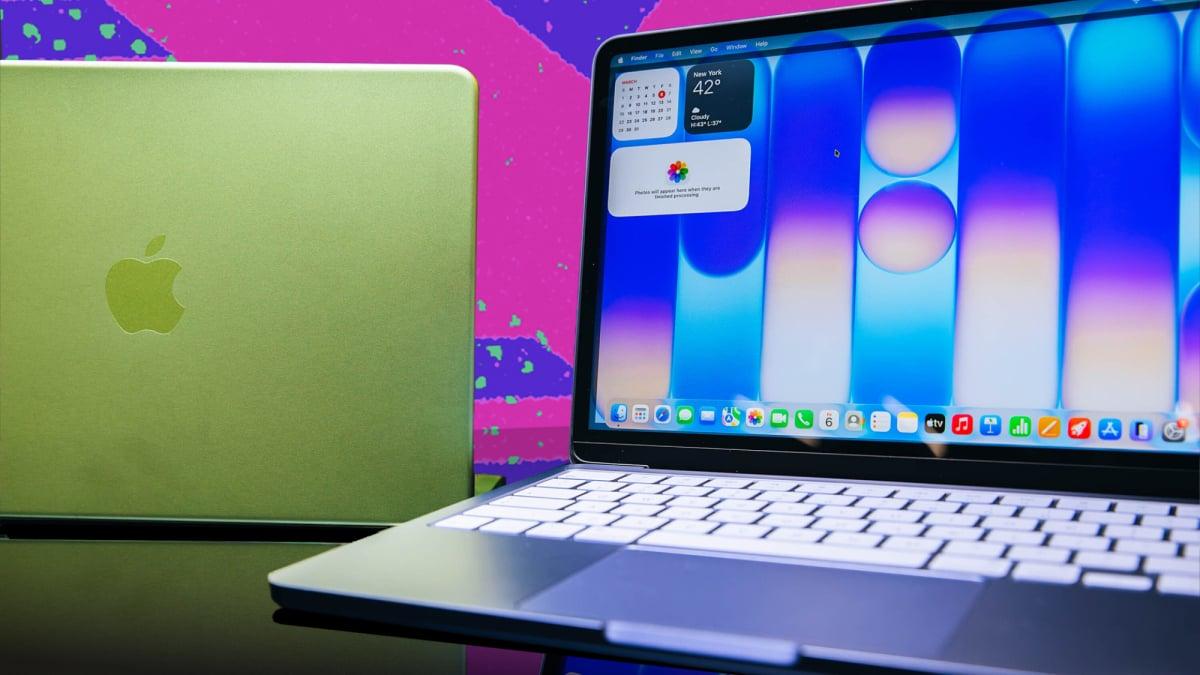
Apple's new MacBook Neo leads the pack.
By

Haley Henschel
Senior Shopping Reporter
Haley Henschel is a Chicago-based Senior Shopping Reporter at Mashable who reviews and finds deals on popular tech, from laptops to gaming consoles and VPNs. She has years of experience covering shopping holidays and can tell you what’s actually worth buying on Black Friday and Amazon Prime Day. Her work has also explored the driving forces behind digital trends within the shopping sphere, from dupes to 12-foot skeletons.
on
All products featured here are independently selected by our editors and writers. If you buy something through links on our site, Mashable may earn an affiliate commission.

Credit: Joe Maldonado / Mashable
Budget laptops are getting harder to find in 2026. You can thank the AI industry: A surge in data center construction has triggered a global RAM shortage that's forced many PC makers to raise their prices and scrap their cheapest models. Right now, affordable laptops worth buying are few and far between.
That's what makes the new Apple MacBook Neo so special. For a starting price of just $599, it offers superb build quality, a sharp, pretty display, and better everyday performance than most premium PCs. It's easily the best cheap laptop you can buy right now, but it's not the only affordable laptop we tested and recommend. So, see the top Chromebooks and laptops under $1,000.
Overview

These are the tech, tools, and products — from laptops to e-readers, from earbuds to robovacs, and more — that Mashable ranks best in class.
Table of Contents
If you prefer Windows, the 2025 Acer Aspire 16 AI is pretty easy to recommend. It has an impressive battery life, a backlit keyboard, a good mix of ports, and a healthy amount of RAM. It's the fastest sub-$900 laptop for multi-core tasks like video editing (by a hair).
For those who can spend a little more, last year's ultraportable Asus Zenbook A14 is my favorite laptop under $1,000. Conversely, if you're trying to spend less than $500, go with the Acer Chromebook Plus 516.
Our Pick

The Good & The Bad
- Incredible single-core performance
- Same all-aluminum chassis as nicer MacBooks
- Fun color options
- Bright, pretty Liquid Retina display
- Great speakers with Dolby Atmos
- Only 8GB of RAM (and you can't upgrade it)
- No keyboard backlighting
- Few ports
Who it's for
Don't overthink this decision: The new Apple MacBook Neo is the ideal laptop for most students and casual users, offering elite build quality and impressive performance at an incredibly competitive price. If your everyday workload revolves around basic tasks, it's the default choice (unless you can't use macOS for some reason).
The MacBook Neo starts with 8GB of RAM and 256GB of storage for $599. For $100 more, you can double your disk space and add Touch ID. College students, their parents, and school faculty can save $100 with the Apple Store's education discount.
Read Mashable's full review of the Apple MacBook Neo.
Why we picked this
You have to feel a little bad for cheap Windows laptops and Chromebooks. Apple's new MacBook Neo is a budget-tier game-changer, squashing the competition when it comes to build quality and single-core performance. (That refers to how snappy it feels in simple scenarios like web browsing, sending emails, and streaming videos — the things most casual users need a laptop for on a regular basis.)
Performance: Our testing found that the MacBook Neo's A18 Pro chip is just as zippy as an M4 MacBook Air when used for single-core tasks. In fact, it's better than five $2,000+ Windows laptops we've tried in this regard. It's only going to feel slow if you try to open too many apps and tabs at once; that's the downside of being limited to 8GB of memory.
The MacBook Neo isn't as fast as the Acer Aspire 16 AI or Asus Zenbook A14 (below) in heavier multi-core tasks like video editing, but it's fine for throwing together a simple video in Final Cut Pro if needed.
Battery life: Low-cost Windows laptops with Snapdragon processors offer better battery life than the MacBook Neo (again, see the Aspire 16 AI and the Zenbook A14). But the Neo still holds its own with about 15 hours of stamina per charge. It should last almost two full school or workdays away from an outlet.
Design: Many budget laptops use plastic, but the Neo has a rare, fully aluminum chassis — and it comes in fun colors like citrus and blush. Its 13-inch Liquid Retina display has a higher resolution than all of the other laptops on this list, so it's going to look the sharpest. It also boasts the best speakers. They support both Dolby Atmos and Spatial Audio, Apple's surround-sound technology. (I've tried a lot of pricier Windows laptops with crappier speakers, so good audio quality at this price point is a feat.) The MacBook Neo weighs the same as a 13.3-inch MacBook Air — just under three pounds — so it's easy to carry around in a backpack.
Value: Truly, I wish you the best of luck in finding a peppier, better-made laptop for $600 (or $500, if you can swing Apple's student discount).
Details

The Good & The Bad
- Solid multi-core performance for the price
- 16GB of RAM = perfect for multitasking
- Excellent battery life
- Backlit keyboard
- Relatively portable for a 16-incher
- Variable 120Hz refresh rate
- Nice variety of ports
- Mediocre build quality; has a plastic keyboard deck
- Poor speakers
- Webcam could be better
- Fan turns off and on constantly (though it's quiet)
- Some app compatibility issues
Who it's for
The Qualcomm-powered Acer Aspire 16 AI from 2025 is the best entry-level Windows laptop I've tested. If you're looking for an affordable computer with a fantastic battery life and a big, smooth display, this one is tough to beat. Plus, it's quite portable for its size.
The Aspire 16 AI starts with 16GB of RAM and 512GB of storage on Amazon, where its record-low price is $429.99.
Why we picked this
Truth be told, the $700 Aspire 16 AI almost feels slightly underpriced for what it brings to the table. This includes of 16GB of memory, which makes it much better-suited for multitasking than the MacBook Neo. It won't get sluggish if you open too many browser tabs at once.
Performance: The Aspire 16 AI runs on Qualcomm's competent Snapdragon X chip. It can't compete with Apple's A18 Pro chip in single-core tasks — it's 40 percent pokier — but it outperforms it in multi-core tasks like light video editing by about 12 percent. (That's an itty-bitty jump, but it's notable.) It actually offers the best multi-core performance out of all the laptops we've tried that cost less than $900.
I should briefly mention that Snapdragon chips are ARM-based CPUs. Without getting too in the weeds, this means they're not compatible with certain specialty apps. (This is also something that afflicts the Asus Zenbook A14, below.) This is mainly a problem if you need a budget laptop for college coursework or PC gaming, but since the Aspire 16 AI is more geared toward general everyday use, it's not a dealbreaker here.
Battery life: The Aspire 16 AI's battery life also impresses. In our benchmark, it ran for 17 hours and 22 minutes before dying. Our current median battery life for Windows laptops is 14 hours, so it's an overachiever in its category. This tracks for most laptops with Snapdragon X series chips.
Design: I think most users will feel spoiled by the Aspire 16 AI's display, which has an anti-glare finish, touchscreen capabilities, and a variable 120Hz refresh rate. It could still be brighter and crisper, but those specs are great for $700. (I mean, the $1,099 M5 MacBook Air still has a mediocre 60Hz refresh rate.) This is a 16-inch laptop, so you get a good amount of screen real estate, but not at the cost of extra heft. At 3.42 pounds, the Aspire 16 AI is pretty light for its size and not too heavy to haul around. The current 16-inch MacBook Pro weighs 4.7 pounds, for reference. And speaking of the MacBook Pro: The Aspire 16 AI's port selection is just as good as that of Apple's high-end machine. You get two USB-C ports, two USB-A ports, an HDMI port, a Kensington lock slot, and even a microSD card slot (plus a headphone jack).
Value: Acer has made some build quality sacrifices to keep the Aspire 16 AI so cheap. Its lid made a clicking sound when I gently pressed down in the center of it, and its keyboard deck is made from plastic. That's not uncommon at this price point, but the all-aluminum MacBook Neo feels way more premium. Still, the Aspire 16 AI is priced super aggressively for a PC in this day and age.
Details

The Good & The Bad
- Good multi-core performance for the price
- 16GB of RAM = perfect for multitasking
- Stellar battery life
- Unique, durable chassis material
- Ridiculously thin and light
- Bright, gorgeous OLED display
- Backlit keyboard
- Terrible speakers
- Some app compatibility issues
Who it's for
The elegant and long-lasting Asus Zenbook A14 from 2025 is my favorite laptop for most people with a budget cap of $1,000. Its ultralight yet rigid build makes it especially great for frequent travelers and remote workers. I'll also note that it's the only laptop on this list with an OLED display, if that's a spec high on your wishlist.
Look for the ZenBook A14 on sale at Best Buy, where it's dipped down to as low as $550 before (a steal). It starts with 512GB of storage and 16GB of RAM.
Why we picked this
I've been hyping this 14-inch laptop since I first saw it at CES 2025. It's an amazing Windows ultraportable and an awesome value.
Performance: The Zenbook A14 is a solid performer for the money. The MacBook Neo still beats it in single-core workloads (by about 31 percent), but it's 28 percent faster in multi-core scenarios. In fact, it doesn't have any multi-core competition among other laptops under $1,000. Compared to the $699.99 Acer Aspire 16 AI (above), which has a lesser Snapdragon X chip, this one's Snapdragon X Plus chip offers 14 percent better single-core performance and 15 percent better multi-core performance. If you need a cheap-ish laptop that can do some heavier lifting, this one's up to the task.
As with the Aspire 16 AI, be mindful of ARM-related software compatibility issues here if you're buying a laptop for college or gaming.
Battery life: The Zenbook A14 ran for 21 hours and 47 minutes in our video rundown test before dying, making it the eighth-longest-lasting laptop we've ever reviewed. Our longest-lasting MacBook died exactly 30 minutes sooner.
Design: Picking up the Zenbook A14 for the first time usually elicits a gasp from people. Asus built its chassis out of a lightweight magnesium-aluminum alloy called "Ceraluminum" that's scratch-, smudge- and shock-resistant. The base configuration is only 2.4 pounds, or 0.3 pounds less than the MacBook Neo, yet it doesn't feel frail. The Ceraluminum makes it super durable without weighing it down. It's slightly thicker than the Neo, but that's so it can squeeze in an HDMI port and a USB-A port.
In a market saturated with boring silver laptops, I think the Zenbook A14's modern-organic look is refreshing. It has a tan "Zabrinskie Beige" finish with a matte, almost ceramic-like texture, and it's accented with gold reflective logos. It's different without being too obnoxious for an office. Top that off with a bright, vivid OLED display, and this laptop is quite the looker.
Value: I'd have no qualms about paying full price for the Zenbook A14 — it's a really solid value (but all the better if you can find it on sale). Raising your budget to the upper end of the "cheap" spectrum eliminates any build quality concerns and nets you a great blend of power and stamina for everyday productivity, even some light creative work. Plus: OLED!
Note that Asus released an updated Zenbook A14 with the Snapdragon X2 Elite chip for 2026. It has much better performance and an even longer battery life than the original model, but it starts at $1,349.99. It might go on sale for under $1,000 eventually, though it only just launched in April, so don't hold your breath.
Details

The Good & The Bad
- Big, crisp display
- Decent mid-level performance for a Chromebook
- Great battery life for a Chromebook
- Good mix of ports
- Often on sale for as little as $299
- Tinny speakers
- Only 8GB of RAM (and you can't upgrade it)
- Chassis is completely plastic
- No keyboard backlighting
Who it's for
You can snag a MacBook Neo for $499 with Apple's education discount, but if you're not eligible for it, the Acer Chromebook Plus 516 is only $479 (and often on sale for much less). It's the best option for folks with the most limited budgets and those who like the simplicity and security of ChromeOS. It's an especially smart buy for a young child whom you don't trust with a nicer computer.
The Chromebook Plus 516 is regularly marked down to between $299 and $349 at Best Buy, where it's bundled with a carrying case. It has 8GB of RAM and just 128GB of slower UFS storage, but you get 100GB of cloud storage for free for a year after you buy it (via Google One).
Why we picked this
While it's hardly an impressive machine, the Chromebook Plus 516 offers the best performance, battery life, and display at the cheapest price point.
Performance: All of the sub-$500 laptops we've tested are Chromebooks, and this particular model has the most computing power of the pack, relatively speaking. We didn't record a single-core result for it, but in multi-core tasks, it's 55 percent slower than the MacBook Neo and 73 percent slower than the Acer Aspire 16 AI. That's... not great, but it's the best you can get for a couple hundred bucks.
As a Chromebook Plus, this device supports several AI-powered software features that regular Chromebooks don't, like Live Translate, Help me read/write, and a built-in Gemini chatbot. It also comes with free trials

 English
 French
 Spanish
 Portuguese
 Deutsch
 Turkish
 Dutch
Dutch
 Italiano
 Russian
 Romaian
 Portuguese (Brazil)
 Greek
Greek