


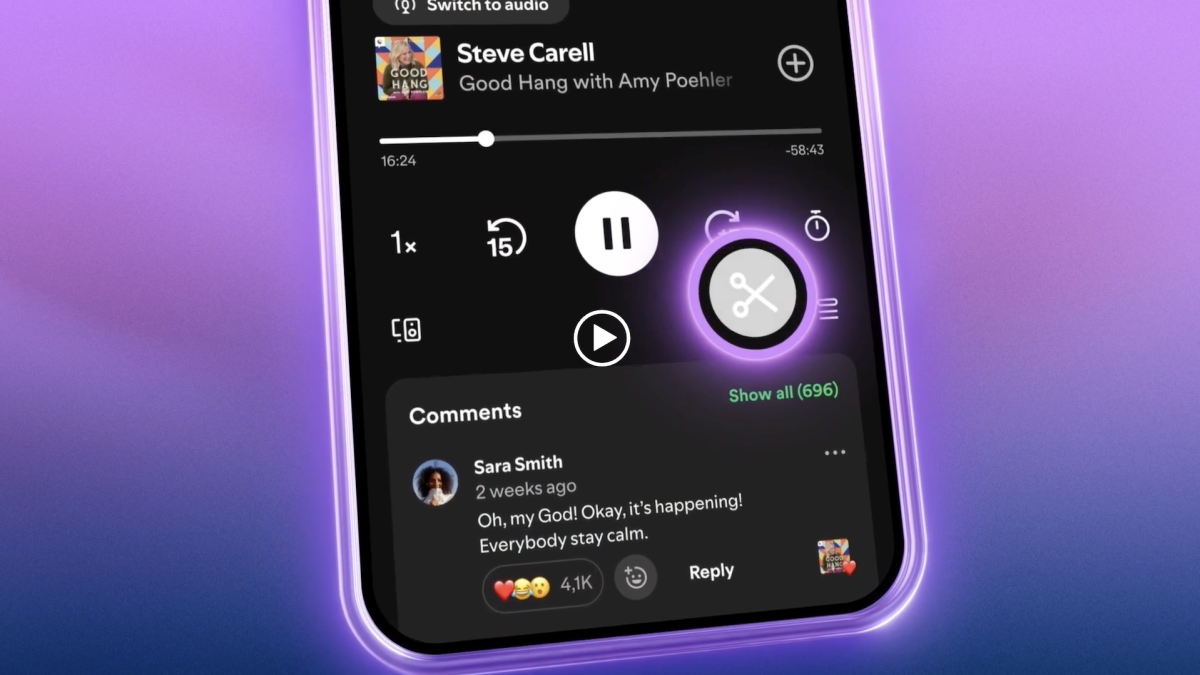
Spotify's podcast Clips feature lets you share a snippet with your friends instead of the entire episode — and it seems to be a win for podcasters.
Launched in May 2026, Clips is available on mobile to both Free and Premium users. It's an expansion of Chapters, which the company added in 2023 for podcasters to easily mark major moments and ad breaks.
The feature is a undeniably handy way to grab the bit of the episode that made you cackle mid-stroll or the section halfway in you know everyone's going to be talking about. For example, perhaps you want to share the section of Amy Poehler's 80-minute Good Hang interview with Billie Eilish in which they talk about the fact that she's rewatched The Office over 30 times.
Mashable Light Speed
The Clips feature is rolling out globally across a collection of podcasts, which will grow in time. If you don't have the feature yet, it's sure to show up in your mobile app soon. It's already been a positive addition for podcasters; according to Spotify, "Early testing has also shown that podcast saving increases when clips are enabled."
But how do you use it? It's very easy.
How to make a podcast clip on Spotify
What You Need
- Smartphone and Spotify app (iOS or Android)
Step 1: Open Spotify and find the podcast you want to clip.
Step 2: Navigate to the time you want the clip to start.
Step 3: Click on the scissors icon, beneath the playback buttons and above the comments.
Step 4: Use the trimming tool to adjust where you'd like your clip to start and end.
Step 5: Tap "Save" and the clip will be sent to a new playlist called "My Clips."
Notably, you can also share a trimmed clip directly after adjusting it — hit "Share" instead of "Save."
Step 6: Open "My Clips" in your library and scroll to your chosen clip, then tap the "Share" button (it looks like a square with an arrow pointing upward from within).
Step 7: Share your clip either through Spotify's DMs or your messaging platform of choice.
Want more tech news and handy tips straight to your inbox? Sign up for Mashable's Top Stories newsletter.

 Arabic
 French
 Spanish
 Portuguese
 Deutsch
 Turkish
 Dutch
Dutch
 Italiano
 Russian
 Romaian
 Portuguese (Brazil)
 Greek
Greek