


Table of Contents
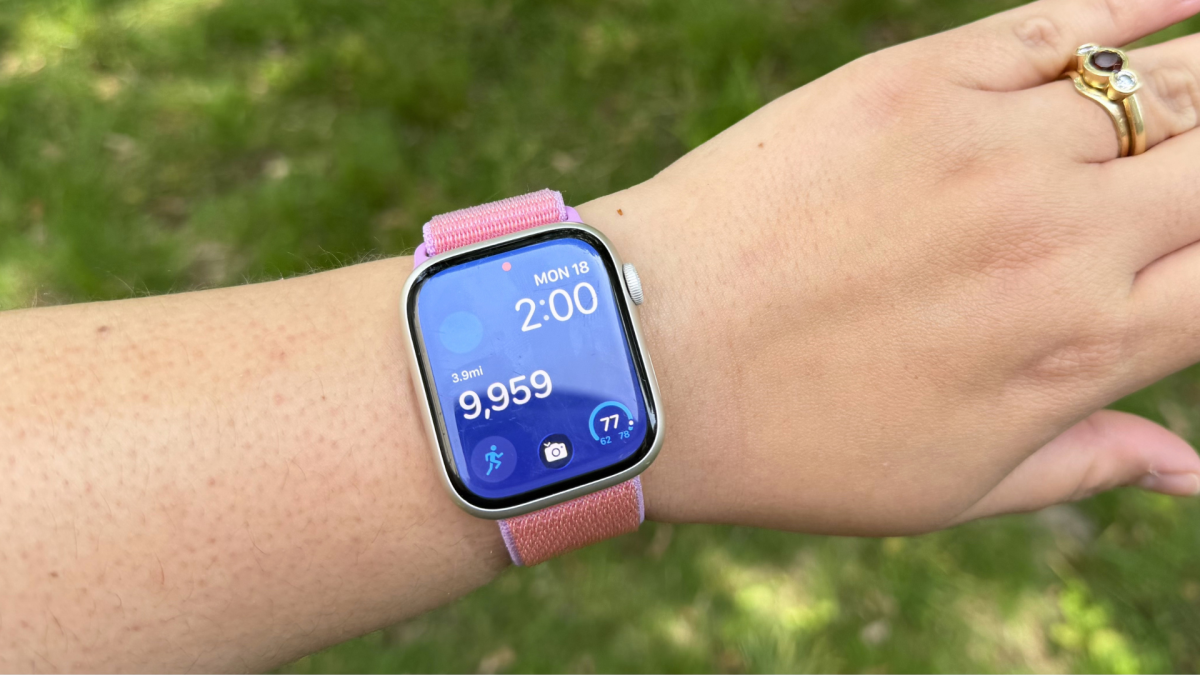
Like every other 20-something, Gen-Z-millennial cusp, I've embraced the hot girl walk. Working from home means I have to work to get in my steps since my office is literally just steps away from my bed. On my quest to hit 10,000 steps a day, my Apple Watch is my on-wrist companion, measuring every step and even reminding me to get up and stretch my legs. Unfortunately, step count isn't front and center — you have to scroll down a few pages in the Fitness app.

Right now, Apple only offers a widget displaying your daily mileage, not an actual step count. Credit: Samantha Mangino / Mashable
While you can customize your home screen with several widgets from Apple's built-in fitness app, there is an option to display step count, but it doesn't actually show your steps. Instead, it shows your mileage, which is fine, but I'm more interested in my actual step count. After a little bit of research, I discovered that you can add a step count widget to your Apple Watch so you can glance down and see it on your wrist — it just requires an additional app.
Find a pedometer app
Your iPhone and Apple Watch both have built-in pedometers, but if you want to see your step count on your Apple Watch home screen, then you need to download a pedometer app. The good news? There are so many pedometer apps to choose from. I've tried StepsApp, Steps, and Pedometer++, and each works for our purposes.
Mashable Light Speed
While some of these apps have paid subscriptions, you don't need one to get an Apple Watch widget. The key piece when setting up these new apps is that they will request access to your health data for more accurate step counts and to ensure your watch and phone data sync with the pedometer app.
Don't forget to install the Watch app

Scroll all the way to the bottom of the Watch app and discover all the apps available to download. Credit: Screenshot / Apple
Once the app is downloaded and set up on your phone, it's not ready on your watch yet. Instead, open your Watch app on your iPhone and scroll all the way to the bottom to reach the Available Apps section. From there, you can download the app to your Apple Watch.

From left to right, an Apple Watch with widgets from Pedometer, Steps, and Stepsapp. Credit: Samantha Mangino / Mangino
In Apple Watch lingo, the widgets you add to your watch face are known as "complications." Once the app is installed on your phone and watch, its widget will appear among the list of complications you can choose from. They won't be available for every watch face style that Apple offers. My go-to for displaying my step count is either Modular or Modular Compact.
Once you select the type of watch face, you can adjust the color and complications, finally adding your preferred step count app widget. Each app has a slightly different widget style, so you may want to pick your app based on the style you prefer.

 English
 Arabic
 French
 Spanish
 Portuguese
 Deutsch
 Dutch
Dutch
 Italiano
 Russian
 Romaian
 Portuguese (Brazil)
 Greek
Greek