

When it comes to web browsers, I bet most of us don't really want them to change. Browsing the web has become such an integral part of our lives that any little "upgrade" can feel like a huge hassle to get used to. Now, however, Google has turned one of the most basic Chrome features on its head, and we still think you should give it a try.
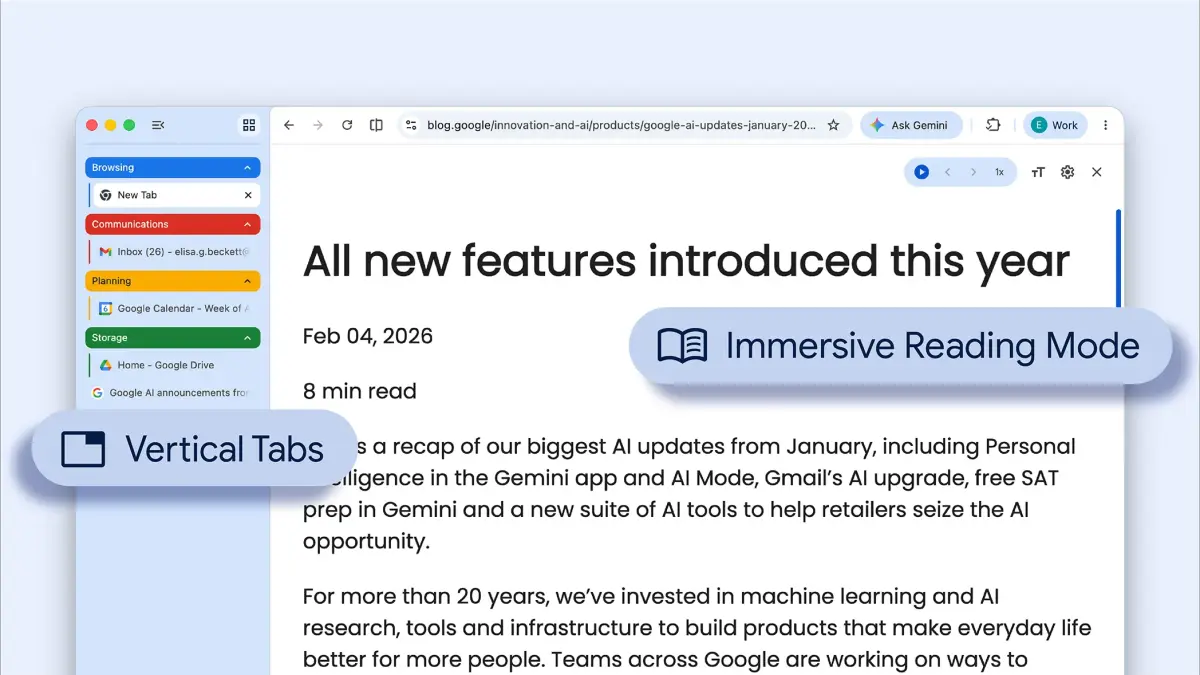
On Tuesday, Google launched vertical tabs in Chrome. Yes, instead of having the tabs horizontally strewn out above the URL bar, you can have them neatly ordered in a long list on the browser window's left side.
I'm the first to admit that this is a change I don't want to get used to, having browsed roughly the same way since the early days of Firefox (tabbed browsing was largely popularized by Firefox in 2002, even though there were browsers and add-ons that did it earlier).
Mashable Light Speed
But having your tabs laid out vertically does have some advantages. For example, when you have a ton of tabs open (I always do), they become so small that it gets hard to read which one is which. Having them on the left makes this easier to manage, as a big chunk of the tab's headline stays visible (you can, however, greatly reduce the vertical tab bar's size so that it only shows icons).

No more guessing what's what. Credit: Google
The feature is fully optional, and can be enabled by right clicking on the tab bar and selecting "Show Tabs Vertically." If you don't see it, don't worry; Google says the feature is currently rolling out, so it'll probably show up in your Chrome soon.
The vertical tabs feature showed up in Google's Chrome Canary (experimental build for developers) back in Nov. 2025, in slightly different format, but it was now made available to everyone.
Google also added a full-page interface for reading mode, making it even more distraction-free. To see how it looks, right-click on any page and select "Open in reading mode."

 English
 Arabic
 French
 Spanish
 Portuguese
 Deutsch
 Turkish
 Dutch
Dutch
 Russian
 Romaian
 Portuguese (Brazil)
 Greek
Greek