


SteelSeries tested its new gaming mouse with a car and dishwasher, but I just played games with it
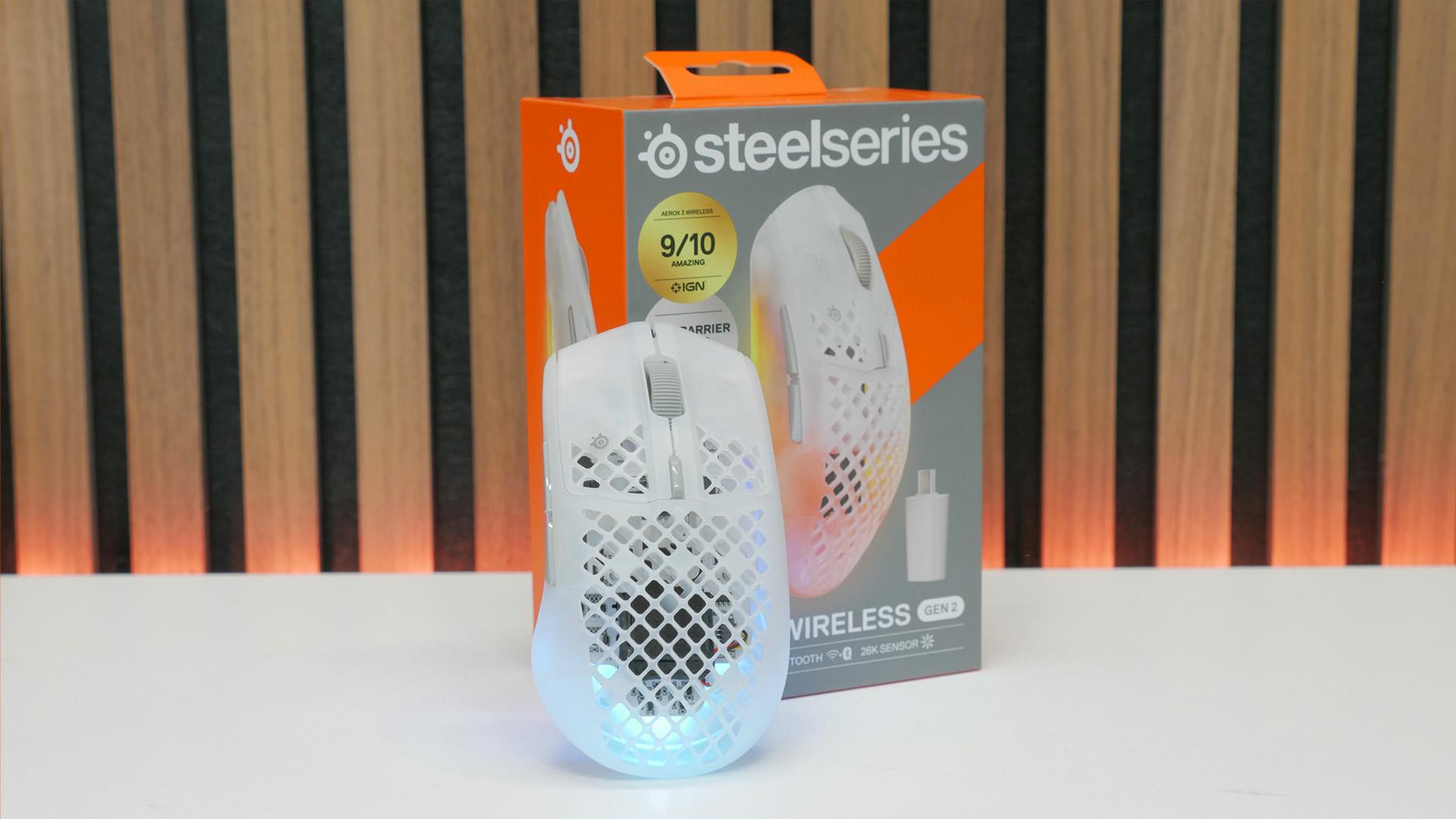
SteelSeries tested its new gaming mouse with a car and dishwasher, but I just played games with it
Verdict

There's a lot to like about the SteelSeries Aerox 3 Wireless Gen 2. It's a tough, versatile, and compact gaming mouse that can stand up to the rigors of travel while delivering solid gaming performance in a funky-looking, RGB-filled package. However, shape and comfort are king for gaming mice, and this isn't a winner on those fronts.
Pros
- Funky translucent shell designs
- Water and dust proofing are nice to have
- Fantastic battery life
- Included cable and adapters are great
Cons
- Aerox shape is strange
- Shell plastic is slippery
- Not particularly light
- Side buttons are too long
The SteelSeries Aerox 3 Wireless Gen 2 is the company's latest iteration of its long-running Aerox gaming mouse. This rodent offers up a compact, symmetrical shape and perfectly capable sensor and switch specs. However, SteelSeries' focus with this one is less about pure performance, but instead on making a mouse that can do it all. It's tough, waterproof, has long battery life, and includes Bluetooth, so it's as at home on the road as safely sat on your desk.
It's a list of capabilities that should stand SteelSeries' latest in good stead when it comes to earning a spot on our best gaming mouse guide. However, there are some aspects of this mouse that are likely to prove divisive. Read on to find out if it's the right choice for you.
Specs
| SteelSeries Aerox 3 Wireless Gen2 specs | |
| Sensor | TrueMove 26K optical |
| Buttons | Six |
| Switches | 80m-click lifetime |
| DPI | 50 - 26,000 |
| Weight | 68g |
| Connections | Lightspeed 2.4GHz wireless, USB-C |
| Polling rate | Up to 4kHz wireless, 1kHz wired |
| Battery | Up to 120hrs at 1kHz polling rate |
| Extras | IP54 waterproof rating, USB-C wireless dongle, USB-A to USB-C cable, USB-C to USB-C adapter, Bluetooth connection, 3-zone RGB lighting |
| Price | $109.99 / £99.99 |
Features
As mentioned above, this is a reasonably feature-packed mouse, by some metrics. While it doesn't have the sort of excess of extra buttons and other external features as the likes of the Logitech G502 X Plus, it does include one extra button on its top (used for switching DPI settings) alongside your standard selection of left, right, middle, and two side buttons.
Meanwhile, compared to ultra pared-down esports gaming mice, like the Razer Viper V4 Pro and Logitech G Pro X2 Superstrike, the presence here of RGB lighting sets the Aerox 3 Wireless Gen 2 apart, as does its inclusion of Bluetooth. Like those mice, you also get a dedicated 2.4GHz wireless connection here as well, and this mouse can connect at up to a 4kHz polling rate.

All this, and SteelSeries is keen to point out just how tough this mouse is. For a start, thanks to the use of an AquaBarrier waterproof coating, the whole mouse is "pretty-much waterproof-ish", with it boasting an IP54 rating. Technically, that means it's only rated to survive splashes of water from all directions, not being fully submerged, but that hasn't stopped SteelSeries from showing the mouse being dropped in a hot tub, as you can see in the video below.
This video also shows the mouse being dropped from a rooftop, run over by a car, used as a foosball ball, stepping on Legos, and taking a dip in the snow. It doesn't always come out externally unscathed from this punishment, but all the electronics still work.
None of this seems remotely necessary for a gaming mouse, but if you do want a mouse that can survive a life on the road, this one seems better equipped than most, despite its holey design.
Running through its other specs, the sensor on the Aerox 3 Wireless Gen 2 is SteelSeries' TrueMove 26K, which - you guessed it - has a 26,000 DPI max sensitivity. That's nearly half the figure of top-tier mice from Logitech and Razer, for instance, but mouse sensors have been effectively flawless for years now, so it's not a cause for concern.

SteelSeries doesn't put a name to the switches used in this mouse but says they're rated to 80M clicks, which is typical.
A USB-C socket in the front of the mouse is used to charge it as well as to connect directly to your PC so you can charge and carry on playing. The wireless dongle for this mouse also uses USB-C, so SteelSeries has included a USB-C to USB-C adapter for connecting it to the end of your cable. This both keeps the dongle closer to your mouse, and means older PCs with no or few USB-C ports can still use this mouse without the need for extra adapters.

SteelSeries doesn't specify the capacity of the battery that you can see nestled in the center of this mouse, but does claim some impressive stats for it. With a maximum battery life of 200hrs using Bluetooth and 120hrs using the 2.4GHz connection at 1kHz polling rate, it's comfortably ahead of most competitors that typically top out at around 80hrs using 2.4GHz.
Design and comfort
Translucent gaming gear is a bit love/hate. I wasn't a fan of the translucent green Razer Phantom Green Collection, for instance. However, the plastic color choices here (black, pink, and white) are more universally appealing and undeniably fun. With the right RGB lighting - not the constantly changing default pattern of this mouse - I think it could look great, and easily match a variety of setups.

When it comes to comfort, though, I've got a confession to make: I'm not much of a Foo Fighters fan. That aside, I've also never found the shape of the Aerox to be particularly comfortable, and that continues with this mouse. It uses a symmetrical shape, but with side buttons only on one side, which is common enough, with competitors such as the Xtrfy MZ1 and aforementioned Viper V4 Pro adopting this basic configuration.
However, the Aerox has a shape that flares out dramatically at the back. I find this then pushes my thumb and little finger further forward than feels natural for a conventional fingertip grip. It sort of works if you use your ring and little fingers to grip the right side, but only if you then hold the mouse at a much steeper angle than I normally would.

It's a similar situation with trying to use a palm grip, as the flared sides just feel like they're getting in the way slightly, but with no other benefit.
Instead, it's when using a claw grip that this mouse seems to come into its own. The flared out back lets you really dig in and pull the mouse back against the base of your hand.
Regardless of shape and grip style, though, SteelSeries hasn't helped with how slippery the sides of this mouse are, and how relatively heavy this mouse is. There are no side rubber pads or holes in this area to aid grip, and the plastic used in the shell, despite having a reasonably coarse texture to it, isn't very grippy. Contrary to what you might think, a plain smooth finish can often be better for grip than the texture used here, and even though soft-touch finishes and rubber sections can wear through, they also offer far superior initial grip. I'd have to invest in some of this mouse's grips to use it long-term.
At 68g, this isn't a heavyweight mouse by any stretch, but it is around 10g heavier than most contenders these days, and nearly double the weight of the lightest options around, a fact that exacerbates any grip issues you might otherwise have with this mouse.
One other factor I was less keen on was the side buttons, which I found to be a bit too long for my liking. This makes them easy to hit accidentally.

Performance
In-game performance is, as expected, excellent. As alluded to earlier, mouse sensors are so good these days that there's almost never any meaningful difference in game tests, and that's the case here, too. During my hours of testing Quake, CS2, Doom: The Dark Ages, and more, this mouse didn't miss a beat.
Any performance issues I did experience were to do with its shape, grippiness, and side button placement, as explained above.
Battery life also held up to expectations, though I didn't push the limits of its Bluetooth range. Instead, during the week or so I've had this mouse I have not actually had to charge it once since taking it out the box. That's despite using it all day for work and some gaming in the evening.
Price
The SteelSeries Aerox 3 Wireless Gen 2 price is $109.99, which puts it right in the middle of modern day gaming mouse pricing, and actually $10 less than the MSRP of the previous Aerox 3 Wireless. It's also well below SteelSeries' own flagship options, as well as those from rivals such as Logitech and Razer.
However, you can grab the likes of the Razer Sabre V2 Pro for the same price, and that offers a superior (on paper) sensor and much lower weight.
Verdict
The SteelSeries Aerox 3 Wireless Gen 2 is a decent enough gaming mouse, with enough features - RGB lighting, Bluetooth, waterproofing, etc - to just about make it stand out from the crowd. It's also priced at a reasonable level.
However, its shape, weight, and surface feel aren't what I'd consider the most universally appealing for a performance gaming mouse. It's a touch on the heavy side, its plastic finish isn't the grippiest, and its flared out rear end feels odd compared to the much straight-sided options with which its competing.
If you know you like the Aerox shape and are just looking for an upgrade, this is a solid choice, particularly if you value its Bluetooth and toughness features for travel and regular-coffee-spillage peace of mind. Otherwise, though, there are lighter, more comfortable options.

 English
 Arabic
 French
 Spanish
 Deutsch
 Turkish
 Dutch
Dutch
 Italiano
 Russian
 Romaian
 Portuguese (Brazil)
 Greek
Greek