


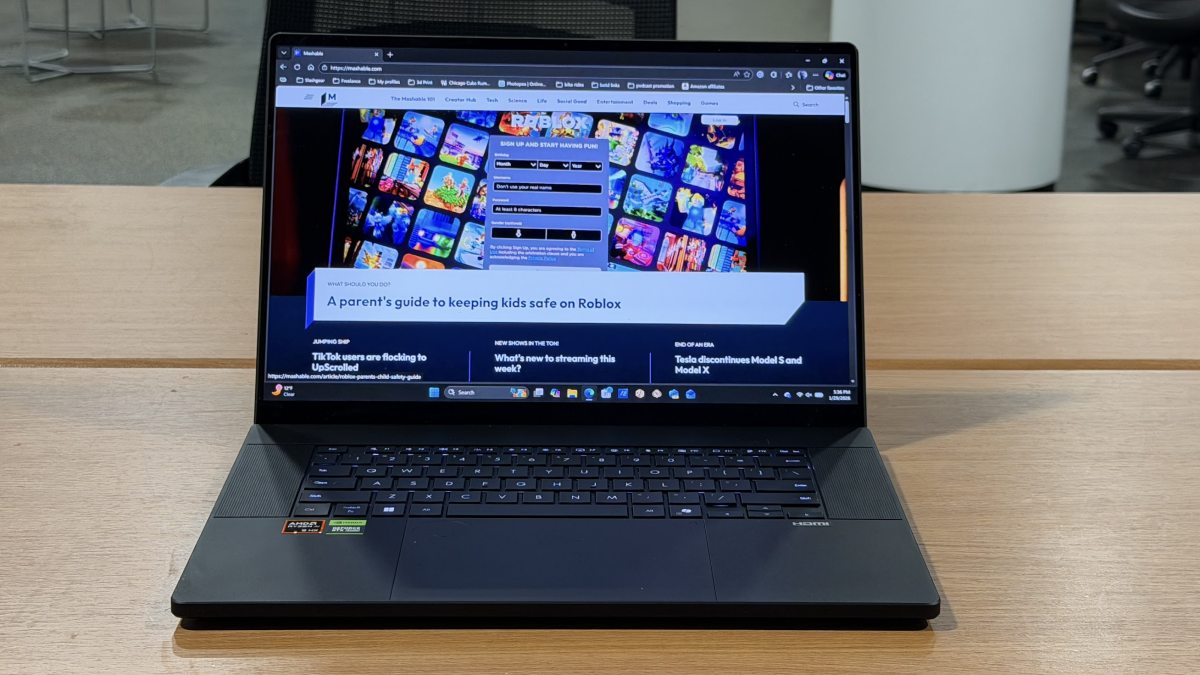

Asus is one of the world's most fun laptop companies. While Lenovo and HP make safe, corporate-friendly, boring hardware, Asus is unafraid to experiment — think dual screen laptops (the Zenbook Duo), or the light-as-a-feather, stiff-as-a-board Zenbook A16.
In the same vein, here comes the Asus ProArt P16 laptop. This is a creator-focused laptop built on a discrete GPU that is ridiculously powerful — but with great power comes a great price tag.
Is it worth it? I've been using this laptop at my kitchen table for just over two weeks. Here's my review.
The hardware: highs and lows

Credit: Adam Doud / Mashable
The design of this laptop includes highs and lows. Color choice is one of the latter: you can get the ProArt P16 in any color you like, so long as it's black. For a laptop designed for creators, I'd like to see a little more creativity in the chassis.
The Ceraluminum backplate on my model got a little nick in it that stands out as a white dot on a sea of black, and it's like having a dead pixel on your monitor. You can work around it, but it draws the eye.
The rest of the hardware is pretty remarkable. There's a 16-inch 4K AMOLED touchscreen with a refresh rate of 120Hz. This laptop also has a 2TB SSD, 64 GB of RAM, an AMD Ryzen AI 9 HX 370 processor, and an NVidia GeForce RTX 5090 GPU.
Put simply, it's a beast. And a beast with plenty of I/O, including a USB 4 Type-C port, a USB 3.2 Type-C port, two USB 3.2 Type-A ports, a 3.5mm headphone jack, full-size SD card reader and an HDMI 2.1 FRL port.
All this is packaged in a .59-inch chassis that weighs just over four pounds. While the ProArt P16 starts at $2,799, or $100 less than the Samsung Galaxy Z Trifold, the bells and whistles in the model I reviewed gets you up to an eye-watering $3,999.
That's just what you have to pay for a laptop this powerful.
The keyboard is lovely to type on with good pitch between the keys and nice travel — maybe a hair more than I generally like, but that's subjective. The layout is easy to use, though it doesn't have the number pad that you'll often find with a 16-inch laptop. That's sacrificed for the speaker grilles on either side of the keyboard.
The speakers are powerful, and can get quite loud. There's not as much bass as I'd like, but physics is the limiting factor here. Overall the speakers are pleasant to listen to, which is never a guarantee in the world of laptops.
The Dial Pad

Credit: Adam Doud / Mashable
The key feature you'll notice when you open the laptop: the Dial Pad in the upper left hand corner of the trackpad. This is a circular indentation that, when deactivated, makes for a nice little fidget toy.
You activate the Dial Pad by swiping on a dot on the opposite side of the trackpad in the upper right corner. I don't have any ideas for a better way to activate it, but it's not terribly intuitive.
Still, the Dial Pad is fun. It comes loaded with a number of functions you can activate depending on what app is open on the computer at the time. For video editing, or watching YouTube, you can use it like a scrubber to move forward and backward through footage.
When you're not working with media, the Dial Pad can switch quickly between tabs,zoom, or even scroll pages. It's a fun way to interact with your computer, and I'm here for it.
Setting up the Dial Pad was a tad annoying. The function works with multiple apps, and you choose what happens with the dial pad for each and every app, which can be laborious.
Fortunately, most of the default functionality makes sense, such as scrubbing through a timeline in DaVinci Resolve. Other times, as in Microsoft Edge (my browser of choice), the default options are limited. On Edge you scroll through tabs, zoom, and YouTube timeline scrubbing (even if YouTube isn't the active tab).
When I wasn't making videos in Resolve, one of my favorite actions was using it to scroll pages while reading; alas, that isn't on by default in most apps.
Overall, though, I love the Dial Pad — it's a great feature, and the setup, while annoying, allows you to really dial in — no pun intended — your ideal settings.
Why the battery life isn't great
With great power comes a short battery life. It wasn't as bad as I'd feared, but I typically averaged about four to five hours on a charge. If I disconnected the plug when I started my shift, I'd get to around lunch time before I got the warning that it was time to plug in.
For reference, my typical workflow involves a dozen or so Edge tabs, Slack, Telegram, and occasionally a bit of streaming audio.
All told, that's not terrible considering the power that's in this laptop. I have owned laptops with discrete GPUs in the past that start giggling at you the second you unplug the charger. This one can get you through your commute on the train, but you won't make it back home on the same charge.
One of the things I made sure to do on this laptop was put together, edit, and export a video using DaVinci Encoder. This machine was able to handle it — granted, it was only in 1080p (I'm not one of those fancy 4K YouTubers), but it included some transitions and it was able to export the video pretty quickly.
I'm sure there are YouTubers who would push this laptop to its limits. But I'm confident that in most cases, the ProArt will stand up to whatever test you throw at it.
As for Benchmark scores, I ran Geekbench 6 three times, with an average single-core score of 2,802, and an average multi-core score of 12,897 on battery. Those are both very respectable scores.
Conclusion: A laptop that does it all
The ProArt P16 is one of the most fun "normal" laptops I've reviewed in a while. I typically lean more toward the niche devices — the dual screens or the impossibly light models. But this machine was very fun to set up and review.
It's nice to know that I can just sit down at the same computer and do everything my job requires, from writing, to research, to video creation. This laptop does it all.
It comes at a price, in both weight and dollars. But neither price is all that bad when you consider everything this laptop brings to bear. That includes Mil-Std 810 G hardening, so you know the laptop will last you a good, long time.
The only thing that would make this laptop better would be a 360-degree hinge so you could consume content as easily as you can create it. But if you're looking for a beast that can get you through any task you could need, this laptop should be at the top of your list.


 English
 Arabic
 French
 Spanish
 Portuguese
 Deutsch
 Turkish
 Dutch
Dutch
 Italiano
 Romaian
 Portuguese (Brazil)
 Greek
Greek