


Terrifically tactical — and terribly expensive.
By

Haley Henschel
Senior Shopping Reporter
Haley Henschel is a Chicago-based Senior Shopping Reporter at Mashable who reviews and finds deals on popular tech, from laptops to gaming consoles and VPNs. She has years of experience covering shopping holidays and can tell you what’s actually worth buying on Black Friday and Amazon Prime Day. Her work has also explored the driving forces behind digital trends within the shopping sphere, from dupes to 12-foot skeletons.
on
All products featured here are independently selected by our editors and writers. If you buy something through links on our site, Mashable may earn an affiliate commission.

Credit: Haley Henschel / Mashable
Table of Contents
Four months after announcing a software collab, Asus and GoPro have hard-launched their partnership in the form of the ProArt GoPro Edition laptop. Somehow, no one thought to name it the GoPro Art.
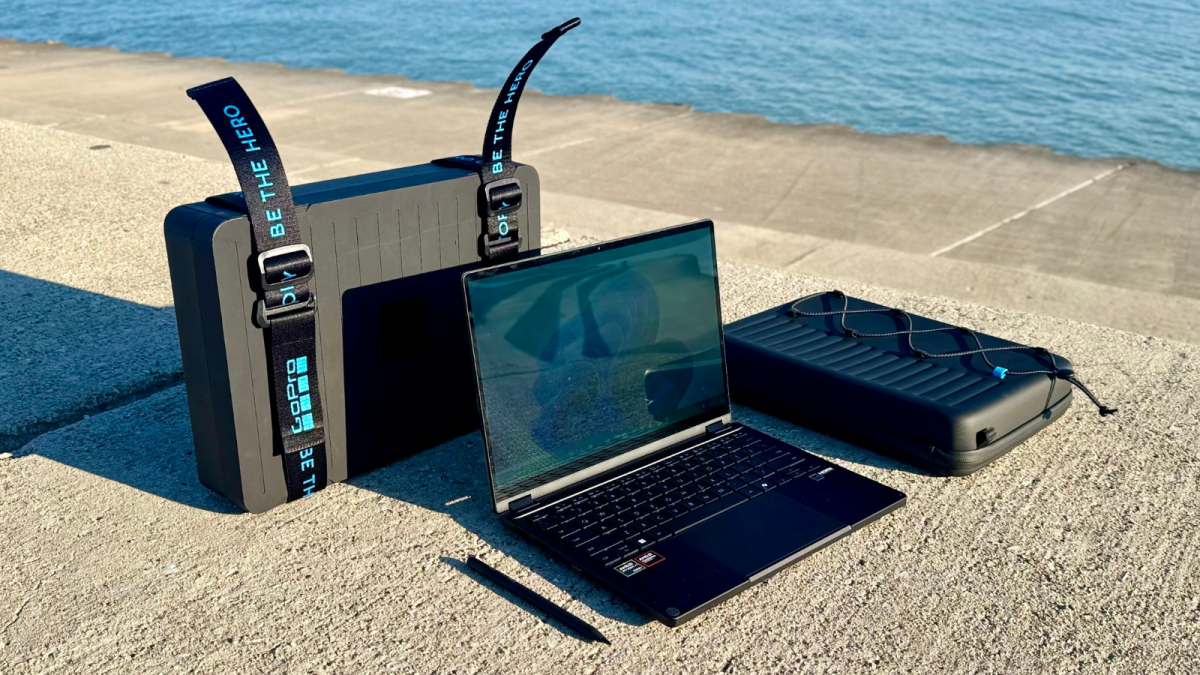
This special-edition variant of Asus' ProArt PX13 convertible features a GoPro-inspired design, a protective sleeve, and reusable packaging with foam inserts for cameras and accessories. It also includes a 12-month GoPro Premium+ subscription and comes pre-loaded with StoryCube, Asus' AI media management app, which supports direct GoPro Cloud downloads and 360-degree video.

The Asus ProArt GoPro Edition has a hotkey in its function row that pulls up the GoPro Player. Credit: Haley Henschel / Mashable
According to a press release, this laptop "reflects how GoPro creators work — streamlining the journey from action capture to on-the-go editing without changing tools or setups."
As of Feb. 25, the ProArt GoPro Edition is available for purchase through Asus and Best Buy for a cool $2,999.99. I spent the last few days using it in the hopes of answering two questions: Is it worth the coin? And, more interestingly, can it compete with Apple's creator-favorite MacBook Pro? I still have some more testing to do, but here are my thoughts so far.
Asus ProArt GoPro Edition review: Specs and accessories

The Asus ProArt GoPro Edition doesn't skimp on accessories. Credit: Haley Henschel / Mashable
The ProArt GoPro Edition has the following specs:
AMD Ryzen AI Max+ 395 chipset with integrated AMD Radeon 8060S graphics
128GB RAM
1TB SSD storage
13.3-inch 2.8K (2880 x 1800) OLED touchscreen display with a 16:10 aspect ratio
WiFi 6 and Bluetooth 5.4
Two USB-C ports, a USB-A port, an HDMI port, a microSD card slot, a headphone jack, and a charging port
Includes an Asus Pen 3.0 (plus its charger), a protective sleeve, and packaging that doubles as a carrying case
Comes with a 12-month GoPro Premium+ subscription (normally $99.99 per year)
A few observations right off the bat. One, that is obviously a metric crapload of memory — enough to run large AI models locally. It's likely the main reason why this laptop costs so damn much. Welcome to RAMageddon.
Secondly, one terabyte of storage is a bit stingy for a laptop geared toward video editing (i.e., working with big files). I'm thinking Asus really wants you to utilize your complimentary GoPo Premium+ plan, which includes unlimited cloud storage for GoPro footage.
Also of note, the ProArt GoPro Edition doesn't come with an actual GoPro — just a 15% off coupon for any gear on GoPro's website. Better than nothing, but I have to wonder why Asus didn't just commit to a bundle option.
For those who don't need any GoPro extras, the standard ProArt PX13 will be sold in two configurations for 2026. Both include an Asus Pen 3.0 with its charger and a six-month GoPro Premium+ plan.

I like the packaging's little suspenders. Credit: Haley Henschel / Mashable
One variant will have the same Ryzen AI Max+ 395 chipset, but 64GB of memory instead of the GoPro model's gluttonous 128GB of RAM. It's priced at $2,799.99 and is now available through Asus and Best Buy. (The GoPro Edition upgrade is actually pretty easy to justify here. If you're already spending close to three grand, what's $200 more for double the RAM and some extra accessories?)
A base ProArt PX13 with a Ryzen AI Max 388 processor, AMD Radeon graphics, and 32GB of RAM will be available at Best Buy sometime in early Q2. Asus hasn't set its price yet.
Asus ProArt GoPro Edition review: Design and build quality
The ProArt GoPro Edition has an all-metal chassis with a "Nano Black" coating that's fingerprint- and smudge-resistant. There are two small fan vents on either side of its base. Underneath, there's a large fan vent and two horizontal bumpers. Its lid's strong hinges can rotate 360 degrees, letting you use the device in tent and tablet modes.

This laptop is doing its best GoPro impression. Credit: Haley Henschel / Mashable
The ProArt GoPro Edition's design references the action camera in its name. There are recessed vertical lines on the lid, fine ridges on its hinges, and similar engravings above the keyboard that mimic a GoPro's facade for a tactical vibe. It's the combat boot of laptops — a compact convertible gone gorpcore.
The ProArt GoPro Edition meets the MIL-STD 810H U.S. military standard for durability, which basically means that it can hold up to occasional bumps and extreme weather. The vanilla ProArt PX13 also meets this standard, so you'll get a rugged computer either way. (The GoPro Edition just looks more rugged.)

The Asus ProArt GoPro Edition has the same 2-in-1 versatility as its ProArt PX13 cousin. Credit: Haley Henschel / Mashable
The ProArt GoPro Edition measures 0.62 to 0.7 inches thin at different points on its chassis, which makes it slightly thicker than Apple's 14-inch MacBook Pro. It pushes our definition of "lightweight" ever so slightly, coming in at 3.06 pounds, but it's definitely still portable and easy to haul around.
Mashable Light Speed
Display

The Asus ProArt GoPro Edition's display is beautiful, but it gets washed out in direct sunlight. Credit: Haley Henschel / Mashable
The ProArt GoPro Edition's touchscreen display has a crisp 2.8K resolution and a luscious, high-contrast OLED panel, so no shit it looks incredible. Plus, its 100 percent DCI-P3 color gamut is perfect for video. That said, its 60Hz refresh rate is so disappointing — I would've liked to see at least 120Hz. I suppose it's fine if you're mainly working with 60fps GoPro footage, but at this price point? C'mon now.
A brightness boost would also be welcome. The ProArt GoPro Edition's display is rated at 400 nits of HDR brightness, which is more than appropriate for indoor use, but it gets washed out in direct sunlight. Not ideal for a laptop that's pitched as an adventure buddy. (The regular ProArt PX13 has the same display, FYI.)

The Asus Pen 3.0 is a premium-feeling stylus with haptic feedback. Credit: Haley Henschel / Mashable
On a more positive note, the Asus Pen 3.0 that ships with the ProArt GoPro Edition is an awesome stylus — probably the best I've ever used. It has haptic feedback and feels super natural in the hand.
Keyboard and trackpad

There's that hotkey. Credit: Haley Henschel / Mashable
The ProArt GoPro Edition has a soft and bouncy island-style keyboard. Some 13-inch laptop keyboards I've tried have felt cramped and awkward, but this one was super comfortable to use from the jump. It's identical to the keyboard on the vanilla ProArt PX13, except there's blue backlighting and a dedicated GoPro hotkey in its function row. It pulls up the GoPro Player, a free desktop app for editing your action camera footage.

To the touchpad's dial on or off, just swipe a finger from the upper-right corner to the center. Credit: Haley Henschel / Mashable
The ProArt GoPro Edition's smooth touchpad has a half-dollar-sized dial in the upper-left corner. (Asus calls it a "DialPad.") You can use it to adjust things like speaker volume and brush size. When it's off, it just blends into the rest of the touchpad. To me, it sits right in the middle of "gimmicky" and "cool."
Speakers
The ProArt GoPro Edition's speakers are located underneath its base. While laptop speakers rarely wow me, I was expecting much better audio quality from a $3,000 machine. Movies sounded OK on it, but some of my favorite songs seemed muffled and bass-deficient. (Have you ever heard a video ad play on a gas pump? That's what it reminded me of.) Cranking up the volume adds an unpleasant harshness. Better stash a good pair of earbuds in your carrying case.
Webcam
This laptop has a basic 1080p webcam with support for Windows Studio Effects and Windows Hello, a facial login feature. It has good contrast, but its colors are quite muted. In low-light conditions, its picture looks almost grayscale.
Asus ProArt GoPro Edition review: CPU performance

At 13.3 inches, the Asus ProArt GoPro Edition is a compact creator laptop. Credit: Haley Henschel / Mashable
We run a couple different tests to measure laptops' processing power. One is Primate Labs' Geekbench 6 CPU benchmark. The other is a real-world stress test that involves trying to overwhelm the device with a bunch of Google Chrome tabs and apps.
In Geekbench 6, the ProArt GoPro Edition's AMD Ryzen AI Max+ 395 chipset earned a single-core score of 2,980 and a multi-core score of 17,967. On the single-core front, its score is similar to that of the 2025 Razer Blade 18 (3,057) and the 2026 MSI Prestige 14 Flip AI+ (2,824), two Windows laptops with top-of-the-line Intel chips. They all trail the 15-inch M4 MacBook Air (3,778), which will feel the snappiest in everyday productivity scenarios.
But I'm more interested in that multi-core score, which reflects the ProArt GoPro Edition's peppiness in more intensive tasks like video editing. It's the sixth-highest multi-core score in our current testing database, which covers laptops from the past two generations. The only models that outpace it are four splurgey gaming laptops with the Intel Core Ultra 9 275HX chip (19,426 to 20,369) and the M4 Pro-powered MacBook Pro (22,758), an utter overachiever.
Yes, this means the ProArt GoPro Edition is a tiny bit faster than the M5 MacBook Pro (17,470). You won't feel the difference in practice, since it's only a three-percent bump, but that's still a noteworthy feat.
In my real-world stress test, the ProArt GoPro Edition never broke a sweat. Its fan turned on for a few seconds around the 20-tab mark, but it ran very quietly. (I actually struggled to hear it over the nearby sound of my husband leashing up our dog for a walk.) Heat-wise, its keyboard got barely lukewarm.
Asus ProArt GoPro Edition review: GPU performance

No dedicated GPU, no problem? Credit: Haley Henschel / Mashable
Asus' decision to omit a dedicated GPU might seem a little strange. A proper graphics card with its own VRAM isn't totally necessary for video editing, but it's a nice-to-have for heavy workloads. (Popular creative apps like Adobe Premiere Pro and DaVinci Resolve have GPU acceleration.) It's also something you'd expect to see on a laptop this expensive, frankly. Last year's ProArt PX13, which started at $1,700, was configurable with RTX 4050 and 4060 graphics.
I reached out to Asus to find out why it went with an integrated GPU (iGPU) instead. Their rep told me that its chipset "is a clear step up from the RTX 40 series GPUs found in the last-gen ProArt PX13, and its performance is competitive with the RTX 5060." Additionally, they said, the iGPU isn't limited to 8GB of VRAM like an RTX 5050 or 5060 GPU. (VRAM, or video RAM, is a graphics card's personal stash of memory. The more VRAM, the better.) Instead, it shares that monstrous 128GB RAM stash with the CPU. The system allocates it automatically depending on the task, but you can manually funnel up to 96GB of memory to the iGPU via the MyAsus app.

Users can change how much memory is allotted to the iGPU in the MyAsus app, which comes pre-installed. Credit: Screenshot / Mashable
To verify Asus' GPU performance claims, I had the ProArt GoPro Edition run 3DMark's Steel Nomad benchmark (an industry-standard graphics test). The ProArt GoPro Edition notched a score of 1,902, so it does indeed beat its predecessor. The 2025 ProArt PX13 with RTX 4050 graphics got a 1,701 Steel Nomad score when tested by PCMag, our sister site. Meanwhile, RTX 4060 gaming laptops they've tried have scores in the 1,500 to 2,000 range.
If the ProArt GoPro Edition's iGPU is competing with any of Nvidia's current-gen discrete GPUs, it's the base RTX 5050. Laptops with that GPU scored around 2,000 to 2,200 in PCMag's testing, while RTX 5060 machines scored between 2,300 and 2,700. It doesn't quite live up to Asus' hype, but it's still plenty capable for an iGPU. It should even be able to handle some gaming, though that pesky 60Hz refresh rate will get in your way there.
Asus ProArt GoPro Edition review: Battery life
I haven't run our stamina test on the ProArt GoPro Edition yet because I needed to calibrate its battery, but Asus' rep said it outlasts its predecessor. For reference, last year's RTX 4050 ProArt PX13 lasted 14 hours and 30 minutes in PCMag's testing. (And for comparison's sake, we got 21 hours and 17 minutes of video playback from the M5 MacBook Pro.) I'll update this story with my results soon.
Asus ProArt GoPro Edition review: The bottom line (so far)

Asus + GoPro = a match made in Windows laptop heaven? Credit: Haley Henschel / Mashable
Even without knowing the ProArt GoPro Edition's battery life test results, I still think the MacBook Pro is the more well-rounded pick for video editors.
For $2,949, you can get a 14-inch model with the industry-leading M4 Pro chip, impeccable speakers, a 12MP webcam, 1TB of storage, and a 120Hz display with a matte finish and up to 1,600 nits of HDR brightness. You miss out on extra accessories and an OLED touchscreen — for now — and you "only" get 48GB of RAM, but that's still plenty for most video work. (A MacBook Pro with 128GB of RAM starts at $4,699 with the M4 Max chip, so for those who do want all that RAM, the ProArt GoPro Edition is a better bargain.)
Creators with more casual workloads are well off with the base M5 MacBook Pro, which comes in at $2,599 with 32GB RAM, 2TB of storage, and its regular glossy display.
Nonetheless, I think the ProArt GoPro Edition is one of the best creator laptops for Windows users among the models I've tested. It has a turbocharged chipset with RTX 4060-level graphics performance, a heavenly (if not exceptionally smooth) display, a great keyboard, an excellent mix of ports, and a unique, rugged convertible design. Its speakers and webcam are mediocre, but in my experience, Windows laptops almost always flop in those areas.
Its price tag is intimidating, but if you're a professional video editor or vlogger with cash to burn, this gorpy gem is worth the investment.

Haley Henschel is a Chicago-based Senior Shopping Reporter at Mashable who reviews and finds deals on popular tech, from laptops to gaming consoles and VPNs. She has years of experience covering shopping holidays and can tell you what’s actually worth buying on Black Friday and Amazon Prime Day. Her work has also explored the driving forces behind digital trends within the shopping sphere, from dupes to 12-foot skeletons.


 English
 French
 Spanish
 Portuguese
 Deutsch
 Turkish
 Dutch
Dutch
 Italiano
 Russian
 Romaian
 Portuguese (Brazil)
 Greek
Greek