


We reviewed the best budget laptops for students, gaming, and everyday productivity.
By

Haley Henschel
Senior Shopping Reporter
Haley Henschel is a Chicago-based Senior Shopping Reporter at Mashable who reviews and finds deals on popular tech, from laptops to gaming consoles and VPNs. She has years of experience covering shopping holidays and can tell you what’s actually worth buying on Black Friday and Amazon Prime Day. Her work has also explored the driving forces behind digital trends within the shopping sphere, from dupes to 12-foot skeletons.
on
All products featured here are independently selected by our editors and writers. If you buy something through links on our site, Mashable may earn an affiliate commission.

Credit: Haley Henschel / Mashable
Even if you get a good deal on it, a slow, crappily made laptop will leave you feeling burned every time you boot it up.
That's why we take an egalitarian approach to vetting the best laptops here at Mashable. Every model our team reviews gets put through the same rigorous testing process, whether it's a premium Apple MacBook, a mid-range Copilot+ PC, or a bare-bones Chromebook. The laptops that ultimately get our seal of approval offer the choicest blends of performance, stamina, build quality, and overall value at their respective price points (something that's getting harder to do across the board amid a global RAM shortage).
Of course, reducing your budget generally means making some kind of spec sacrifice. When it comes to the best cheap laptops, our picks don't necessarily need to outperform or outclass pricier models (though that's always nice). Rather, they just need to make the least amount of compromises compared to their peers — so you do the least amount of settling.
If you're trying to avoid fugly, quick-to-die clunkers on your quest for a good, affordable laptop, keep reading.
Overview
Table of Contents
As of March 2026, I think the 13-inch Apple MacBook Air powered by the M4 chip is the best cheap MacBook for most people. It's seriously speedy and super well-made. It's priced at a very fair $999 to start, but Amazon and Best Buy have sold it for as little as $749.
If you need an even cheaper MacBook, just hold tight: Apple is rumored to be launching a new low-cost MacBook in early March. It could retail for around $599 to $699.
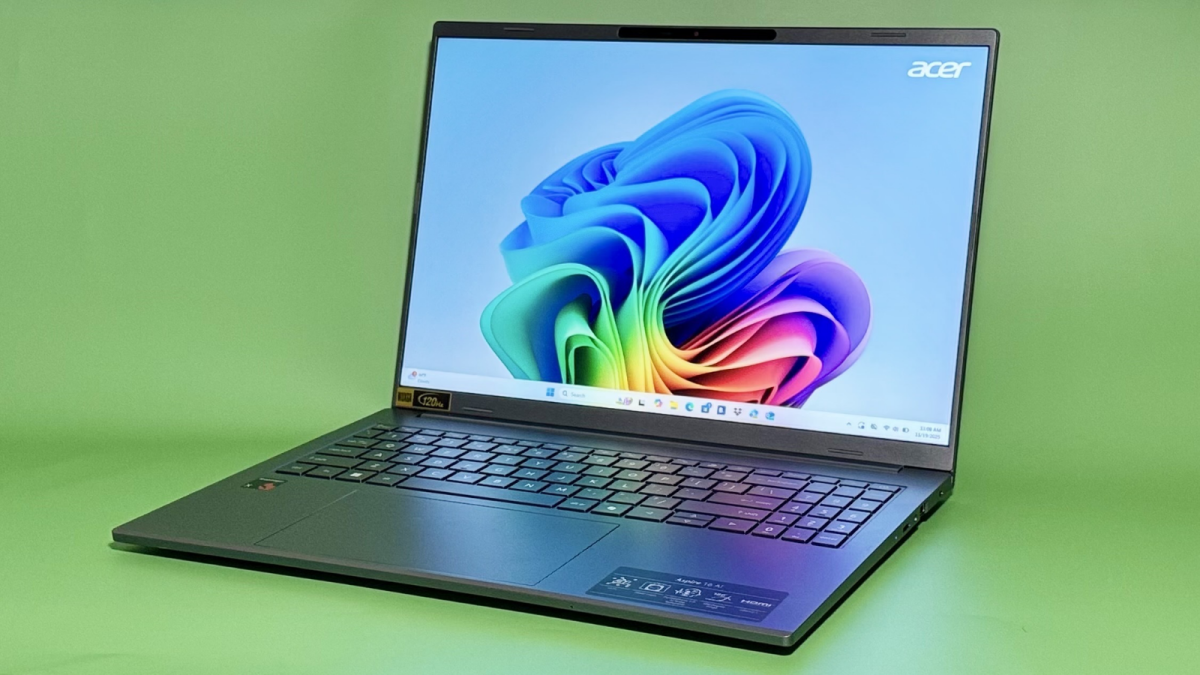
Among the best Windows laptops, the Acer Aspire 16 AI is my top budget pick. It has a big, buttery smooth display, an impressive battery life, and a good mix of ports. On the performance front, it outpaces every other sub-$900 laptop we've tried. For those with a more flexible budget, the ultraportable Asus Zenbook A14 is my favorite Windows laptop under $1,000.
Our Pick

The Good & The Bad
- Fastest laptop under $900
- Clean, minimalist design
- Relatively portable for a 16-incher
- Vivid anti-reflective touchscreen
- Variable 120Hz refresh rate
- Great variety of ports
- Incredible battery life
- Poor speakers
- Hinge is a bit wobbly
- Webcam isn't great
- Fan turns off and on constantly (though it's quiet)
Who it's for
Last year's Snapdragon X-powered Acer Aspire 16 AI is the best entry-level Windows laptop I've tested. If you're looking for an affordable, well-specced computer with a fantastic battery life and a big, smooth display — and you need something peppier than a Chromebook — this one is tough to beat. Plus, it's quite portable for its size.
Note: The 2026 Acer Aspire 16 will be configurable with new Intel Core Ultra Series 3 and AMD Ryzen AI 400 Series processors. It will be available in Q2, but we don't know its pricing yet.
Why we picked this
Out of all the laptops on this list, I think this one punches the most above its price point. Truth be told, it almost feels slightly underpriced for all that it brings to the table.
Internals-wise, it comes with 16GB of RAM, 512GB of storage — double that of the base MacBook Air — and a competent Snapdragon X chip. In Geekbench 6's CPU benchmark, our main performance test, that processor earned a multi-core score of 9,802. (That tells us how well it can handle multitasking and more intensive apps. The higher the score, the better.) Out of all the laptops we've tried that cost less than $900, that's the highest score we've seen. Notably, that makes it significantly speedier than two of the snazziest Chromebooks on the market, which cost about the same: the Lenovo Chromebook Plus 14 (7,680) and the Acer Chromebook Plus Spin 514 (7,187).
As an aside, I want to point out that the Snapdragon X chip is an ARM-based CPU. Without getting too in the weeds, that means it's not compatible with certain specialty apps. (This is also something that afflicts the Zenbook A14, below.) This is mainly a problem if you need a budget laptop for college coursework or light gaming, but since the Aspire 16 AI is more geared toward general everyday use, I consider it a non-issue here.
The bigger takeaway is that the Snapdragon X chip doesn't guzzle too much juice. In our video rundown test, the Aspire 16 AI lasted 17 hours and 22 minutes before dying. Our current median battery life for Windows laptops is 14 hours, so it's an overachiever. This tracks for most laptops with Qualcomm's first-gen Snapdragon chips.
I think most buyers will appreciate the Aspire 16 AI's display, which has an anti-glare finish, touchscreen capabilities, and a variable 120Hz refresh rate. It could still be brighter and crisper, but those specs are decidedly decent for $700. (The M4 MacBook Airs still have a mediocre 60Hz refresh rate.)
This is a 16-inch laptop, so you get a good amount of screen real estate, but not at the cost of extra heft. At 3.42 pounds, the Aspire 16 AI is pretty darn light for its size and not too heavy to haul around. Apple's current 16-inch MacBook Pro weighs 4.7 pounds, for reference.
The Aspire 16 AI's "budgetness" is most apparent in its gnarly speakers and middling webcam. (I thought its picture looked crisp, but it dulls and flattens its subject in a way that almost makes it seem posterized.) Its hinge is also a little wiggly.
Details

The Good & The Bad
- Good performance for the price
- Stellar battery life
- Unique, durable chassis material
- Ridiculously thin and light
- Bright, gorgeous OLED display
- Terrible speakers
Who it's for
For Windows users with some wiggle room in their budgets, the elegant and long-lasting Asus Zenbook A14 is my top pick under $1,000 (though I've seen it on sale for just $550 before). Its ultralight yet rigid build makes it especially great for frequent travelers and remote workers; it's a leading MacBook Air alternative. I'll also note that it's the only laptop on this list with an OLED display, if that's a spec high on your wishlist.
Note: The 2026 Asus Zenbook A14 will have a new matte keycap coating, run on a new Snapdragon X2 Elite processor, and start with 24GB of RAM. We don't know its pricing or availability yet.
Why we picked this
I've been hyping the Zenbook A14 since I first saw it at CES 2025. This is a near-perfect ultraportable.
Picking it up for the first time usually elicits a gasp from people. Asus built its chassis out of a lightweight magnesium-aluminum alloy called "Ceraluminum" that's scratch-, smudge- and shock-resistant. The base configuration is only 2.4 pounds, or 0.3 pounds less than a 13-inch MacBook Air, yet it doesn't feel frail. The Ceraluminum makes it super durable without weighing it down. Its build is slightly thicker than its Apple counterpart, but that's so it can squeeze in an HDMI port and a USB-A port.
In a market saturated with boring silver laptops, I think the Zenbook A14's modern-organic look is refreshing. It has a tan "Zabrinskie Beige" finish with a matte, almost ceramic-like texture, and it's accented with gold reflective logos. It's different without being too obnoxious for an office. Top that off with a vivid 14-inch OLED display, and this laptop is quite the looker.
Build quality-wise, the Zenbook A14's speakers are the only thing about it that screams "bargain bin." Their audio quality is dreadful. If you plan on listening to music or watching a lot of movies on it, enlist your favorite pair of headphones or earbuds.
With a Geekbench 6 score of 11,256, the Zenbook A14 is a solid performer for the money. It's about 25 percent slower than current-gen MacBook Air — it's more in line with 2024's M3 model — but it clears every other non-gaming Windows laptop in our database that costs $1,000 or less. Here's another good point of comparison: It's just five percent slower than the 13.8-inch Microsoft Surface Laptop 7 with the upgraded Snapdragon X Elite chip (11,875), a $1,400+ machine that we've deemed the best Windows laptop for most people, regardless of price point.
Last but not least: The Zenbook A14's battery life. It's awesome. It ran for 21 hours and 47 minutes in our video rundown test before dying, making it the fourth longest-lasting laptop we've ever tried. Our longest-lasting MacBook died exactly half an hour sooner.
Details

The Good & The Bad
- Lightweight and thin
- Sooo speedy and quiet
- Bright display
- Battery lasts a full workday
- 12MP Center Stage camera
- Could use some more ports
- New sky blue color is basically just a new shade of gray
Who it's for
The 13-inch MacBook Air is my top pick for budget-conscious Apple users seeking a powerful, pretty, and portable notebook. It's an excellent value at full price — it starts at $899 for students and $999 for everyone else — but you'll probably never pay that much. Third-party tech retailers usually have it on sale for $100 to $200 off.
Read Mashable's full review of the 15-inch MacBook Air (M4).
Why we picked this
When it comes to budget options, MacBooks are in a bit of a limbo period. The $649 M1 MacBook Air that Walmart used to sell (our former top pick here) is no longer in stock as of early 2026, and rumor has it that a new low-cost MacBook is will succeed it in March. In the meantime, that leaves me recommending the M4 Air, the least expensive model in Apple's current lineup. It pushes the definition of "cheap" a bit, but it's not difficult to snag at a sizable discount. Plus, I think most people will find it to be more than worth the money.
This is the slightly smaller version of our favorite MacBook for most people, the 15-inch Air, which has two extra speakers and a 10-core GPU instead of an eight-core GPU. Mashable Senior Editor Stan Schroeder called that one "impressively powerful" while noting how quiet it ran; it got a Geekbench 6 multi-core score of 14,992, which is one of the highest in our testing database. (It's faster than many more expensive laptops.)
Those two extra GPU cores make the 15-incher better for creative work, but when it comes to everyday performance, the 13-inch size is going to be just as snappy — maybe even a little more so. Our sister sites CNET and PCMag both got multi-core scores of around 15,050 when they ran it through the same Geekbench 6 test.
The 13-inch Air comes with the same exquisite 12MP FaceTime camera as the 15-inch model, which supports Apple's zooming Center Stage feature. Schroeder called it a "big upgrade" compared to the 1080p webcam on his daily driver, an older 16-inch MacBook Pro: "the image is sharper, a bit brighter, and more detailed," he writes. Its other notable upgrade from previous models is added open-lid support for two external displays, meaning you can still use its own screen even when it's hooked up to monitors.
Looks-wise, this is the same MacBook Air we've had since the M2 era. Not that that's necessarily a bad thing: It's an attractive, well-made machine with a crisp display and a clackety keyboard. It does come in a new sky blue colorway, but it's very subtle.
Details

The Good & The Bad
- Solid battery life
- Nice 120Hz display
- Satisfying keyboard
- Not too heavy
- Fast for a Chromebook; mostly smooth cloud gaming performance
- Weird lid design
- Refresh rate can't be turned down
Who it's for
The Acer Chromebook Plus 516 GE (the "GE" stands for "gaming edition") is a speedy Chromebook with some premium gaming-forward fixings. It's ideal for casual players who are tired of trying to keep up with new titles' fancy hardware requirements — and needing to keep their machine glued to an outlet.
Read Mashable's full review of the Acer Chromebook Plus 516 GE.
Why we picked this
Acer's original Chromebook 516 GE from late 2022 was a fantastic cloud gaming machine, and the newer "Plus" version is even better. It kept everything good about the first version — an anti-ghosting RGB keyboard, a 120Hz display, and even its $649 price tag — then tacked on a couple of upgrades.
For one, there's a new Intel Core 5 120U processor inside of this machine. It nabbed it the second-highest Geekbench 6 multi-core score out of all the Chromebooks we've ever tested, trailing the pricier Lenovo Chromebook Plus 14 by just 20 points. This processor gives it enough power to support advanced Gemini AI features like "Help me write" and a Magic Eraser tool in the Photos app.
The Chromebook Plus 516 GE also received a battery life boost. In our video rundown test, it lasted just over 10 hours on a single charge (or four hours longer than its predecessor). That's decent for a Chromebook and incredible for a gaming laptop. The current median battery life for recent gaming laptops in our database is just four hours.
When it comes to game-streaming capabilities, the Chromebook Plus 516 GE left Mashable's Perry "fairly impressed." He experienced some input latency when playing titles via Xbox Game Pass, but hardly noticed any video buffering or stuttering. (Games looked the best when streamed via Nvidia GeForce Now's Ultimate tier, he said.) Though Perry said he'd never swap it for his gaming consoles or Steam Deck, he called the Chromebook Plus 516 GE "an incredible value" and an "excellent" pick for anyone who's into game streaming. "If you want to cheat your way into sort of having a high-end gaming laptop, this is a way to do it," he wrote.
Next time around, Acer should just make it less clunky, clean up its lid design — the half matte/half gloss thing is "awkward," per Perry — and give users the ability to turn its refresh rate down. That'll preserve its battery life when it's not being used for gaming.
Details
Frequently Asked Questions
Certain times of the year are better for laptop shopping than others. If you're looking for a good deal on a laptop, I recommend buying around Black Friday, during back-to-school season (with a close watch on Amazon's Prime Day sale), and over long holiday weekends. If you're just after brand-new models with the latest specs, bargains be damned, you'll see them hitting the market in Q1 following the Consumer Electronics Show (CES) in January.
For more intel and buying tips, check out my guide to when you should buy a laptop.
Mashable has been writing about laptops for over a decade, and I've personally been covering them since 2023. I also helped develop the rigorous hands-on testing process we currently use to review every model. This methodology revolves around four key criteria:
The laptops we review get put to work as our primary computers. This includes trying any unique software or use cases they support. We also subject all of our loaners to a multi-app/tab stress test and Primate Labs' Geekbench 6, which measures CPU performance in common tasks. Gaming laptops get put through additional graphical benchmarking.
As we're using a laptop, we zero in on certain components to evaluate its build quality. These include the display, keyboard, touchpad, webcam, speakers, and ports. We also assess its overall aesthetic and portability.
To gauge a laptop's stamina, we conduct a battery rundown test that involves playing a looped 1080p version of "Tears of Steel," a short open-source Blender movie, at 50 percent brightness and 50 percent volume. Ideally, we hope to get at least 19 hours of battery life from MacBooks, 14 hours from Windows laptops, 10 hours from Chromebooks, and four hours from gaming laptops. (They're notoriously power-hungry.)
We determine the ultimate value of a laptop by comparing its performance, design/build quality, and battery life to other laptops with similar pricing, specs, release dates, and use cases. We consider any accessories it comes with, any upgrades from its predecessor(s), and its future-proofing.

Haley Henschel is a Chicago-based Senior Shopping Reporter at Mashable who reviews and finds deals on popular tech, from laptops to gaming consoles and VPNs. She has years of experience covering shopping holidays and can tell you what’s actually worth buying on Black Friday and Amazon Prime Day. Her work has also explored the driving forces behind digital trends within the shopping sphere, from dupes to 12-foot skeletons.

 English
 Arabic
 French
 Spanish
 Portuguese
 Deutsch
 Dutch
Dutch
 Italiano
 Russian
 Romaian
 Portuguese (Brazil)
 Greek
Greek