


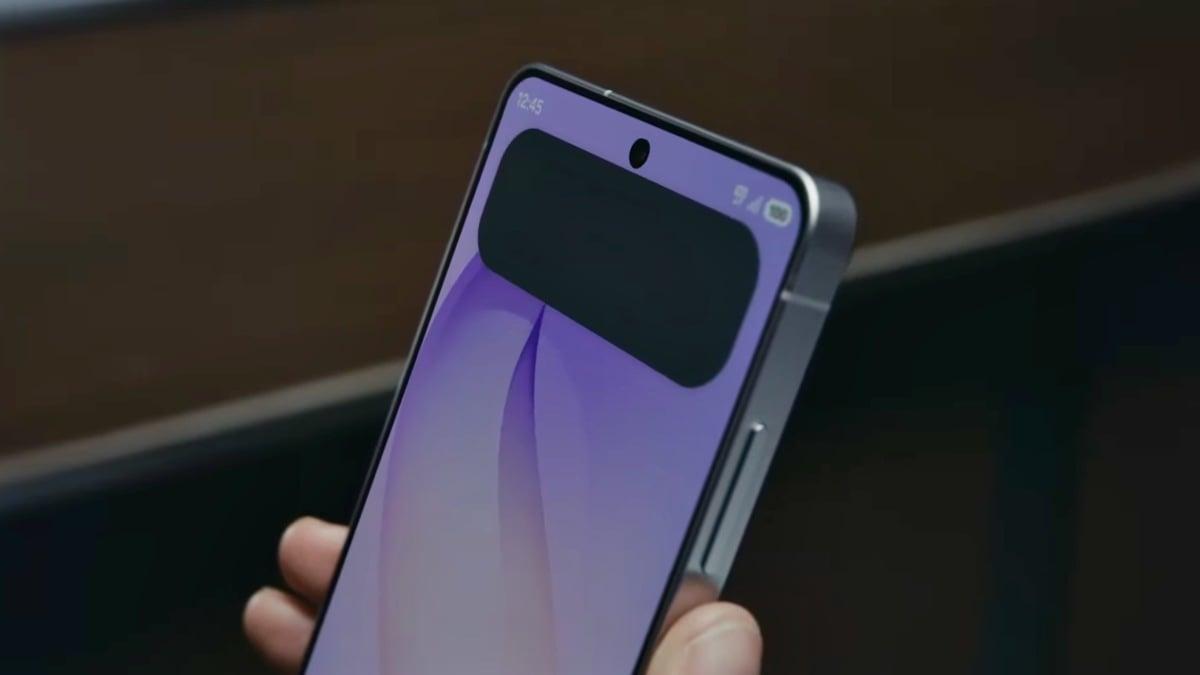
Samsung showed off its new Privacy Display feature during its marquee Unpacked event on Wednesday, where it announced its new lineup of Galaxy S26 phones.
Mashable's Amanda Yeo covered the Privacy Display news as it dropped, calling it "the coolest innovation by far" at the tech giant's big event. The general idea is that the Galaxy S26 Ultra can change screen visibility to ensure your privacy. The actual pixels within the display shift to keep nosy eyes off your screen.
But there's more to Privacy Display than just some shifting pixels. Here are four things it can do.
Hide specific apps
Say — smartly, I'd add — that you don't want folks snooping around as you use a mobile banking app. You can choose to set that app, or any other app, to always use Privacy Display, so you can check your account in public, in peace.
Mashable Light Speed
This Tweet is currently unavailable. It might be loading or has been removed.
Hide unexpected notifications
You might not want randos to see your notifications. And hey, that's none of their business! You can toggle Privacy Display so that notifications are obscured as the pop-ups appear on screen. Samsung's presentation noted this could be especially useful when, say, ferrying a friend to their surprise birthday party.
This Tweet is currently unavailable. It might be loading or has been removed.
Activate with just one button
Say you suddenly want some privacy. Maybe you're sending gossipy texts, and the subject of the gossip enters the room. Hey, that's your prerogative. Obviously, it's a little sketchy and a bit of a hassle to navigate settings to turn on Privacy Display. Thankfully, you can simply toggle on the feature by pressing the power button twice.
This Tweet is currently unavailable. It might be loading or has been removed.
Go Maximum mode
Sometimes you want to be really private. For those moments, Samsung created Maximum mode in Privacy Display. In short, it hides everything but the head-on view. Wrote Mashable's Yeo about her hands-on test: "The display really impressed when the stronger Maximum privacy protection mode was turned on, which immediately made the S26 Ultra's screen appear almost as if the phone had been shut down."
There's plenty for privacy lovers to test out with Privacy Display — and the Galaxy S26 Ultra is available for pre-order for those interested.

 English
 Arabic
 French
 Spanish
 Portuguese
 Deutsch
 Turkish
 Dutch
Dutch
 Italiano
 Russian
 Romaian
 Portuguese (Brazil)