


Samsung unveiled its new Galaxy S26 Ultra smartphone at Samsung Unpacked on Wednesday — or as the tech giant put it, their new "AI phone." Coming in at 0.3 millimetres thinner and four grams lighter than last year's S25 Ultra, Samsung's 2026 flagship phone continues to lean heavily into AI, aiming to transition machine learning from a feature to an integral part of its infrastructure.
Yet despite this, one of the S26 Ultra's most exciting features has nothing to do with generative AI. Say hello to Samsung's Privacy display, a feature that makes it easier than ever to read smutty fanfiction on public transport.

Credit: Amanda Yeo / Mashable
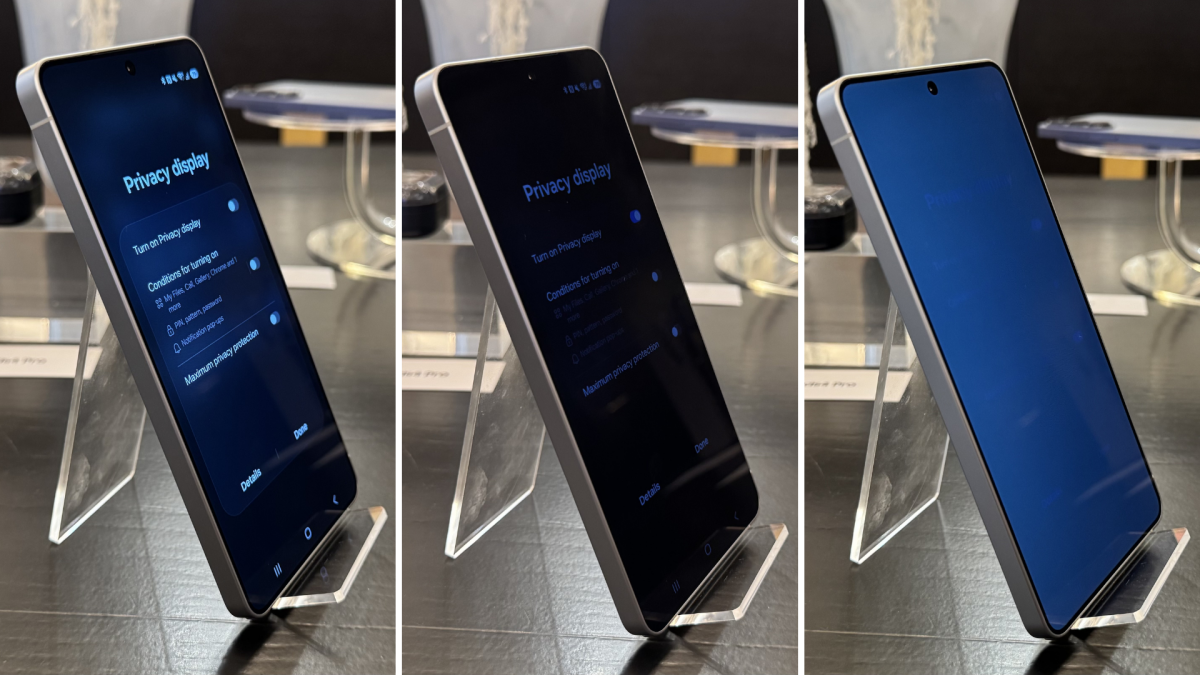
Advertised as a world first, the S26 Ultra's Privacy display reduces its screen's viewing angle so that curious bystanders will have a harder time seeing which part of Heated Rivalry you're rewatching. The display does this by using a combination of wide and narrow pixels, which are separated by partition walls. Activating Privacy display turns these wide pixels off, making the display only visible from a more acute angle than usual. You can also narrow this angle even further by turning on Maximum privacy protection mode.
I had the opportunity to try the new Privacy display at a recent Samsung briefing, and found it remarkably effective — particularly its Maximum mode. Activating the Privacy display made the S26 Ultra's screen appear noticeably darker when viewed from wide angles, rendering it more difficult to read if not facing it head-on. However, the display really impressed when the stronger Maximum privacy protection mode was turned on, which immediately made the S26 Ultra's screen appear almost as if the phone had been shut down.
Mashable Light Speed
Both the Privacy and Maximum privacy protection modes slightly affect the display, washing out the colours. This is more pronounced in the latter, but still isn't particularly noticeable or bothersome in either when using the S26 Ultra for standard activities. Many users will likely become accustomed to it quickly, and I had to switch the modes on and off to properly appreciate the difference.

Credit: Amanda Yeo / Mashable
If the washed-out display bothers you, the Samsung Galaxy S26 Ultra also allows you to set Privacy display to automatically activate only when using specific apps, entering passwords and PIN numbers, and when receiving notifications. This applies the Privacy display solely to the notification itself, leaving the rest of the screen visible to any snoopers in your vicinity. It's a cool feature that lets users fully enjoy the Samsung Galaxy's brightest-ever display while still maintaining their privacy.
For others, simply having Maximum privacy protection turned on all the time may offer more peace of mind. Why hide your notifications while leaving your spicy BookTok preferences open for scrutiny? Fortunately, keeping this mode activated shouldn't drain your phone's battery either. A Samsung spokesperson couldn’t definitively say whether Privacy display has any impact on the S26 Ultra's battery life. However, considering that it involves turning pixels off, it seems reasonable to speculate that it may even have a small beneficial effect.

Credit: Amanda Yeo / Mashable
To activate the Galaxy S26 Ultra's Privacy display, simply swipe down from the top right corner of the screen to open the Quick Settings panel. Tap the "Privacy display" button, and you'll be taken to a menu where you can toggle Privacy display on or choose the conditions for it to activate. Either "Turn on Privacy display," "Conditions for turning on," or both must be activated for Maximum privacy protection to work.
Samsung's new Privacy display is only available on the Galaxy S26 Ultra, so you'll have to spring for the flagship if you want it. The Galaxy S26 Ultra is available for pre-order now, starting at $1,299. It's scheduled to ship on March 11.

 English
 Arabic
 French
 Spanish
 Portuguese
 Turkish
 Dutch
Dutch
 Italiano
 Russian
 Romaian
 Portuguese (Brazil)
 Greek
Greek