


MSI Raider A18 HX A9W review - peak gaming laptop performance
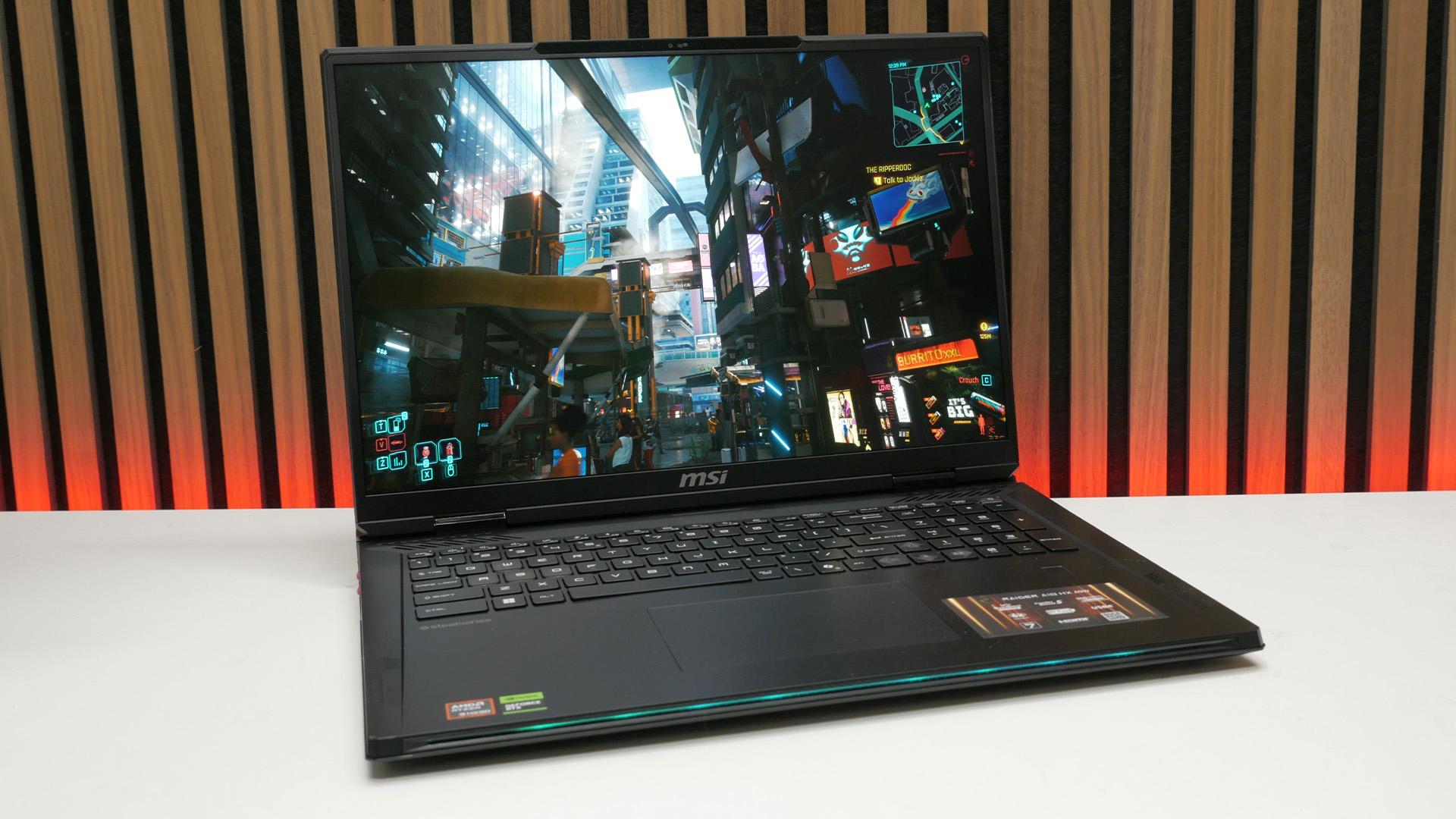
MSI Raider A18 HX A9W review - peak gaming laptop performance
Verdict

MSI's most powerful gaming laptop takes the crown as the fastest we've tested when it comes to game frame rates. It's also mighty powerful for other tasks too, thanks to its 16-core AMD CPU and 64GB of RAM. Its 18-inch, 120Hz, 4K+, miniLED screen also looks fantastic and is backed by good speakers and plenty of connections. This large laptop also runs relatively cool and quiet. Its price is high, though, plus its styling is a bit underwhelming and its keyboard a bit disappointing.
Pros
- The fastest gaming laptop we've tested
- Superb-quality display
- Runs relatively cool and quiet
- Price isn't that bad considering current RAM prices
Cons
- Underwhelming design
- It's big and heavy
- Very low battery life
- Keyboard isn't great
For many of us, the ultimate gaming laptop is one that balances portability, longevity, and performance. We want a laptop you can use for most of the day on the go without worrying about the battery giving out, that won't break your back as you lug it around, but which still has enough power for a gaming session in the evening. The MSI Raider A18 HX A9W is not that.
This chungus of a machine is easily one of the best gaming laptop options around, not because it delivers on portability or battery life, but because it's mega-powerful. In fact, it's so power-oriented that MSI has even equipped it with a desktop-class CPU, rather than a laptop chip compromised by power-saving trickery. The result is impressive - especially thanks to its 120Hz, 4K miniLED screen - but good luck carrying this laptop around.
Specs
| MSI Raider A18 HX A9W specs | |
| CPU | Up to AMD Ryzen 9 9955HX3D |
| GPU | Up to Nvidia GeForce RTX 5090 |
| Display | Up to 18-inch 3,840 x 2,400 (4K), 120Hz, miniLED |
| RAM | Up to 96GB 5,600MT/s LPDDR5 SO-DIMM (64GB reviewed) |
| Storage | Up to 2TB PCIe 4.0 SSD |
| Networking | Wi-Fi 7, Bluetooth 5.4 |
| Ports | Left side: 2 x USB-A, SD card slot Right side: 2 x USB-C 40Gbps, USB-A, audio combi jack Back: 2.5Gb Ethernet, HDMI, power |
| Battery | 99WHrs |
| OS | Windows 11 Home |
| Dimensions (W x D x H) | 404 x 307.5 x 24-32.1mm |
| Weight | 3.6 kg / 7.9 lbs |
| Price | $5,099 |
| Warranty | One-year limited |
The MSI Raider A18 HX A9W is absolutely packed with high-end hardware, or at least it can be. While variants of the MSI Raider A18 HX platform can include GPUs such as the RTX 5070 Ti and displays as meager as having a 1080p resolution and 144Hz refresh rate, the model I'm reviewing here is the top-of-the-line RTX 5090 model with truly top-tier specs.

The main pixel pusher for gaming is the laptop version of the RTX 5090. It's not as powerful as the desktop RTX 5090, but is still the fastest gaming laptop GPU around that's able to deliver smooth 4K frame rates in many games.
Backing up this bruiser of a GPU is the most striking spec choice of this laptop, which is an AMD Ryzen 9 9955HX3D CPU. It's basically a desktop Ryzen 9 9950X3D, but tweaked to fit in a laptop, and it's as powerful as you'd expect, with 16 cores and up to a 5.4GHz maximum clock speed. Plus, it includes the 3D V-Cache that is the secret sauce to making AMD's X3D chips so fast in games.
Up to 96GB of DDR5 RAM can also be packed into this chassis, though most configurations of the RTX 5090 version come with 64GB, which is plenty for gaming. You might want more if you're mainly planning to use this machine as a more affordable alternative to an AI workstation laptop, but 64GB is enough for anything else.

Oddly, you can only get up to 2TB of SSD storage, but a second slot is available to be filled, and both SSD slots take standard M.2 SSDs, so are relatively easy to upgrade.
For a screen, this model comes with an 18-inch, IPS-LCD, miniLED panel that can hit 120Hz and has a beyond-4K resolution of 3,840 x 2,400 (4K is 3,840 x 2,160). This gives the display a slightly taller aspect ratio than typical widescreen monitors, giving you more vertical resolution that's useful for reading documents and such on what is still a relatively small 18-inch screen (when compared to a separate monitor).

Connectivity is plentiful, with lots of USBs on the left and right sides, along with an SD card slot on the left edge and a combo audio jack on the right side (for use with analog headsets that include a mic and headphones). The back is home to 2.5Gb Ethernet, an HDMI port, and the power socket, which is just similar enough in shape to a USB-A port to be slightly annoying.
Design
First things first. Let's address the size of this laptop. By all means, there have been and still are even bigger laptops, but so far as modern-day, conventional gaming laptops go, this is one of the largest. Weighing in at nearly 8lbs, and being nearly 16 inches wide, it will need a serious backpack to lug it around.

On the plus side, it's not quite as horrendously thick as some big, bulky gaming laptops of old. At up to 32.1mm thick, it is nearly twice as thick (and nearly twice as heavy) as the Razer Blade 16, for instance, but most laptop pockets in larger laptop bags will accommodate it. One thing to keep in mind, though, is the large power pack, which adds another 2lb/1kg+ to the total weight.
Otherwise, in terms of styling, MSI hasn't fully avoided the slightly cheesy angular lines, colorful highlights, and RGB lighting of so many gaming laptops, but it hasn't gone overboard.

The lid has a light-up MSI logo, the sides have RGB strips in them, the back and sides have red-colored vents, and there's a red cover to the speakers, but otherwise it's a fairly simple black form with an aluminum top plate to the display and keyboard surround. Still, when compared to the likes of the Razer Blade 16 or Alienware 16 Area-51, it's a little lacking in finesse.
That's particularly the case when you open the lid and are greeted by the RGB-backlit keyboard with its clear WASD keys and a digital-looking font on the keys. The addition of Dynaudio and SteelSeries logos denoting the collaborations on the speakers and keyboard, respectively, further clutters the look.

On a perhaps more important note, one thing I was surprised to find was how relatively tricky it was to get to the SSD and memory of this laptop. After removing the base plate - which is tricky in itself and requires just the right amount of brute force - you also need to remove a heatpipe to access the SSDs, with the location of the SODIMM memory not entirely obvious to me without removing all of the heatpipes and other cooling apparatus.
Display and speakers
The screen of this laptop is fantastic. The combination of an 18-inch diagonal and over 4K resolution means you not only get an incredibly sharp-looking, high-resolution image, but you can take advantage of it more than you can on smaller screens. The laptop defaults to using a 200% zoom/scaling setting in Windows (1,920 x 1,200 equivalent desktop resolution), but if your eyesight is good, you could easily use this laptop at as low as 150% (2,560 x 1,600 equivalent resolution).

As well as offering a display that's larger and sharper than most, this one simply looks fantastic. It's an LCD, rather than OLED, so doesn't natively have the incredible contrast of an OLED. However, it uses a miniLED backlight with over a thousand backlight zones, which allows it to reduce the brightness or turn off the backlight for darker parts of the image. This means you don't get the gray, washed-out look of low-contrast single-backlight LCD displays.
This was proven in my screen quality tests, with my colorimeter detecting 0nits luminance in its small black test window. Meanwhile, when showing pure white, the screen could hit a dazzling 683nits brightness. The net effect is that this display can show utter darkness right next to dazzlingly bright colors without any bleed between the two, for a really impactful, high-contrast image.
It can produce excellent HDR too, thanks to its ability to cover 70% of the DCI-P3 color space. Fire up a movie or cinematic game - especially one that's HDR - and it looks amazing on this screen.

All this and the panel can run at up to 120Hz, for a smooth gaming experience, even in competitive shooters. The fact it can't go beyond 120Hz and that it's an LCD means it's not on the very cutting edge of esports monitors for avid FPS gamers, but it's still fine for more casual rounds.
Perhaps the main thing to note as a downside is that the screen uses a matte coating to reduce reflections. Like many such coatings, this slightly dulls the look of the panel, as compared to glossy finishes, particularly in brighter lighting. But it's a more practical option in many situations.
MSI has employed a six-driver speaker system in this laptop, using two pairs of bass drivers that fire in opposite directions from one another, to reduce internal vibrations without reducing power. The combination sounds great for a laptop. It can't deliver true sub bass, but there's enough depth for music to sound impactful, warm, and rounded while beefy sounds in games and video hit with plenty of power.
Top-end clarity is good, too. You can easily play games happily with these speakers, and watching video is great too. I wouldn't go out of my way to listen to music on this laptop, but it's fine for occasional use.
Keyboard and trackpad
I was a bit disappointed in the keyboard and trackpad on this laptop. For a start, the keyboard just looks a mess, with its weird font and cheesy clear WASD keys. Plus, the cursor keys feel cramped with the way they're squashed in next to the numpad.

The key action is fine, but there's something about it or, perhaps, the completely flat keycap profile that just meant I never settled into easily touch typing on it. It always felt like the feedback and sense of being able to place my hands on the keyboard weren't quite there. It's a stark contrast to the fantastically crisp and responsive keyboard of the Alienware 16 Area-51, for instance.
It's a similar story with the trackpad. It works. It's accurate and responsive, but it's a touch small for the size of laptop, and its click is not the most defined. Both it and the keyboard are perfunctory rather than anything special.
What is special, though, is the performance of this laptop. I tested the MSI Raider A18 HX A9W for over the course of a couple of weeks, using it for daily work tasks, watching video, and of course gaming. I also ran it through a range of benchmarks for both productivity and gaming.
I ran the gaming tests at three main settings. Firstly, games were run at the native 3,840 x 2,400 resolution of the screen, to see if gaming at this high resolution is feasible. Then, I dropped to 1440p (2,560 x 1,440), and 1080p, to see how this laptop fared for gaming at lower resolutions that you might use for competitive gaming. I also ran some tests using upscaling to see if a playable frame rate could be achieved at native resolution.
Cyberpunk 2077
Cyberpunk 2077 is always my first test, as it's still a graphically rich and challenging title for any graphics card, particularly if you ever engage its path tracing mode. For this laptop, though, I stuck to the Ultra ray tracing preset, which was already enough of a strong test for this laptop to try and run at 3,840 x 2,400.

Sure enough, without upscaling or frame generation, this laptop could only hit 18fps in this scenario. Enabling DLSS upscaling set to Balanced (natively rendering the game at 2227 x 1392 and upscaling from there), the laptop could hit 44fps average, which is still on the low side. Turning off ray tracing and dropping to High detail settings, though, and the game could hit 53fps.
In our 1080p test, this laptop hit 67fps average with with ray tracing, which compares to 65fps for the Razer Blade 16 equipped with the same RTX 5090 GPU.
Realistically, you'll probably want to run this game with DLSS Performance if you want to enable ray tracing, for a roughly 60fps experience. Meanwhile, dropping to no ray tracing and high detail settings while using Balanced DLSS at native resolution should get you over 100fps.
Indiana Jones and the Great Circle
Moving on to Indiana Jones and the Great Circle, this amazing-looking game forces on some degree of ray tracing, so can be a stern test for many GPUs. However, the RTX 5090 in this Raider 18 HX brushes it aside.

At native resolution with the game set to Ultra detail settings, you'll still get 63fps from this monster. Drop to 1440p and this rises to 98fps, while at 1080p, it trots along at 119fps. Again, the Razer Blade 16 isn't far behind, with a 1080p figure of 115fps, but the MSI maintains its lead as the fastest gaming laptop we've yet tested.
F1 24
In our third game test, the Raider A18 HX A9W continued to impress. Running at native resolution with ultra detail settings, it only hits 47fps, which is a little below what we'd consider smooth enough for a game like this.

However, at 1440p and 1080p it hit 87fps and 119fps, respectively. So, if you were to run at native resolution and enable DLSS at Balanced, you can expect to hit around 100fps in this game, and have an awesome visual experience.
Cinebench
When it comes to testing raw CPU speed, Cinebench R24 remains our go-to benchmark, and it very neatly showed how the chip here may be powerful, but isn't the most capable, outside of gaming.

Both its single and multi-thread scores are the second highest we've ever tested, but the Intel Core Ultra 9 275HX in the Asus ROG Strix Scar 16 is the fastest chip for productivity that we've yet tested. Still, there's not much in it, and this is still a CPU that will deal with just about anything you throw at it.
Cooling and noise
With such powerful hardware inside, it's no surprise the MSI Raider 18 HX A9W can get fairly loud when under load. However, one of the advantages of a larger, chunkier laptop is that it has room for more capable cooling, with room for the components inside to breathe. In turn, this means a laptop that runs cooler and quieter.

Sure enough, running the FurMark GPU stress test and Cinebench R24 multi-thread tests together at the same time, putting the GPU and CPU at nearly 100% load for ten minutes, this laptop still only hit 41.5dB from a height of 20cm above the keyboard. The sound of its fans is noticeable with open-back headphones, but if you're wearing closed-back headphones, you might struggle to notice the noise, particularly as it's a lower-pitched, whooshing sound, rather than a higher-pitched, more irritating sound. It's impressive stuff.
What's more, the laptop doesn't heat up alarmingly either. Just above the top of the keyboard does get a little warm, but base and sides stay remarkably cool.
Battery
The MSI Raider 18 HX A9W uses a 99Wh battery, which means it just sits below the maximum 100Wh limit for batteries to be carried on aeroplanes. This would normally be a decently large battery for any laptop, but for one as powerful as this, it can only do so much.
As with most gaming laptops, if you try to play triple-A games using the RTX 5090 on battery alone, this laptop won't get you much more than an hour of use. In our standard PCMark 10 gaming battery life test, it managed 76 minutes of use, which is a little better than some options, but comfortably behind the Razer Blade 16's 106 minutes.

Sadly, battery life even when not gaming isn't great either. It managed just 176 minutes in the PCMark 10 Office battery test, which is miles behind many other gaming laptops. You can get a little more life out of it in some scenarios, but you'll struggle to get more than three hours. This simply isn't a machine meant to be used away from an outlet.
Price
Unsurprisingly, considering its high-spec hardware, the MSI Raider 18 HX A9W price is very high. The exact price will vary depending on configuration, but the spec tested here is currently $5,099. Whichever way you swing it, that's a huge sum of money. You do get an incredible amount for your outlay - especially considering current DDR5 memory prices - but there are clearly areas where this laptop doesn't deliver the ultra-premium experience you might hope for when spending that amount of money.
Alternatives
Asus ROG Strix Scar G16 2025
Offering a somewhat similar chunky take on the gaming laptop formula, the Strix Scar G16 2025 is likely to offer a better balance of features for most buyers than the Raider 18 HX A9W. It is a bit smaller, with a 16-inch screen, but its battery life is far better, its display goes to 240Hz, its keyboard and trackpad are better, and it's a bit cheaper for a similar RTX 5090 spec.
Read our full Asus ROG Strix Scar G16 2025 review for the full picture.
Razer Blade 16 2025
For even more of a slim, light, and generally more versatile laptop, the Razer Blade 16 is the one. It's far thinner and lighter than the Raider 19 HX A9W, yet can still pack an RTX 5090 into its amazing-looking chassis. It also has amazing battery life. It is mighty expensive, though, and the MSI has the edge for pure performance - plus it runs a lot cooler and quieter than the Razer when under full load, too.
Read our full Razer Blade 16 review.
Verdict
Large gaming laptops have always been products designed to fit a particular niche. They're for those who need the relative portability or compactness of a laptop but don't actually need the ability to use such machines while on the move or in situations where battery life is going to be a problem. That's exactly what you get with the MSI Raider 18 HX A9W, with all the inherent compromises such a machine comes with.
So, it will get you an hour or so of gaming and a couple of hours of other use away from an outlet, but otherwise it's meant to be plugged in and provide as much performance as possible in a single, self-contained unit. And, given that brief, it excels.
This is the fastest gaming laptop we've tested when it comes to gaming frame rates, and it's the second fastest ever for productivity, too. Equipped with 64GB of RAM, it'll also handled many more workstation-centric applications, too, even if it isn't going to be the most powerful AI machine around, unless you find a spec that includes 96GB of RAM.
In terms of styling and overall design, it's fine. It's inoffensive enough, but certainly nothing special that you'll want to give pride of place on your desk. But it's practical, with conveniently-placed connectivity, a large and excellent-quality screen, and it runs impressively cool and quiet. The main potential stumbling block is the middling quality keyboard - I'd want to use an external keyboard instead.
If you're in need of this very particular niche kind of gaming laptop, this is the fastest out there, and largely delivers the goods elsewhere, too. You pay an enormous price for that chart-topping privilege, but any gaming laptop with an RTX 5090 is going to cost you north of $4,000, so the price here is acceptable, especially given current memory/SSD/graphics card prices.

 English
 Arabic
 French
 Portuguese
 Deutsch
 Turkish
 Dutch
Dutch
 Italiano
 Russian
 Romaian
 Portuguese (Brazil)
 Greek
Greek