


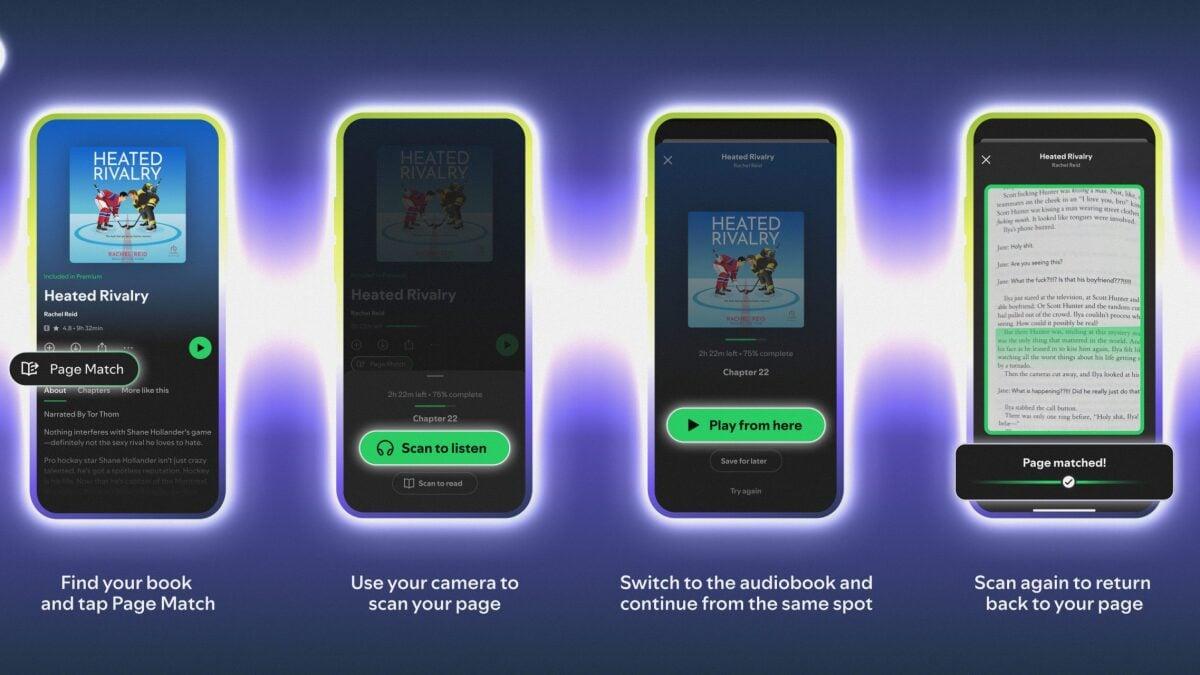
If you're like me and tend to read physical books while listening to the audiobook, dismayed at the inconvenience of time spent away from your current narrative, insistent on having that storyline blasting through your consciousness 24/7, there's a new Spotify feature for you. (I'm fine.)
Launched on Feb. 5, Spotify's new Page Match feature takes cues from Audible's reading/listening sync, enabling you to seamlessly switch between audio and physical format. The feature was announced as part of Spotify's major push into physical book sales, with the audio streamer pairing up with online book marketplace Bookshop.org to sell titles directly through the platform.
The anticipated feature follows Spotify's audiobook Recaps feature, launched in Nov. 2025, which lets you listen to short audio summaries of the story so far.
But what is Page Match and how does it work?
What is Page Match?
As Mashable culture editor Crystal Bell writes, Page Match is a "technically ambitious" Spotify mobile app feature that amalgamates your physical books, audiobooks, and e-books and lets you continue where you left off reading. Essentially, it's like a bookmark across time and space.
Mashable Light Speed
"Built using computer vision and text matching — not AI, [Owen Smith, Spotify’s global head of audiobooks] noted — the feature lets readers scan a page in the Spotify app to jump instantly to the corresponding moment in the audiobook, then scan again later to find their place back on the page," Bell writes.
So far, Page Match is only available in English, and will be available for most titles by the end of February.
Is Spotify's Page Match free?
Page Match is available to all Spotify users, free and paying, however there's some differences — and remember, those prices are going up.
The feature only works for free users who have bought an audiobook through Spotify. Premium Spotify users can use Page Match for any book with the monthly allocation of audiobook hours that comes with the subscription, as can users who have paid for the extra Audiobook+ plan.
Now, here's how to use the feature, whether you're moving from book to audiobook or the other way around.
How to use Spotify's Page Match (book to audiobook)
What You Need
- Spotify iOS or Android app on mobile
Step 1: Open Spotify on your smartphone.
Step 2: Search for your book in the audiobook section.
Step 3: Tap "Scan to listen" and allow camera access with the pop-up.
Step 4: Take a photo of the page you're currently reading.
Step 5: Wait for Spotify to match the page to the audiobook time, then tap "Play from here" or "Save for later."
If Spotify can't find the page, the app will prompt you to try again.
How to use Spotify's Page Match (audiobook to book)
What You Need
- Spotify iOS or Android app on mobile
Step 1: Open Spotify on your smartphone.
Step 2: Navigate to your audiobook in search or Your Library.
Step 3: Tap the "Page Match" button."
Step 4: Tap "Scan to read" and allow camera access with the pop-up.
Step 5: Take a photo of any page in your physical book or e-reader.
Step 6: Wait for Spotify to process, after which it should tell you where in the book you stopped listening.
If you can't yet see the Page Match buttons on your Spotify app, don't fret. The feature only launched on Thursday, Feb. 5 and is rolling out globally, so it should appear on your phone soon — make sure you've updated the Spotify app at least.

 English
 Arabic
 French
 Spanish
 Portuguese
 Deutsch
 Turkish
 Dutch
Dutch
 Italiano
 Russian
 Romaian
 Portuguese (Brazil)