


From the M5 MacBook Pro to the Acer Aspire 16 AI.
By

Haley Henschel
Senior Shopping Reporter
Haley Henschel is a Chicago-based Senior Shopping Reporter at Mashable who reviews and finds deals on popular tech, from laptops to gaming consoles and VPNs. She has years of experience covering shopping holidays and can tell you what’s actually worth buying on Black Friday and Amazon Prime Day. Her work has also explored the driving forces behind digital trends within the shopping sphere, from dupes to 12-foot skeletons.
on
All products featured here are independently selected by our editors and writers. If you buy something through links on our site, Mashable may earn an affiliate commission.

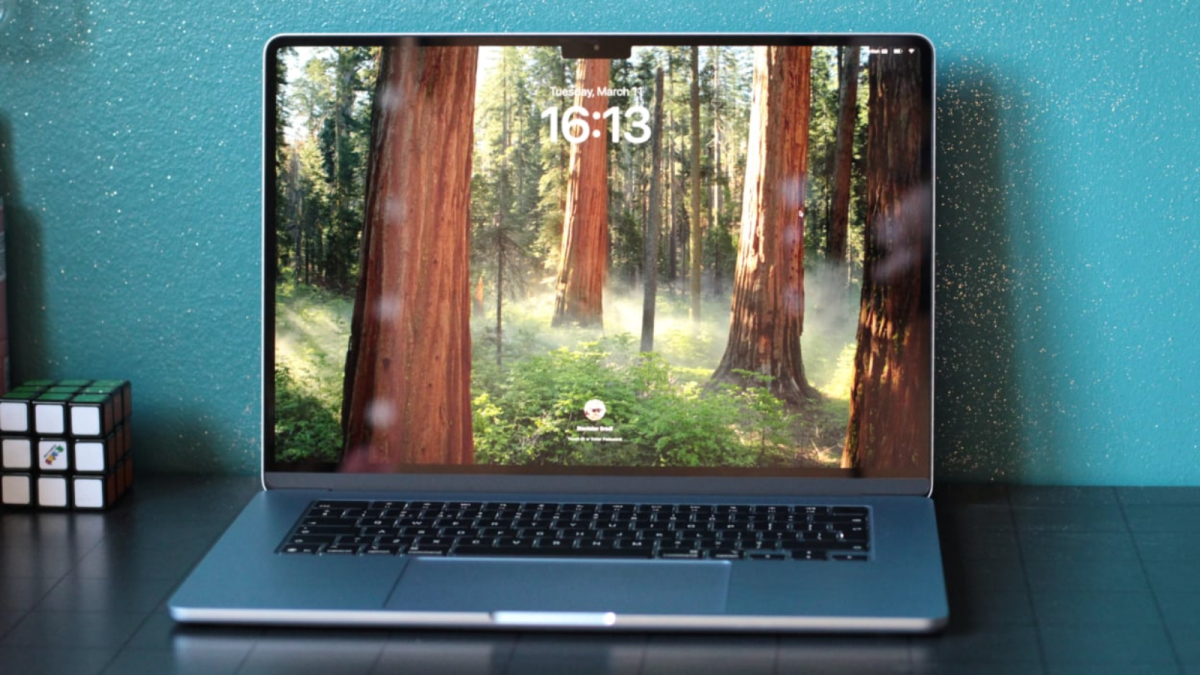
Credit: Stan Schroeder / Mashable
The best laptops are fast enough for their primary use cases, well-made, and priced fairly for their specs. Ideally, they also have enough stamina to last a full workday (but often much longer). Whether your preferred daily driver is a sleek Apple MacBook, a versatile Windows laptop, or a simple Chromebook, a reliable PC is a solid investment that feels worth it for years to come.
Mashable has been testing laptops for over 10 years, and I took the category's helm in 2023. More recently, I established the meticulous testing procedure that our team currently uses to review laptops. Over the past 12 months, we've researched dozens of models and tried 33 of the most promising configurations available. I've settled on 12 top picks for 2026 buyers based on our findings.
Overview
Table of Contents
What is the best laptop for 2026?
My answer ultimately boils down to your operating system preference: Windows or macOS?
As of January 2026, I think the 15-inch Apple MacBook Air (M4) is the best MacBook for most people. It's a sleek-as-ever notebook featuring impressive performance, open-lid support for two external displays, a great 12MP Center Stage camera, and an extremely reasonable starting price of $1,199 (making it $100 cheaper than its M3 predecessor).
The best Windows laptop for most people is the 13.8-inch Microsoft Surface Laptop 7, a sophisticated and snappy Copilot+ PC boasting a stellar battery life of nearly 23 hours. Note that Microsoft makes an Intel version that may appeal to users wary of Windows on ARM for app compatibility reasons, but it's a business-oriented model with a significant markup.
Need something different? I've selected ten other options that are ideal for strict budgets, ultra-basic workloads, frequent travelers, content creation, PC gaming, and beyond.
A quick note before we get into the full list: Five of my picks received next-gen updates at CES 2026, and while most of their successors don't have official release dates or prices yet, the ongoing memory shortage is expected to make most new laptops more expensive later this year. Because of this, I'd strongly consider buying a last-gen model and springing for a RAM or SSD upgrade if possible. (More on this below.)
If you'd rather roll the dice and see how the latest laptops fare in testing, stay tuned. We'll be putting them through our extensive review process as soon as they start trickling out.

The Good & The Bad
- Very competitively priced
- M4 chip is incredibly powerful
- Super quiet
- Supports two external displays with its lid open
- Nice new 12MP Center Stage camera
- Same premium design as always
- Also available in 13-inch size
- Can get hot under heavy workloads
- New Sky Blue finish is a little too subtle
Who it's for
Apple didn't reinvent the wheel in its latest 15-inch MacBook Air, but a blazing-fast processor, a few fresh features, and a new lower price make it one of the best current-generation laptop deals — if not the best. It's a fantastic pick for students, professionals, and anyone else in need of a polished, relatively portable laptop, especially those ready to give up an Intel or M1-era MacBook. (It officially feels like a big-enough jump to justify an upgrade.) MacBook Pros are nice, but they're overkill for non-specialty users, realistically.
Note that the M4 MacBook Air also comes in an even cheaper 13-inch size with a slightly lower resolution and two fewer speakers (four instead of six, sans force-cancelling woofers). We like it best for students and budget shoppers — it's often on sale for just $749.
Read Mashable's full review of the 15-inch Apple MacBook Air (M4).
Why we picked this
Same tried-and-true formula, new fixings. Let's start under its hood: Apple has refreshed its 2025 MacBook Air with an M4 processor, which notched a Geekbench 6 multi-core performance score of 14,992 in our testing. It's 24 percent faster than the M3 version and 85 percent faster than all of the laptops that are currently in our testing database; Mashable Senior Editor Stan Schroeder called it "almost overkill" in his review. All that power means it does get a little hot when you work it hard, but it does stay whisper-quiet, at least.
Less exciting but still notable are the MacBook Air's new open-lid support of two 6K external displays and upgraded 12MP camera, which now has Apple's auto-framing Center Stage and top-down Desk View feature. It also comes in a new sky blue finish, which I've seen aptly described as "like looking at a gray MacBook and someone shouting 'blue' from a hundred yards away"... which is to say, it's subtle. Schroeder requested "real colors" from Apple the next time it revisits the MacBook Air. (A smoother 120Hz display would also be nice if we're making a wish list — we've wanted a refresh rate bump for the Air since the M2 era.)
The real game-changer here is the M4 MacBook Air's price. Our review unit with 1TB of storage costs $1,599, but the base model with 256GB of storage is only $1,199. You might recall that the 15-inch M3 MacBook Air started at $1,299. "Apple doesn't do this often, so enjoy it while you can," Schroeder wrote. It's a genuinely shocking move for any laptop manufacturer at a time when price hikes are way more common, and it's one of the big reasons why the MacBook Air has reclaimed its Mashable Choice Award-winner status.
Details

The Good & The Bad
- Solid performance
- Fantastic battery life
- Stylish well-made design
- Bright, vibrant touchscreen display
- 120Hz refresh rate
- Some app compatibility issues
- Gets pricey fast (but easy to find on sale)
Who it's for
The Mashable Choice Award-winning Microsoft Surface Laptop 7th Edition is an exceptional all-rounder — the ideal blend of performance, power efficiency, build quality, innovation, and overall value. We recommend it for nearly any Windows user who's due for an upgrade; the only reason you should pass on it is if your go-to apps aren't compatible with Windows on ARM. (An Intel-powered business edition is available, but it'll cost you: The base model is $300 more expensive than the starter Snapdragon version.)
Read Mashable's full review of the 13.8-inch Microsoft Surface Laptop 7.
Why we picked this
Microsoft's flagship machine ticks most of the boxes on our "best laptop" checklist. Our Snapdragon X Elite testing unit went nearly 23 hours per charge, making it the third-longest-lasting laptop we've ever tried. In a Geekbench 6 benchmark, our main performance test, it got a multi-core score of 11,875, making it speedier than 54 percent of the models in our laptop testing database. That's not half bad, but if you put it in Performance mode instead of Balanced, it gets as fast as an M4 MacBook Air.
If all that feels like overkill, or its premium price tag gives you sticker shock, know that it starts at $999.99 with a lesser Snapdragon X Plus chip and 256GB of storage. (Note that this configuration is only available through Amazon and Best Buy, not the Microsoft Store itself.)
The Surface Laptop 7's Snapdragon CPU is both a blessing and a curse: As an ARM chip, as opposed to an x86 chip from Intel or AMD, it's not going to be compatible with certain specialty apps and programs. This is a dealbreaker for students, gamers, and certain creative professionals. (The design app AutoCAD is a no-go, for example.) But if this is a non-issue for you, personally, move this machine to the top of your list.
Design-wise, the Surface Laptop 7 has a modern aluminum chassis that comes in four colorways and doesn't cling to fingerprints. Its bright display can hit a refresh rate of up to 120Hz, and its snappy keyboard is paired with a haptic touchpad. You can take your pick from two sizes, too: 13.8- or 15-inch, the latter of which includes a microSD card reader.
Details

The Good & The Bad
- Good performance for a Chromebook
- All-day battery life
- Nice speakers
- Good mix of ports
- Excellent build quality
- Comfy keyboard
- Fan runs constantly (but quietly)
- Doesn't come with a stylus
- Trackpad and touchscreen could be smoother
Who it's for
Chromebooks have all the software you might need for a basic everyday workload, and many of them have better hardware than the cheapest Windows laptops. The Lenovo Flex 5i Chromebook Plus is a well-made hybrid model that will serve most people well, and it's not too pricey.
Read Mashable's full review of the Lenovo Flex 5i Chromebook Plus.
Why we picked this
The build quality of the Flex 5i Chromebook Plus wowed Mashable Contributor Sarah Chaney, our reviewer. "The laptop feels solidly constructed, with practically no give when pushing on the chassis, sturdy hinges that don’t creak or stick, and a cool-to-the-touch aluminum lid that resists fingerprints well," she wrote. Its sharp screen flips 360 degrees, so it can sit in tent mode or be used like a tablet. For a $600 machine, it also has a nice, bouncy keyboard, well-rounded speakers, and plenty of ports (including a microSD card reader).
The Flex 5i Chromebook Plus got a Geekbench 6 multi-core score of 7,024, which means it's about 28 percent slower than the Acer Aspire 16 AI, my favorite cheap Windows laptop. Still, it's peppy for a Chromebook: Only three models we've tried are speedier, and the No. 1 fastest Chromebook only beat its score by nine percent. Also, all three models are $50 to $150 more expensive.
The Flex 5i Chromebook Plus tends to run its fan all the time, but Chaney said the noise is "mild (and not noticeable at all with music playing)." Plus, it keeps the machine very cool.
Details

The Good & The Bad
- Fastest laptop under $900
- Awesome battery life
- Clean, minimalist design
- Relatively portable for a 16-inch laptop
- Vibrant anti-reflective touchscreen
- 120Hz refresh rate
- Wide variety of ports
- Poor speakers
- Hinge it a bit wobbly
- Webcam isn't great
- Fan turns off and on constantly (though it's quiet)
- Some app compatibility issues
Who it's for
Acer's Aspire 16 AI is the best laptop for folks who want a competent Windows laptop that doesn't break the bank. It's fast and long-lasting and doesn't make too many build quality compromises in order to cost $700.
Note: The 2026 Acer Aspire 16 will be configurable with new Intel Core Ultra Series 3 and AMD Ryzen AI 400 Series processors. It will be available in Q2, but we don't know its pricing yet.
Why we picked this
"Cheap laptop" doesn't always equate to "crappy laptop" — not when the Aspire 16 AI exists. It's faster than all other laptops under $900 that we've tried, and it lasts over 17 hours on a single charge. (That's longer than some M4-era MacBooks.) Its fan ran almost constantly in my testing, but you'll hardly notice it. It's incredibly quiet.
Unlike the latest MacBook Airs and other pricier Windows laptops, the Aspire 16 AI also has an anti-reflective touchscreen with a silky-smooth 120Hz refresh rate. It's a premium spec I don't see on many budget laptops, aside from models that are meant for gaming. What's more, the display is vibrant and intense enough to use in direct sunlight if you crank its brightness all the way up.
The Aspire 16 AI's port selection is just as impressive. It comes with an HDMI port and a microSD card in addition to pairs of USB-C and USB-A ports. Surprisingly, it's still not super bulky: At 3.42 pounds and 0.63 inches thin, it's pretty portable for a 16-inch laptop.
The Aspire 16 AI's low-quality speakers and webcam feel more like afterthoughts. I also noticed that its hinge wiggled a bit whenever I tapped or adjusted the position of its screen.
Details

The Good & The Bad
- Good performance for the price
- Stellar battery life
- Unique, durable chassis material
- Ridiculously thin and light
- Gorgeous OLED display
- Some app compatibility issues
- God-awful speakers
Who it's for
The ultralight, long-lasting Asus Zenbook A14 is the ultimate laptop for on-the-go Windows users who want to spend less than $1,000. It's my favorite MacBook Air alternative for Windows users. I do want to note that its speakers suck, so its ideal owner will also have a great pair of headphones on hand.
Note: The 2026 Asus Zenbook A14 will have a new matte keycap coating, run on a new Snapdragon X2 Elite processor, and start with 24GB of RAM. We don't know its pricing or availability yet.
Why we picked this
The Zenbook A14 is made of a magnesium-aluminum alloy called "Ceraluminum" that's durable, scratch-resistant, and deceptively lightweight. The Zabriskie Beige base model that comes with a Snapdragon X Plus chip, 16GB of RAM, and 512GB of storage weighs just 2.4 pounds, or 0.3 pounds less than the 13-inch M4 MacBook Air and 0.56 pounds less than the 13.8-inch Surface Laptop 7 (also $1,000 apiece). That doesn't sound like a huge difference, but I was shocked the first time I picked one up at CES 2025. It still feels super sturdy despite its featheriness, fortunately, so I'd have no qualms about toting it to an office, airport, or coffee shop.
You'll want to show it off in public, by the way. That Ceraluminum chassis has a ceramic look and feel to it, and it's adorned with reflective Asus logos that remind me of jewelry. The whole thing is very "organic modern," if you're familiar with that interior design style, and it's a refreshing change from your standard silver notebooks.
In a performance test, the Zenbook A14

 English
 Arabic
 French
 Spanish
 Portuguese
 Deutsch
 Dutch
Dutch
 Italiano
 Russian
 Romaian
 Portuguese (Brazil)
 Greek
Greek