


Samsung launched the Galaxy Z Flip7, the latest generation of flip-style foldable, at its Summer 2025 Samsung Unpacked event. The smartphone maker caught up to its competitors in some areas — and overtook them by adding the largest cover screen on a flip foldable to date (4.1 inches).
Unfortunately, Samsung also hobbled the Z Flip7 by limiting the apps you can run on that cover screen.
Samsung's closest rival in the foldable space, Motorola, allows you to run pretty much any app you want on its cover screen. You can for example quickly check messages, perform quick actions within apps, or even watch videos on the outside screen, all without having to unfold.
If Samsung would let you curate your own front screen experience, you'd be lighting up a 4.1-inch screen every time, instead of the 6.9-inch screen on the inside — and extend battery life in the process.
Samsung believes the apps that it has vetted are appropriate for the external display. Luckily, it left the door open to allowing the user to jump through a few hoops to expand that selection of apps.
Mashable Light Speed
Samsung also cut down on the number of steps to do it compared to previous models, but it's still a lot. Here's how to unlock the cover screen on your Samsung Galaxy Z Flip7:

Credit: Timothy Beck Werth / Mashable
Go to Settings -> Advanced Features -> Labs
Toggle the switches next to "Multi window" for all apps, Use main screen navigation on cover screen, and Apps allowed on cover screen (Labs).
Select the last option, Apps allowed on cover screen.
Select "Get MultiStar"
If prompted, agree to the Galaxy Store privacy notice
Select Install
Once installed, tap the back button (or use the swipe gesture to go back)
Select "Get MultiStar" (yep, again).
Select each of the apps you want to run on the cover screen. The list of apps is scrollable, so be sure to scroll down so you don't miss any.
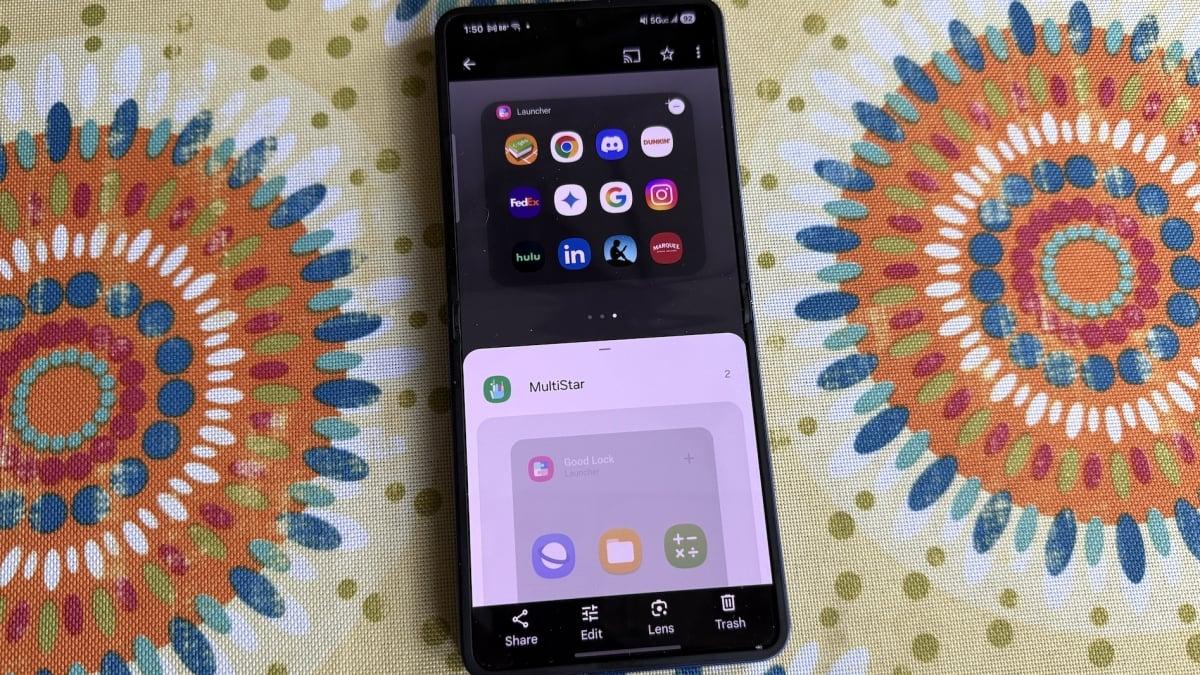
Select Enable Launcher Widget
Scroll down and Select the MultiStar option to expand it.
Tap Launcher to add the widget.
After all that effort, your reward is a new widget on your cover screen, complete with launch icons of all the apps your selected. (This also unlocks a few games that were designed for your cover screen by a company called Gamesnacks; Stack Bounce is my personal favorite).
Fair warning on the app launcher, however: Some of the apps you picked likely won't work well. Some may be oddly sized on the smaller screen, or have some of their elements blocked by the camera lenses.
One more thing to bear in mind. When you open an app on the cover screen, you'll see a small icon in the bottom middle of the cover screen that looks like a tiny cover screen. When you tap on that, you can change the aspect ratio of the app to 16:9, 2:1, 20:9 or 21:9.
Tapping on the icon cycles through the options, but the phone doesn't remember your choice per app — it only remembers your choice, so if you select 16:9 for an app, and open a different app, it will also be in 16:9.
That's not a perfect fix for this issue, which speaks to Samsung's insistence on curating the experience. Still, they're your apps; use them how and where you want.

 Arabic
 French
 Spanish
 Portuguese
 Deutsch
 Turkish
 Dutch
Dutch
 Italiano
 Russian
 Romaian
 Portuguese (Brazil)
 Greek
Greek