




Table of Contents
I wouldn't believe the HP OmniBook 3 16's battery life test results if I hadn't witnessed them myself. This new 16-inch laptop with Qualcomm's starter Snapdragon X chip lasted 40 hours and 14 minutes before dying, effortlessly securing its place as our new battery life champ.
It dethrones last year's OmniBook 5 14, which also had a Snapdragon processor. (Déjà vu!) And it ran for nearly twice as long as the M5 Apple MacBook Pro, our longest-lasting MacBook. If you're looking for the best battery life laptop of 2026, your hunt ends here.
As a whole, the OmniBook 3 16 isn't quite worthy of our coveted Mashable Choice Award (though it's still good enough to earn a Mashable Selects badge). Similarly priced laptops like the Acer Swift 16 AI and Asus Zenbook A16 offer way more power with nicer build quality and above-average, if not record-breaking battery life. Still, its multi-day stamina makes the new Omnibook 3 16 a compelling candidate for on-the-go workers who hate fighting over outlets at cafés and airports.
Smart shoppers will hold out until it goes on sale, which luckily happens often. Good discounts turn it into a great big-screened budget option.
The HP OmniBook 3 16 at a glance

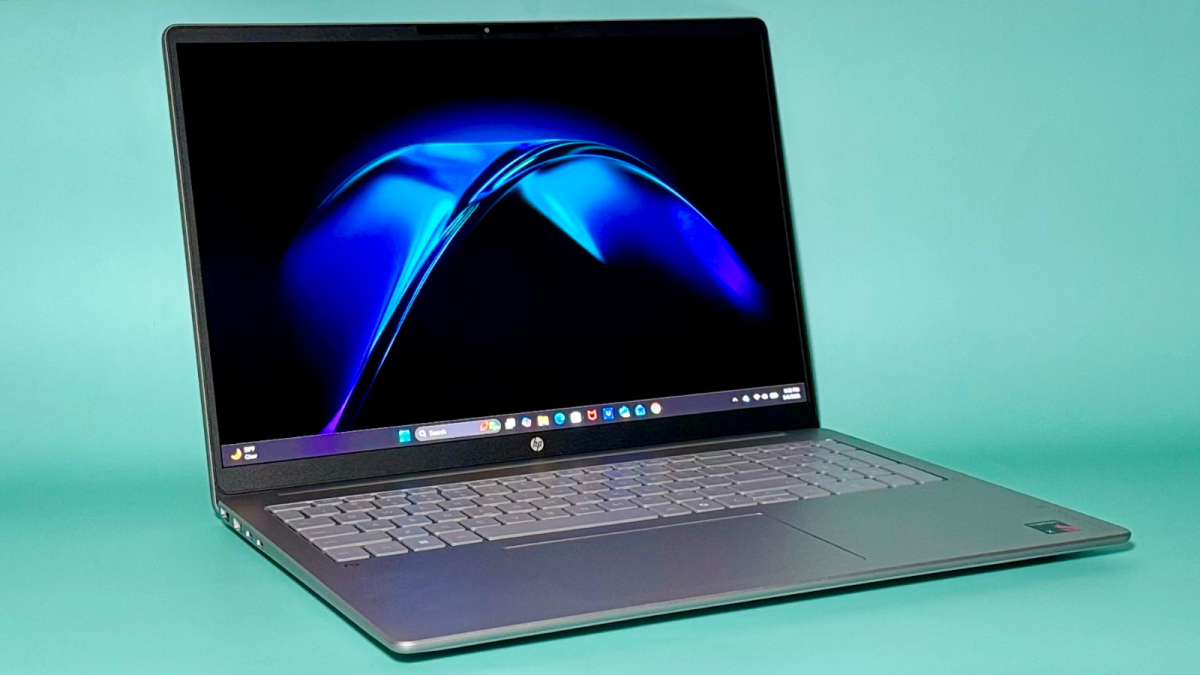
Before I looked at its spec sheet, I really thought the HP OmniBook 3 16 had an OLED display. It's very colorful with deep blacks. Credit: Haley Henschel / Mashable
What I liked: Its older entry-level processor holds its own in multi-core scenarios. It runs super cool and quiet. It has a huge, colorful display. It's pretty thin. Its keyboard is comfortable to type on. Its webcam and mic are above-average. It's frequently on sale. And that battery life, man. Ridiculous.
What I didn't like: Its design is boring. There's some give to its lid and keyboard deck. Its display is dim and glossy, so it's difficult to see its picture in bright light. There are some compatibility concerns with Snapdragon chips. Its wireless technology is outdated. For what you get, it's too expensive at its regular sticker price: This year, I've tried $1,700-ish laptops that are way faster, equipped with OLED touchscreens, and made with zero plastic.

Key specs
CPU: Qualcomm Snapdragon X
Memory: 32GB RAM
Storage: 1TB SSD
Display: 16-inch 1920 x 1200 IPS panel with 60Hz refresh rate and 300 nits of brightness
Webcam: 1080p with physical privacy shutter
Ports: HDMI port, two USB-C ports, two USB-A ports, and a headphone jack
Connectivity: WiFi 6E and Bluetooth 5.3
Dimensions: 14.12 x 9.91 x 0.58 inches
Weight: 3.65 pounds
Color: Glacier silver
Pricing and availability
The OmniBook 3 16 starts at $999.99 with 8GB RAM and 256GB of storage on HP's website. The model I tested, with way more memory and storage, costs $1,629.99. That's not an awful deal in this day and age, but again, the competition gets much less intense when it's on sale. At the time of writing, it was 28% to 47% off, depending on the configuration, and the base model was going for just $529.99.

The HP OmniBook 3 16 comes in glacier silver by default (pictured here). You can change its color for a small fee. Credit: Haley Henschel / Mashable
For $10 more, HP will let you change its color to warm gold, mica silver, or starlight blue. For $80 extra, you can add touchscreen capabilities.
Amazon and Staples both carry models that are better deals at full price versus buying direct, but they're not customizable.
HP OmniBook 3 16 performance
The OmniBook 3 16's Snapdragon X chip is an entry-level processor from 2025. Its single-core performance is, as expected, basic; it's much less snappy than the MacBook Neo's repurposed iPhone A18 Pro chip. But its multi-core performance is relatively impressive, rivaling that of last year's upper mid-range Intel Core Ultra 7 258V chip or a brand-new base Core Ultra 5 325 chip. It's well-suited for everyday productivity.
FYI: That Snapdragon chip is ARM-based, so it's not ideal for gaming or running specialty apps. Read my guide to the best Windows laptops to learn more about ARM compatibility issues.
On a more positive note, I couldn't get the OmniBook 3 16's fan to turn on during a stress test in which I opened tons of browser tabs and apps simultaneously. Most laptops get a little warm during this exercise, but it stayed completely, remarkably cool.
HP OmniBook 3 16 design and build quality

The HP OmniBook 3 16's touchpad is slightly off-center to align with its keyboard, which might bug some folks. Credit: Haley Henschel / Mashable
This is a plain-looking laptop with average build quality. Its aluminum top cover and plastic keyboard deck both have some flex in the middle. Its lid wiggles whenever you adjust its position, and its hinge is a little creaky. At least it's pretty slender for its size, if not particularly lightweight.

Most of the HP OmniBook 3 16's ports are located on its left-hand side. Credit: Haley Henschel / Mashable
The OmniBook 3 16's display is a highlight. Its colors are so vivid and its contrast so good that I wondered if it had an OLED panel at first — it's actually just a regular IPS screen. Note that it looks best indoors because it's dim and glossy.
The OmniBook 3 16 has a backlit keyboard with a pleasant snappy-squishy (but not mushy) feel and a numpad. Happily, its mechanical touchpad doesn't rattle with every finger tap like the one on last year's OmniBook 5 14.
Who should get the HP OmniBook 3 16?

Big screen, bigger battery life. Credit: Haley Henschel / Mashable
The OmniBook 3 16 is a decent everyday laptop for remote workers, commuters, and travelers who want a big, entertainment-ready screen and freakishly good battery life. It's made for all-nighters and long-haul trips. Again, try to buy it on sale, when it's at its peak value.


 English
 Arabic
 French
 Spanish
 Deutsch
 Turkish
 Dutch
Dutch
 Italiano
 Russian
 Romaian
 Portuguese (Brazil)
 Greek
Greek