


See how the Microsoft Surface Laptop 7, Asus Zenbook A14, and other top-rated models compare.
By

Haley Henschel
Senior Shopping Reporter
Haley Henschel is a Chicago-based Senior Shopping Reporter at Mashable who reviews and finds deals on popular tech, from laptops to gaming consoles and VPNs. She has years of experience covering shopping holidays and can tell you what’s actually worth buying on Black Friday and Amazon Prime Day. Her work has also explored the driving forces behind digital trends within the shopping sphere, from dupes to 12-foot skeletons.
on
All products featured here are independently selected by our editors and writers. If you buy something through links on our site, Mashable may earn an affiliate commission.

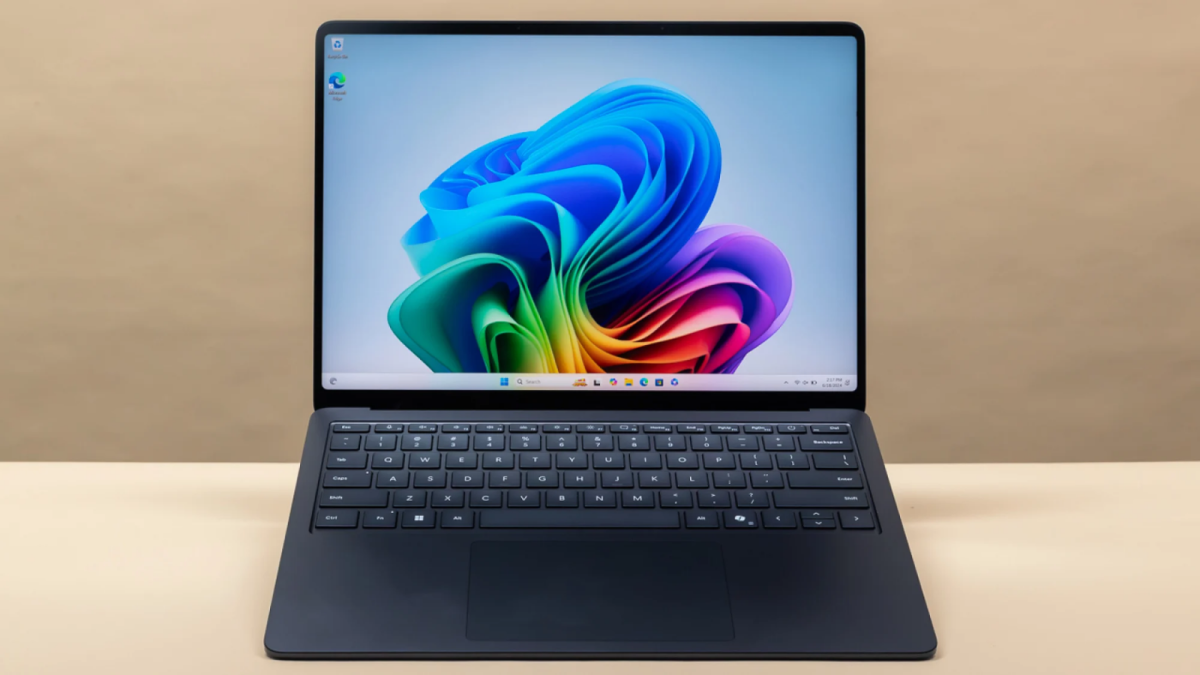
Microsoft's Surface Laptop 7 rocks. Credit: Joe Maldonado / Mashable
Even the most devoted Apple disciples should be able to admit that the best Windows laptops have some advantages over the best MacBooks.
For one thing, Windows PCs offer a wider variety of hardware and configuration options, often at cheaper prices. (They still hold the monopoly on touchscreen displays, for example.) On the software side, you're going to get broader support for specialized business apps and video games on a Windows laptop. Windows 11 also goes hard on Copilot integration, that being Microsoft's ChatGPT-like assistant, giving it appeal for AI early adopters.
I've been writing about laptops for Mashable since 2023, and in my experience, the top Windows laptops run an impressive gamut; think ultraportable Copilot+ PCs, dual-display stunners, subtle gaming stations, and approachable modular systems. Some of them even manage to beat the latest MacBooks on battery life — a feat largely made possible by Qualcomm's Snapdragon X series chips.
Overview
Table of Contents
At present, I think the best Windows laptop for most people is the 13.8-inch Microsoft Surface Laptop 7 powered by the Snapdragon X Elite chip. It's a stylish workhorse with enough power to handle demanding workloads and has a premium build as well as an amazing all-day battery life (outdone by just two other models). Even the M4 MacBooks can't keep up. Beyond that, I have other picks for users with different budgets, use cases, and design preferences.
I chose my picks based on hands-on testing conducted by myself and other Mashable staff and contributors. We've reviewed dozens of PCs on the basis of performance, build quality, battery life, and value over the years, and the ones I'm recommending are the cream of recent-gen crops. Most of them scored high enough to secure a Mashable Choice Award, the highest honor we give to the gadgets we review.
Why now is a good time to buy a new Windows laptop
AI data centers have gobbled up DDR5 RAM and SSDs in recent months, leading to a shortage of such components for consumer devices — laptops included. Experts predict that PCs will get pricier over the coming months or ship with lesser specs, as Mashable's Alex Perry reported. Remember the dark days when mid-range laptops started with just 8GB of RAM? That's looking like a possibility again. (Yeah, it's bad out there.)
This is all to say that I recommend buying a new Windows laptop sooner rather than later, and to consider a storage or memory upgrade if you can afford it. You'll add some extra future-proofing while avoiding imminent price hikes amid the persistent AI boom.
On a more positive note, now is the time of year when I typically see many current-gen laptops go on sale at deep discounts. They're about to be refreshed at the Consumer Electronics Show (CES), a huge tech industry trade show that happens in early January, so retailers price them to move. Act snappy and you could score a great laptop at a great price before the RAM and SSD shortage (probably) makes everything a worse value.
Our Pick

The Good & The Bad
- Solid performance
- Excellent all-day battery life
- Stylish design
- Great build quality
- Bright, vibrant display
- 120Hz refresh rate
- Some app compatibility issues
- Gets pricey fast (but easy to find on sale)
Who it's for
The Microsoft Surface Laptop 7th Edition is a huge W for the Copilot+ PC series and a worthy candidate for anyone who needs a well-rounded Windows 11 laptop. It overachieves on performance, battery life, and build quality, making its premium price tag easy to stomach. (That said, it's very easy to find on sale.) Just make sure it works with your favorite apps before you make it your new daily driver.
Read Mashable's full review of the 13.8-inch Microsoft Surface Laptop 7.
Why we picked this
How much time do you have? "Apple must be sweating through its armpits with the launch of the Surface Laptop 7 because — holy cow — this is one hell of a laptop," wrote former Mashable tech editor Kim Gedeon. The upgraded Snapdragon X Elite variant she tried is faster than 54 percent of the models in our laptop testing database when in Balanced mode; in Performance mode, it beats 82 percent of the competition, scoring on par with the M4 Apple MacBook Air in our Geekbench 6 CPU benchmark.
The Surface Laptop 7 also outlasts most other laptops with a battery life of nearly 23 hours per charge. The only models that beat it are the Lenovo Yoga 9i 2-in-1 Aura Edition and the HP OmniBook 5 14. For comparison's sake, the 14-inch M5 MacBook Pro is our longest-lasting MacBook at 21 hours and 17 minutes.
Looks-wise, "[the] Surface Laptop 7 oozes sophistication and polished refinement," said Gedeon. Its stylish and sturdy aluminum design is available in four fingerprint-resistant aluminum finishes. And its vivid 120Hz touchscreen display is plenty bright.
Gedeon tested the 13.8-inch model, which starts at $1,400 with the Snapdragon X Elite chip and $1,000 with the lesser Snapdragon X Plus chip. Microsoft also makes a 15-inch Surface Laptop 7 for those who need more screen space (or a microSDXC card slot) and a cheaper, more compact 13-inch version. All sizes can get expensive fast as you add more RAM and storage, but they're often on sale at retailers like Amazon and Best Buy.
As with all laptops powered by ARM-based Qualcomm chips, there's a tiny asterisk next to our recommendation of this Surface Laptop 7 because it isn't compatible with certain specialty apps. This is mainly a problem for students, PC gamers, and certain creative pros. (Microsoft also makes an Intel version, but it's geared toward businesses and significantly more expensive than its Qualcomm counterpart; we haven't tried it.) Double-check before you commit to the Surface Laptop 7, but if you don't think you'll run into any workflow hangups, it's the Windows 11 laptop to beat in 2025. Google Drive, Adobe Photoshop, Spotify, Netflix, OneDrive, Dropbox, and Zoom are all a go, for what it's worth.
Details

The Good & The Bad
- Fastest laptop under $900
- Clean, minimalist design
- Relatively portable for a 16-incher
- Vivid anti-reflective touchscreen
- 120Hz refresh rate
- Great variety of ports
- Incredible battery life
- Poor speakers
- Hinge is a bit wobbly
- Webcam isn't great
- Fan turns off and on constantly (though it's quiet)
- Some app compatibility issues
Who it's for
The Acer Aspire 16 AI is a long-lasting big-screener that doesn't sacrifice too much for the sake of its $700 price tag, so I think it's the ideal Windows laptop for budget shoppers. It offers mostly amazing specs for the money — and even beats pricier laptops on this list in some ways.
Why we picked this
I'll start with the fact that the Aspire 16 AI is our speediest laptop under $900: Its Snapdragon X chip earned a Geekbench 6 multi-core score of 9,802 in our performance benchmark. It's at least 28 percent faster than the Lenovo Chromebook Plus 14 and the Acer Chromebook Plus Spin 514 — the newest, fanciest Chromebooks — which are two major players in the $700 to $800 price range. Among other Windows laptops, the models that offer similar levels of power are last year's Lenovo Yoga 7i 14 and Yoga 7i 16, which cost $899.99 apiece.
Of note, both of those Yoga 7i models have half the battery life of the Aspire 16 AI. It offers over 17 hours of usage per charge, outlasting 81 percent of the laptops in our current testing database. Qualcomm's higher-end Snapdragon X Elite and Plus chips have translated to crazy power efficiency in more premium Windows laptops; I can confirm that the entry-level Snapdragon X version does the same for budget laptops like this one.
The Aspire 16 AI's fan did turn off and on quite a bit during our stress test, but it's whisper-quiet and prevented the machine from ever getting even a little bit warm.
While the Aspire 16 AI doesn't look or feel cheap, there are a few aspects of its build quality that reflect its lower price point (I'll get to that in a bit). On the plus side, it has a really nice HD touchscreen with an anti-reflective finish and a 120Hz refresh rate. I put it right next to my 2021 MacBook Pro to compare their displays, and while the Aspire 16 AI's picture wasn't as crisp, its colors were just as punchy.
The Aspire 16 AI's port selection is also excellent. An HDMI port and microSD card, on top of two USB-C and USB-A ports, are boons for peripheral-happy users. (The $1,199.99 Lenovo Yoga Slim 7x and the $2,119.99 Yoga Book 9i don't have anything other than USB-C ports — not even headphone jacks.) It's pretty lightweight and thin for a 16-inch laptop, too; it's a hair thinner than the Acer Swift Go 16.
I'm less enamored with the fact that the Aspire 16 AI's lid has a bit of give to it when I pressed down in the center of it, and that its hinge wiggled whenever I adjusted or tapped it. Its webcam and speakers are also pretty poor. (When I played a song on it for my musician husband, he audibly went "EULGH" in disgust.) Its touchpad isn't centered with its keyboard or its base, which didn't bother me too much, but I think it might drive others nuts.
Details

The Good & The Bad
- Good performance for the price
- Stellar battery life
- Unique, durable chassis material
- Ridiculously thin and light
- Gorgeous OLED display
- Some app compatibility issues
- God-awful speakers
Who it's for
The Asus Zenbook A14 is a beautiful notebook you can take with you anywhere. Its all-day battery life, gorgeous OLED display, and remarkably lightweight yet durable design make it an exemplary ultraportable. It's my favorite MacBook Air alternative and my favorite Windows laptop under $1,000. I just wish it had better speakers.
Why we picked this
Our favorite laptop from CES 2025 lived up to the hype: The Zenbook A14 is a pretty ultraportable that can go all day. Its 14-inch chassis is made from a unique material called "Ceraluminum" that's durable, scratch-resistant, textured matte, and embellished with metallic, jewelry-like accents. This gives it an elegant, minimalist look and a feathery (but not fragile) feel. The base configuration, which comes in Zabriskie Beige with a Snapdragon X Plus chip, 16GB of RAM, and 512GB storage, weighs just 2.4 pounds. Its overall build quality impressed me in testing, too; I especially liked its clicky keyboard and silky touchpad.
The Zenbook A14 earned a Geekbench 6 multi-core score of 11,256 in our CPU benchmark, making it the fastest Windows laptop under $1,000 in our database (excluding any gaming models). It's not quite as powerful as the M4 MacBook Air, which also starts at $1,000 — it's more on par with an M3-era model — but it one-ups Apple with a vivid OLED display, an HDMI port, double the starting storage, and an even "airier" design (coming in 0.3 pounds lighter). It also has a better battery life, lasting 21 hours and 47 minutes in our video rundown test.
The Zenbook A14's speakers are its Achilles' heel: They sound awful, so don't use them without a good pair of headphones. As a Qualcomm-powered laptop, you also run the risk of possible compatibility problems depending on the apps you use (same as the Surface Laptop 7).
A second Iceland Gray variant of the Zenbook A14 boasts an even lighter design, weighing only 2.18 pounds. It comes with a lesser Snapdragon X processor but double the RAM and SSD space (32GB and 1TB, respectively). In testing, it was only 7 percent slower and lasted 20 minutes less than the $1,000 "Plus" variant. It feels like a fair buy at $1,200 if you want an even lighter laptop with oodles of memory and storage, but the cheaper model is a tad more competitive at its price point and adequately specced for most people with basic workloads.
Details

The Good & The Bad
- Wonderfully clacky keyboard
- Excellent battery life
- Good mix of ports
- Lightweight
- Solid build quality
- No app compatibility issues
- Very average webcam
- Quiet, mediocre speakers and mic
- OLED display seems a little muted
- Doesn't come with a stylus
Who it's for
College students will appreciate this 14-inch convertible's lightweight build, all-day battery life, decent future-proofing, and affordable price. Crucially, it runs on an AMD (non-ARM) chip, so it's apt for students enrolled in programs requiring specialty software like AutoCAD.
Why we picked this
College coursework is one use case that definitely doesn't jive with Windows on ARM. When I examined the 20 top public universities' hardware recommendations, I found that a few schools explicitly advised their students against getting Windows laptops that run on Qualcomm's Snapdragon X chips because they aren't compatible with certain essential software and peripherals. As such, I zeroed in on Intel- and AMD-powered laptops to find contenders for this category. This Lenovo convertible came out on top because it's portable and well-specced for the price.
The Lenovo Yoga 7 14 certainly acts like an ARM-based laptop. By that, I mean it's relatively fast and power-efficient. Our review unit with an AMD Ryzen 7 AI 350 CPU got a Geekbench 6 multi-core score of 11,868 and ran for 17 hours and 44 minutes before dying. That makes it just as zippy as the Microsoft Surface Laptop 7 and Lenovo Yoga Slim 7x, and its battery life is almost as good. It's certainly above-average — you won't be SOL if you forget to bring your charger to a study session.
The Lenovo Yoga 7 14's build quality impressed Mashable Contributor Sarah Chaney, our reviewer. It has a premium all-aluminum chassis that's "solidly constructed despite weighing practically nothing," she wrote. It comes in at about three pounds and measures 0.6 inches thin, so your average textbook dwarfs it. It's packed with ports, including an HDMI port, a microSD card slot, and double-sided USB-C ports for convenient charging.
Chaney also gushed about this hybrid's clacky, almost mechanical-feeling keyboard with adjustable backlighting. We've encountered similar ones on more premium Lenovo machines (like the ones on this list), and they're consistently great. "In an ideal world, I'd dump my current laptop in a heartbeat to get one with this style of keyboard from Lenovo," Chaney said, "but alas, I'm environmentally conscious, and my current laptop is doing just fine."
In terms of future-proofing, our $1,100 review unit came with a generous terabyte of storage and support for the latest connectivity standards (WiFi 7 and Bluetooth 5.4). It also has an OLED display; it's a little more muted compared to other OLED laptops, but it's still a notable step up from an IPS display in terms of vibrancy.
The Lenovo Yoga 7 14's blurry webcam, too-quiet mic, and muffled speakers won't age as well, but they're workable. Besides, we expect such specs to be pretty average at this price point.
Details

The Good & The Bad
- Absurdly good battery life — best of any laptop we've ever tested (by a lot)
- Pretty OLED display
- Sleek, portable design
- Runs cool and quiet
- Snappy, comfortable keyboard

 English
 Arabic
 French
 Spanish
 Portuguese
 Deutsch
 Turkish
 Dutch
Dutch
 Italiano
 Russian
 Portuguese (Brazil)
 Greek
Greek