


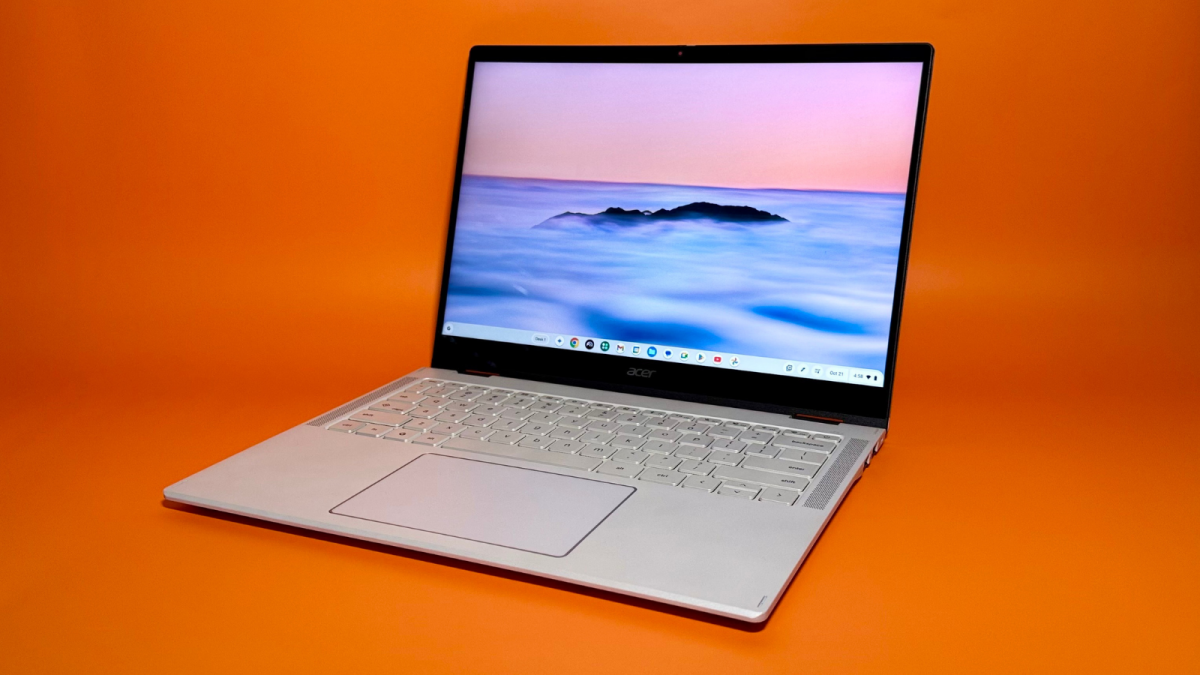
We've tried nearly a dozen recent models. These six are the cream of the Chromebook crop.
By

Haley Henschel
Senior Shopping Reporter
Haley Henschel is a Chicago-based Senior Shopping Reporter at Mashable who reviews and finds deals on popular tech, from laptops to gaming consoles and VPNs. She has years of experience covering shopping holidays and can tell you what’s actually worth buying on Black Friday and Amazon Prime Day. Her work has also explored the driving forces behind digital trends within the shopping sphere, from dupes to 12-foot skeletons.
on
All products featured here are independently selected by our editors and writers. If you buy something through links on our site, Mashable may earn an affiliate commission.

Credit: Haley Henschel / Mashable
The gap between the best Chromebooks and good cheap laptops is more of a crevice than a canyon. For users with simple workloads that don't involve specialty software or frequent PC gaming, a competent Chromebook can provide the specs you need at a very reasonable price. I'm talking $300 on the low end and $800 max, if you want to ball out on the newest, most advanced models.
Overview
Table of Contents
Mashable staff and contributors have tested nearly a dozen popular Chromebooks over the course of the past two years, and as of late 2025, there are six I recommend in particular. My top pick for most people is the Lenovo 5i Flex Chromebook Plus, a mid-range convertible with excellent build quality, upper-level performance, and an all-day battery life. It's priced at $599.99 in two configurations, and one is usually on sale for well under $400.
My complete guide to the best Chromebooks includes other picks for budget shoppers, splurgers, kids, and casual gamers, so keep scrolling. (And if you aren't sure whether a Chromebook is right for you, check out my explainer on how they're different from regular Windows laptops and MacBooks.)
Our Pick

The Good & The Bad
- Solid performance
- All-day battery life
- Awesome speakers
- Good mix of ports
- Stellar build quality
- Comfy keyboard
- Fan runs constantly (but quietly)
- Doesn't come with a stylus
- Trackpad and touchscreen could be smoother
Our review
Read Mashable's full review of the Lenovo Flex 5i Chromebook Plus.
Who it's for
The Lenovo Flex 5i Chromebook Plus is a sturdy, speedy hybrid that's not too expensive. I think it's the best Chromebook for most people, including college students who might want a cheap secondary laptop for note-taking.
Why we picked this
The Flex 5i Chromebook Plus finds a happy medium between premium features, strong performance, and affordability. Put another way, it goes above Google's "Chromebook Plus" category minimums without feeling superfluous.
For starters, this bad boy might get confused for a regular Windows laptop if it weren't for the Chromebook Plus logo in the corner of its lid. "I would’ve guessed [it] was a $1,000 laptop if I didn’t already know its price," said Mashable contributor Sarah Chaney. "The build quality is superb." Its hinge isn't wiggly or creaky, and its aluminum lid isn't a fingerprint magnet, either. It has a bouncy, comfy keyboard and a good mix of ports, including a nice-for-creatives microSD card reader.
The speakers on the Flex 5i Chromebook Plus are also surprisingly good. Most laptops' speakers are generally pretty lousy, but Chaney found them to be on par with those on her daily driver, the Lenovo Yoga 9i 2-in-1 (Gen 9), which has a snazzy rotating Bowers & Wilkins soundbar.
The Flex 5i Chromebook Plus' 1200p touchscreen display isn't the most vibrant or smoothest one we've ever encountered, but it's sufficiently crisp and totally respectable for everyday use.
The Flex 5i Chromebook Plus is the third-fastest Chromebook we've tried by a slim margin. Its Intel Core i5-1334U CPU earned a multi-core score of 7,024 in Geekbench 6's CPU benchmark. It's only 8 percent slower than the $650 Acer Chromebook Plus 516 GE, our top performer, and a mere 2 percent slower than the splurge-worthy $699 Acer Chromebook Plus Spin 514, which has a much newer processor. You'll get just over 12 hours of battery life from it, too. (The cheaper Acer Chromebook Plus 516 lasts two hours longer but runs 24 percent slower.)
While the fan on the Flex 5i Chromebook Plus ran almost constantly during our testing, it's very quiet and good at keeping the chassis cool.
As a final note, the Flex 5i Chromebook Plus we tested is a Costco exclusive that you can buy online without a membership; it costs $15 to ship. Another configuration is available at Best Buy with a less powerful Intel processor and half the storage (128GB versus 256GB), but it's often on sale for just $350.
Details

The Good & The Bad
- Awesome battery life
- Big, bright display
- Decent mid-level performance
- Great build quality
- Often on sale for as little as $299
- Not super portable (but on the lighter side for a 16-incher)
- Tinny speakers
Who it's for
This 16-inch Acer clamshell model delivers the primo Chromebook Plus experience under $500 (and as little as $300 when it's on sale), making it the best Chromebook for budget shoppers. If you want a good amount of screen real estate for multitasking and watching movies, I also think it's the best big-screen Chromebook for most people.
Why we picked this
Out of all the Chromebook Plus models under $500, the Acer Chromebook Plus 516 has the best specs by far. It's powered by an Intel Core i3-1315U processor that earned a Geekbench 6 multi-core score of 5,670 in our testing, affording it mid-range power despite its entry-level price tag. It's 24 percent slower than the Lenovo Flex 5i Chromebook Plus, which is $120 more, but 21 percent faster than the Acer Chromebook 312, which is $30 less. On the low end, that's a notable performance jump for a small chunk of cash.
Acer has also equipped this Chromebook Plus with a 1200p display that looks brighter than its 300 nits in person. For reference, the three other Plus-tier models that retail for less than $500 as of late 2025 have older, less powerful CPUs and 1080p displays that just meet the category's minimums.
The battery life of the Chromebook Plus 516 is excellent: It held out for 14 hours and 7 minutes in our testing, making it the second-longest-lasting Chromebook we've ever tried.
There are a few notable differences between this Chromebook and the Acer Chromebook Plus 516 GE, the version that's optimized for cloud gaming (see below). The GE model has a nicer 120Hz 1600p display, a backlit keyboard, an Ethernet port, and a newer, more powerful CPU, but it doesn't last as long and costs $170 more at full price. (On sale, I've seen the standard model fall to $299 and the GE version dip to $449.)
Size-wise, the regular Chromebook Plus 516 is about a 10th of an inch thinner, but it weighs the same at 3.75 pounds. While that's heavy for a Chromebook, it's light for a device this big. Most 16-inch Windows laptops we've tried have weighed at least four pounds.
Details

The Good & The Bad
- Stunning 2K OLED touchscreen display
- Fantastic performance; the fastest Chromebook we've tested
- Lightweight, thin design
- Fanless
- Great webcam
- Supports two exclusive AI features
- Expensive
- Overkill for most Chromebook users' needs
- Mediocre speakers
- Touchpad can be finicky
Who it's for
The Lenovo Chromebook Plus 14 and the Acer Chromebook Plus Spin 514 (below) are two newer models powered by the ultra-efficient MediaTek Kompanio Ultra 910 chip. Both of them are amazing machines that will convert any remaining Chromebook skeptics among us, provided you can afford them. They're pricey and overkill for most people needing a simple, web-based laptop, so I've reserved them for splurgers. (Definitely look for them on sale.)
I recommend Lenovo's model for those who prefer a traditional clamshell form factor, appreciate a fanless design, and want a vivid OLED display for watching movies and TV shows.
Why we picked this
While $749 is ridiculously expensive for a Chromebook, the Lenovo Chromebook Plus 14 brings a ton to the table — a striking 2K OLED touchscreen, for one thing. "The colors on it look just as vibrant and punchy as I could’ve hoped," said Chaney, our reviewer. Bummer that it has a 60Hz refresh rate instead of a 120Hz refresh rate like the Acer Chromebook Plus Spin 514, but this probably won't be a dealbreaker unless you're using it for cloud gaming. (And if that's your primary case, I have a better recommendation for you later on in this guide.) Simply put, it's beauteous.
The Chromebook Plus 14 got a multi-core score of 7,680 in our Geekbench 6 performance test, making it the fastest Chromebook we've ever tested (by an exceptionally small margin, but still). That's extra-impressive when you factor in its fanless design. It doesn't make any noise when it's running, "and it only gets a little warm during long periods of use, even when charging," said Chaney. This keeps the machine very light to boot: At 2.78 pounds, it's less than a 10th of a pound heavier than the latest 13-inch Apple MacBook Air. I'd call it the MacBook Air of Chromebooks, except Apple laptops don't have OLED displays. Not yet, anyway.
In our battery life benchmark, the Chromebook Plus 14 held out for 15 hours and 45 minutes before dying — an impressive result for a laptop with a bright, power-guzzling OLED display. That makes it the second-longest-lasting Chromebook we've tested after the overachieving Acer Chromebook Plus Spin 514, which lasted nearly three hours longer.
I also want to point out that the Chromebook Plus 14 is quite future-proofed. Along with that fresh processor, it comes with a generous 16GB of RAM, a sharp 5MP webcam, and support for WiFi 7 and Bluetooth 5.4 (the latest wireless connectivity technologies). It also has a backlit keyboard with a fingerprint reader, two premium fixings. It's expensive, yes, but it does its best to justify that price tag. If you can make the investment or find it on sale, it'll make a fantastic daily driver for years to come.
Our $749 review unit is available at both Best Buy and Lenovo. The latter sells an additional configuration with half the storage, 12GB of RAM, and no fingerprint reader or touchscreen for $100 less, and while we haven't tried it, it feels like the smarter buy. The only catch: It was sold out at the time of writing.
Lastly, I should add that the Chromebook Plus 14 comes with two exclusive AI features: a tab-sorting tool called "smart grouping" and an AI image editor in the Gallery app. (The Chromebook Plus Spin 514 has these, too.) I wouldn't buy it solely for those features, but we did find smart grouping useful in testing. The image editor's results were very crude and fake-looking.
Details

The Good & The Bad
- Excellent performance; runs cool and quiet
- Fantastic battery life; the longest-lasting Chromebook we've tested
- 2K display with 120Hz refresh rate
- Smooth touchpad
- Supports two exclusive AI features
- Expensive
- Overkill for most Chromebook users' needs
- Doesn't come with a stylus
Our review
Read Mashable's hands-on impressions of the Acer Chromebook Plus Spin 514.
Who it's for
The Acer Chromebook Plus Spin 514 is an amazing device that I recommend for anyone who wants a high-end Chromebook that doubles as a tablet and lets them leave their charger at home. (Its battery life is incredible.) But at $699.99 as tested, it falls into the "want, not need" category for most people. As with the Lenovo Chromebook Plus 14, it's not a terrible value at full price, but it turns into a more compelling buy for the Chromebook crowd when it's on sale.
Why we picked this
The Chromebook Plus Spin 514 is technically the third-fastest Chromebook we've tried, but it's neck-and-neck with Nos. 1 and 2. Its Geekbench 6 multi-core score of 7,187 makes it only seven percent slower than the Lenovo Chromebook Plus 14 (7,680) and six percent slower than the Acer Chromebook Plus 516 GE (7,660); you won't notice those discrepancies in practice. It does have a fan, but I struggled to get it to turn on in our multi-app/tab stress test. When it finally kicks on, it's very quiet.
The Chromebook Plus Spin 514 doesn't have any competition when it comes to battery life. It survives for over 18 hours per charge, making it the longest-lasting Chromebook we've ever tried. In fact, it outlasts 87 percent of the laptops in our entire testing database, including the 14-inch M4 Apple MacBook Pro. That's bonkers.
The Chromebook Plus Spin 514 looks and feels nicer than a Chromebook has any right to. It has a polished aluminum exterior that comes in a pretty platinum silver finish with subtle holographic accents. At 0.61 inches thick, it's thinner than all of the other models on this list (beating out the Chromebook Plus 14 by one hundredth of an inch). Its smooth touchpad and clicky keyboard are both satisfying to use, minus the hollow-sounding space bar. Its hinge does wiggle a bit when you adjust it, but it holds sturdy when you flip its 2K touchscreen around into tent mode. Nothing about it screams "cheap."
Perhaps most notably, that touchscreen has an elite 120Hz refresh rate. I haven't encountered that spec on any other Chromebooks except for the Acer Chromebook Plus 516 GE, which is a gaming Chromebook, and it's super easy on the eyes. It makes fast-moving graphics in games and videos look buttery smooth.
As with Lenovo's Chromebook Plus 14, you get a ton of future-proofing for your money here. The Chromebook Plus Spin 514 comes with an all-new processor, 12GB of RAM, a 5MP webcam, and support for WiFi 7 plus Bluetooth 5.4.
My review unit is a Best Buy exclusive, by the way. A second configuration with 16GB of RAM, an added fingerprint reader, a backlit keyboard, and a 2.8K display is available on Acer's website, but it'll cost you $100 more (ah!) and bump its refresh rate down to 60Hz. You're probably more than fine with the cheaper (relatively speaking) model.
Details

The Good & The Bad
- Super portable
- Responsive touchscreen
- Durable feel
- Great battery life
- Often on sale for as low as $299
- Chunky, unattractive bezels
- Tinny speakers
- Grainy webcam
- Low-end performance; runs a bit warm
- Doesn't come with a stylus
Who it's for
Acer's Chromebook Spin 312 is portable, durable, long-lasting, scant on AI, and capable of doing double-duty as a tablet. Its $450 MSRP makes it the cheapest Chromebook I recommend, but know that you'll probably pay even less: I've seen it on sale for just $299 at Best Buy. For all these reasons, I think it's the

 Arabic
 French
 Spanish
 Portuguese
 Deutsch
 Turkish
 Dutch
Dutch
 Italiano
 Russian
 Romaian
 Portuguese (Brazil)
 Greek
Greek