


Alienware AW3425DW review - ultrawide OLED gaming monitor excellence
Alienware AW3425DW review - ultrawide OLED gaming monitor excellence
Verdict

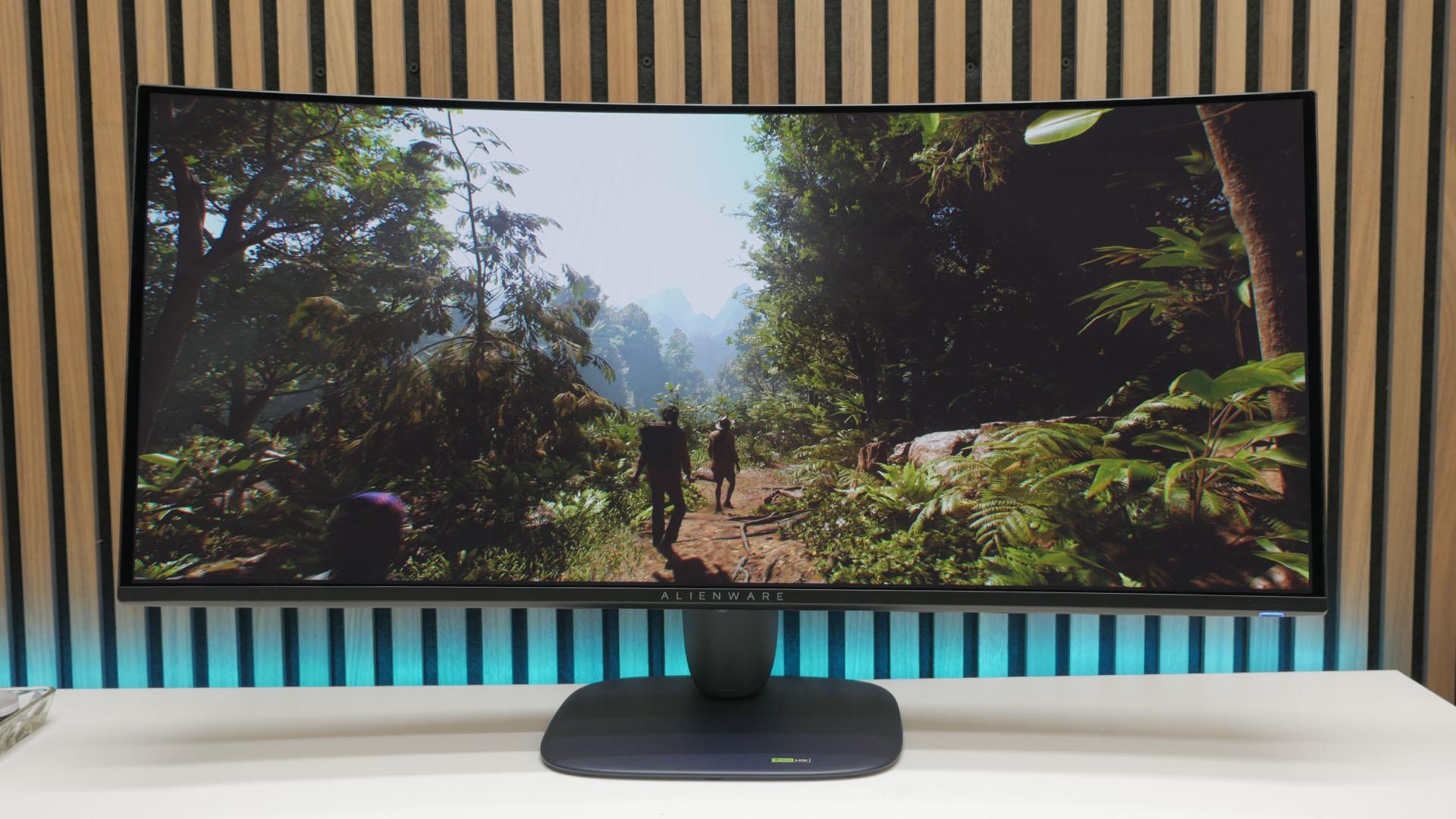
The Alienware AW3425DW is a top-tier gaming monitor that, thanks to its ultrawide 34-inch screen, is perfect for watching movies and playing epic triple-A games. Its second-gen Samsung QD-OLED panel also delivers fantastic image quality with none of the pitfalls of some earlier OLED panels. Its 240Hz refresh rate also ensures that it's good for both competitive gaming and cinematic moments.
Pros
- 34-inch size is great for movies, gaming, and work
- Much better text sharpness than early OLEDs
- Fantastic gaming performance
- Simpler, more practical design than predecessor
- Great out-of-the-box image quality
Cons
- Blue plastic stand/frame is an odd choice
- Fullscreen brightness not as high as LCDs
- Ultrawide aspect not always best for some games
The Alienware AW3425DW is the company's flagship ultrawide OLED of 2025, with this 34-inch gaming monitor packing in Samsung's latest QD-OLED tech that's brighter and sharper than previous panels. Plus, this display boasts a faster refresh rate than 2023's AW3423DW. We've always loved the 34-inch ultrawide screen size, and combined with this latest OLED tech and a decently competitive price, it makes this a standout choice right now.
With Alienware's previous AW3423DW having been our top choice of ultrawide OLED on our best gaming monitor guide for the last two years, the AW3425DW neatly slots in to replace it as our new go-to recommendation for those seeking a large OLED display without totally breaking the bank. Read on below to find out just where it does and doesn't excel.
Specs
| Alienware AW3425DW specs | |
| Size | 34-inch |
| Resolution | 3,440 x 1,440 |
| Refresh rate | 240Hz |
| Response time | 0.03ms |
| Panel type | QD-OLED |
| Variable refresh rate |
Adaptive Sync, Nvidia G-Sync Compatible, AMD FreeSync Premium Pro |
| HDR | Yes (DisplayHDR True Black 400 certified) |
| Curve | 1500R |
| Ports | 1 x DisplayPort 1.4, 2 x HDMI (1.4 and 2.3), 5Gbps USB hub (USB-B upstream, 1 x USB-A and 1x USB-C downstream with 15W charging) |
| Price | $799 / £699 |
Features
The core of the Alienware AW3425DW is, of course, its screen. Alienware has employed Samsung's latest Gen-2 QD-OLED panel tech that brings several subtle but impactful improvements over its previous AW3423DW display.
Most obviously, the AW3425DW is now a 240Hz panel, up from the 175Hz of the previous model. It's not a night-and-day difference in speed, but it's a welcome step up that puts this display in a class where most gamers will never feel the need to go any faster - 360Hz+ panels being only of much use to those seeking peak performance in the twitchiest of the best FPS games, such as Apex Legends, CS2, and Valorant.

Joining this refresh rate speed is the effectively instant response time of OLED. Rated at 0.03ms, this panel is roughly 100x faster to respond than typical LCD gaming monitors, and still around 30x faster than the very fastest LCDs.
Along with speed, though, what this new panel tech delivers is better image quality. It's still only rated to a maximum brightness of 250cd/m2, making it considerably less bright overall than many LCD panels, although it can peak at 1,000 cd/m2 in HDR. Also, 250cd/m2 is enough for most normal indoor use. In fact, I didn't change the brightness from its default 75% (168cd/m2 according to my measurements) until required for my image quality tests.
Instead, where this panel's improvements are most felt is in tackling the downsides of early OLED panels. Specifically, here, there are no obvious brightness fluctuations as you switch from a full screen of white to only a small box, while text quality is similarly good. The same couldn't be said for early OLEDs regarding both of these issues. These are both factors we'll explore more in the image quality section below.

Other than the presence of a slight curve to this panel and some lighting on its rear, the feature list of this display is quite short, and actually a bit of a step down from the AW3423DW.
It has a DisplayPort and two HDMI ports, all of which can deliver the display's top 240Hz refresh rate at a resolution of 3,440 x 1,440, and it has a USB hub with a USB-B upstream connection and USB-A and USB-C downlink ports. However, it no longer has a headphone jack, and it has two fewer USB ports than before.

Also missing is the official Nvidia G-Sync Ultimate support of the AW3423DW. However, this is not much of a loss, as this standard was always a bit vague, incorporating a range of HDR and latency criteria, as well as verifying the display works at delivering G-Sync with Nvidia graphics cards. Have no fear, though, as this display is still rated as G-Sync compatible, still delivers fantastic HDR, and is ultra-fast in all other aspects. Think of this more as Nvidia G-Sync Ultimate being a deprecated standard than anything else.
Design
Alienware has toned down the design of the AW3425DW from the AW3423DW, making for a simpler, smarter-looking display. Gone is the slightly glossy white plastic on the back and stand, and in its place is a matte-textured dark blue plastic throughout.
It's actually an intriguing choice, as while it's dark enough to mostly blend in with black gaming gear in a dimly-lit room, in brighter lighting it very clearly doesn't match. I'd go so far as to say it's a downside, though a minor one.

Improved, though, is the stand shape. The old display has a splayed-out three-footed design that is more striking but far less practical than the simple rounded rectangle used here. It's compact yet stable, which is all it needs to be.
This display's connections are more practical, too. They're arranged along the back of the display, facing downwards, with cables simply routed through a hole in the center of the stand. The old design's removable cover was cumbersome, if neater once all set up.

The final main change is the lighting on the back. The glowing alien head is still there, but the central glowing section of the old design is gone, and it's no worse for it.

The stand on this display offers 110mm of height adjustment, -20° to 20° of rotation, and -5° to 21° of tilt. Understandably, for an ultrawide display - that's any display with an aspect ratio higher than the standard 16:9 of most gaming monitors, by the way - the display can't be pivoted into a portrait orientation, as the sides of the display would hit your desk.
Image quality
Right out of the box, the Alienware AW3425DW looks fantastic. The company includes a calibration chart for the panel showing that it has been tested and set up properly before shipping, and sure enough, it looks great. Color balance appears accurate, with no tinge of color making whites look off-white, for instance, and, most notably, the display doesn't show overblown HDR-like colors when displaying non-HDR content.

Too many monitors have extended HDR color ranges that they just apply to normal, non-HDR colors, making them look overly vivid and unnatural. Here, though, they look correct, to the point of almost appearing slightly muted when compared to some displays.
However, when the colors are supposed to look properly vivid, this display really delivers. HDR looks simply incredible. There's such a distinct sense of switching from viewing sRGB content (i.e. any normal computer image that isn't HDR), where it feels like you're viewing a computer image, to HDR looking like real life. Bright areas are subtly brighter and colors extend that little bit further, but all without it feeling like the display is forcing overly vivid colors into your eyeballs.

Then, of course, there's the biggest bonus of all with OLED, which is that each individual pixel emits its own light, so when they're off, they're truly off. In contrast, LCDs require a backlight, and the illumination from this can bleed through even when the panel is trying to show complete darkness. Here, you get no light bleed at all. Some LCDs use multi-zone backlights, which can help, but they still end up with a backlight glow around pinpoints of bright light. Not so here.
As a result, contrast is effectively infinite, giving an incredible amount of impact and a feeling of realism to the image. Technically, once you account for reflections and ambient light, you're often not truly getting a pure dark image on the screen, but to the extent that matters, you are.

Another problem you don't get here is one that plagued many early OLEDs, which is the brightness of the panel varying according to the size of bright elements on screen. On those early panels, if you had a full screen of white - like I'm currently mostly seeing as I type into a word document - the overall brightness would be quite low. Have only a small window of white, though, and this would be much brighter - often more than twice as bright. This was annoying in and of itself, but was made worse if you Alt-Tabbed between apps, say, and you'd get a noticeable switch in brightness across the whole image.
Here, there's none of that. Whether running a full screen of white or a tiny square, this display registered its full 250cd/m2. The actual measurement did vary a bit from test to test - between 250 and 263cd/m2 - but this was not because of the image being shown changing.
It's a different story when showing HDR. According to my tests, a small window of white hit as high as 470cd/m2 - the test I use couldn't get the display to hit its supposed 1,000cd/m2 peak - and this stayed consistent until around a third of the screen was fully white, at which point its maximum brightness started dropping, with a full screen hitting around 300cd/m2. This means that, technically, if you're watching HDR with some big full-screen bright moments - think a bright sunny day or an explosion - you're not going to get quite such an impactful image as displays that can maintain their full brightness even in full screen. However, in practice, I found HDR still had the impact you mostly want from it. Movies and games look simply amazing.
As for true color accuracy, measuring with my colorimeter showed the display as being a little too red, so I jumped into the manual color balance setting in the onscreen menu and dropped the red/green/blue balance from 100x100x100 (RxGxB) to 95x99x100. This took the color temperature from 6088K to 6503K, getting it essentially perfectly aligned with the desired level of 6500K. In person, though, this difference was hard to spot - it still looked great right out of the box.
When it came to gamma - the rate of change from dark to light colors - this display was also a little off from ideal, with it hitting 2.15 rather than 2.2. However, this wasn't really noticeable in normal use. Only those concerned with professional image and video editing will have any need to think about tweaking this display's settings, and a colorimeter and color correction software will take care of such a small discrepancy anyway.
So, all told, in terms of colors, contrast, and HDR, this display is fantastic. However, the other crucial image quality consideration I've identified for many early OLEDs is text sharpness. With a resolution of 3,440 x 1,440 on a 34-inch panel, this display delivers the same pixel density as a 27-inch, 1440p panel, and generally, that has proved a great option for LCD panels.
However, for some early OLED panels, this combination of screen size and resolution didn't work as well. The arrangement of the red, green, and blue subpixels of those panels didn't play well with high contrast edges, such as black text on a white background, or vice versa. This made reading text on these panels not a good experience.

Thankfully, though, this new Samsung QD-OLED panel doesn't suffer from the same problem. Text edges look sharp and don't have the distracting color fringing of those early panels. You can see the difference in the image above. On the left is the Alienware, in the middle is the AOC Agon Pro AG276QZD OLED (a 1st-gen WOLED panel), and on the right is an LCD. All have the same effective pixel density but wildly different text quality.
Gaming performance
In some ways, there's very little to be said about the gaming performance of this monitor. With a 240Hz refresh rate and 0.03ms response time, it's no surprise that gaming on the Alienware AW3425DW is fantastic. Whether you're taking advantage of the full 21:9 aspect ratio of this ultrawide screen in a cinematic title or vast RTS, or if you're running a more competitive game at a maxed-out frame rate, it can easily keep up.
There's simply no discernible issues with a slow response time or latency of any other sort. Plus, with Freesync and G-Sync support, you get smooth, tear and stutter-free images regardless of what graphics card you're running.
The only reason you'd want better performance is if you're into super competitive FPS games, where a move to an even faster refresh rate could give a small advantage. For Apex Legends and CS2, I would still prefer an even higher refresh rate, but as an all-rounder display, it's more than ample.
One thing to note, though, is that when it comes to competitive FPS titles, I tend to find that these ultrawide panels can almost be distracting, as the view at the edges is stretched in a way that can throw off my aim. Thankfully, though, if you suffer from the same thing, you can either just run games in a window, or the monitor does offer an aspect ratio-matching mode, so if you run a game at a 16:9 aspect, the screen will resize to match. It was a bit temperamental, with it working in CS2 at 1080p but not at 1440p, yet it worked fine for 1440p in Doom Eternal. For the most part, though, I was able to find a setup that suited me.
Price
The Alienware AW3425DW costs $799 / £699, making it sensibly priced, even if it's not an outstanding bargain. We're starting to see OLED displays drop ever closer to mainstream prices, but you're still mostly paying over $500 just for a 27-inch 1440p OLED, and most 32-inch 4K panels are still closer to $1,000, so to get a 34-inch panel for just under $800 is reasonable.
Alternatives
Alienware AW3423DW
The older version of this display is still worth considering if you can find it for the right price. It still delivers the dazzling, high-contrast, rich-colored image you'd expect of OLED, along with its ultra-fast response time. Its text quality isn't as good, nor is its brightness management, but if you can find it for under $500, it's a tempting option. Read our full Alienware AW3423DW review for more information.
Philips Evnia 34M2C8600
The Philips Evnia 34M2C8600 is another 34-inch ultrawide OLED. In fact, it uses the same panel as the AW3423DW, so it delivers the same 175Hz refresh rate and other core features. However, Philips has added its signature Ambilight tech to this panel, providing a captivating wash of screen-matching color behind the display. It's a neat feature, and this display packs a few other extra features, too. Read our full Philips Evnia 34M2C8600 review for more information.

Verdict
The Alienware AW3425DW might not seem like a revolution on paper when compared to its predecessor and other first-gen 34-inch ultrawide OLED gaming monitors. However, along with a bump from 175Hz up to 240Hz, this display packs in a host of more subtle but significant upgrades. In particular, its text clarity is much better, and it doesn't suffer from distracting changes in brightness.
Along with generally dazzling image quality and speedy gaming performance, this all adds up to a display that feels like much more of a complete upgrade for those already rocking an LCD 34-inch ultrawide or those who have otherwise been holding out for a truly great OLED ultrawide. It's a great panel for gaming, work, and everything in between, all while not needing you to mess around with Windows scaling options and requiring a mega graphics card, like you do with a 4K screen.
Image quality is decent right out of the box, with its OLED panel providing its ever-absorbing infinite contrast, and its punchy-looking colors are largely accurate too. Meanwhile, it can deliver stunning-looking HDR when called upon.
All this, plus the simple scale of a 34-inch ultrawide display is as convincing as ever. I personally will still go back to my 32-inch, 16:9, 4K OLED for day-to-day use, as I tend to keep most apps in full screen (to help with concentration) and really value the extra sharpness of 4K for image and video editing.
However, for more general work, the width of a panel like this, which allows for two apps to comfortably run side by side, is undeniably neat. Meanwhile, for gaming and video, the ultrawide 21:9 aspect ratio looks amazing.
So, in summary, 34-inch, 3,440 x 1,440 ultrawide displays are great, OLED displays are great, 240Hz displays are great, and this monitor ticks every one of those boxes while also being the best in its class.

 Arabic
 French
 Spanish
 Portuguese
 Deutsch
 Turkish
 Dutch
Dutch
 Italiano
 Russian
 Romaian
 Portuguese (Brazil)
 Greek
Greek